Leaving a job is never just an administrative event; it’s a personal and financial turning point. Whether you’re transitioning to a new opportunity, facing an unexpected layoff, planning to move abroad, or taking a career break, your Employees’ Provident Fund (EPF) and pension benefits are meant to protect you during this phase.
While most employees understand how to withdraw their Provident Fund balance using Form 19, far fewer understand what happens to their pension component under the Employees’ Pension Scheme (EPS). That’s where Form 10C becomes critical.
Form 10C is not just another compliance form. It determines whether you receive a lump sum withdrawal of your pension contribution or preserve your service record through a Scheme Certificate that secures your future monthly pension. The choice you make here can impact your long-term retirement security.
This 2026 guide simplifies everything. We break down eligibility rules, the latest regulatory updates, step-by-step online and offline filing procedures, rejection reasons, and strategic advice so you can make an informed decision.
What Is Form 10C in EPF?
Form 10C is the primary form used by members of the Employees’ Pension Scheme (EPS) to claim benefits when leaving a job. Depending on the total years of service, it serves two main purposes:
- Pension Withdrawal: Members with less than 10 years of service can use Form 10C to withdraw their accumulated pension contributions as a lump sum.
- Scheme Certificate: Members with more than 10 years of service (or those who wish to carry forward their service) use it to obtain a Scheme Certificate. This preserves the service record to ensure eligibility for a monthly pension after age 58.
Important Distinction:
- Form 19 is for withdrawing your PF Balance (Employee + Employer share).
- Form 10C is for withdrawing your Pension Fund (Employer’s 8.33% share).
Confused between the two? Read our detailed comparison of Form 19 vs Form 10C to understand which form applies to your situation.
When Can You Use Form 10C?
Your eligibility depends entirely on your Total Service Period. It varies if you have less than 10 years of service and if you have 10 years or more of service.
Case 1: Service Less Than 10 Years (Withdrawal Benefit)
If you have not yet completed 10 years of service, you are not eligible for a monthly pension. However, you are eligible for a Withdrawal Benefit.
- Action: Submit Form 10C.
- Result: You receive a lump sum amount calculated based on your service period and last drawn salary.
- Best For: Those who need immediate funds or do not plan to work in the formal sector again.
Case 2: Service 10 Years or More (Scheme Certificate)
Once you cross 10 years of service, the EPS rules change. You are now entitled to a Lifetime Monthly Pension after age 58.
- Action: Submit Form 10C requesting a Scheme Certificate.
- Result: You get a document proving your service history. You cannot withdraw the cash lump sum.
- Best For: Securing your retirement income.
Major Update: The "Less Than 6 Months" Rule
This is the most critical update for 2026.
Previously, if an employee worked for less than 6 months, they were not eligible to withdraw their pension money. That money was forfeited to the government pool.
The New Rule:
As per the latest amendment to Table D, you can now withdraw your EPS benefit even if your service is less than 6 months, provided you have contributed for at least 1 month.
- Old Rule: < 6 months = ₹0 Refund.
- New Rule: < 6 months = Proportionate Refund allowed.
Eligibility Checklist
Before logging into the portal, ensure you meet these criteria:
- You have left your employment.
- Your "Date of Exit" is updated in the EPF database by your employer.
- You are currently unemployed (there is usually a 2-month waiting period, though exceptions exist for women marrying/pregnant or those moving abroad).
- Your UAN is active and KYC (Aadhaar, PAN, Bank Details) is verified.
How to Apply for Form 10C Online (Step-by-Step)
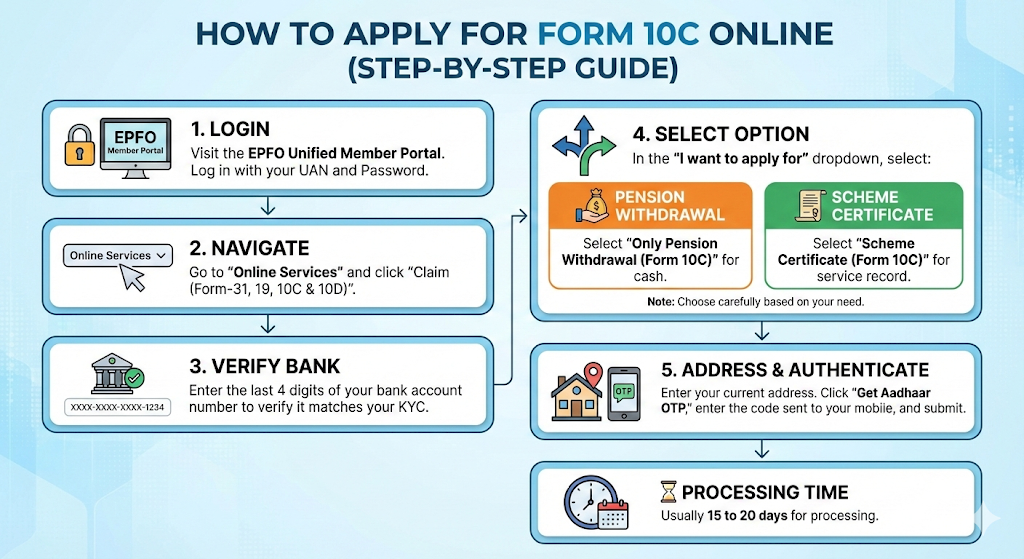
- Login: Visit the EPFO Unified Member Portal and log in with your UAN and Password.
- Navigate: Go to Online Services and click Claim (Form-31, 19, 10C & 10D).
- Verify: Enter the last 4 digits of your bank account number to verify it matches your KYC.
- Select Option: In the "I want to apply for" dropdown, select Only Pension Withdrawal (Form 10C).
- Address: Enter your current address.
- Authenticate: Click "Get Aadhaar OTP," enter the OTP sent to your mobile, and submit.
Processing Time: Usually 15 to 20 days.
If you’re unable to log in or see errors, refer to our detailed EPF portal troubleshooting guide.
Form 10C Offline Submission
If you left your job and want to withdraw your Employees’ Pension Scheme (EPS) benefits, you can apply using Form 10C offline, especially helpful when online claims fail due to KYC issues, inactive UAN, or employer inaction. Don’t worry, the process is simple when your documents are ready.
Documents Required
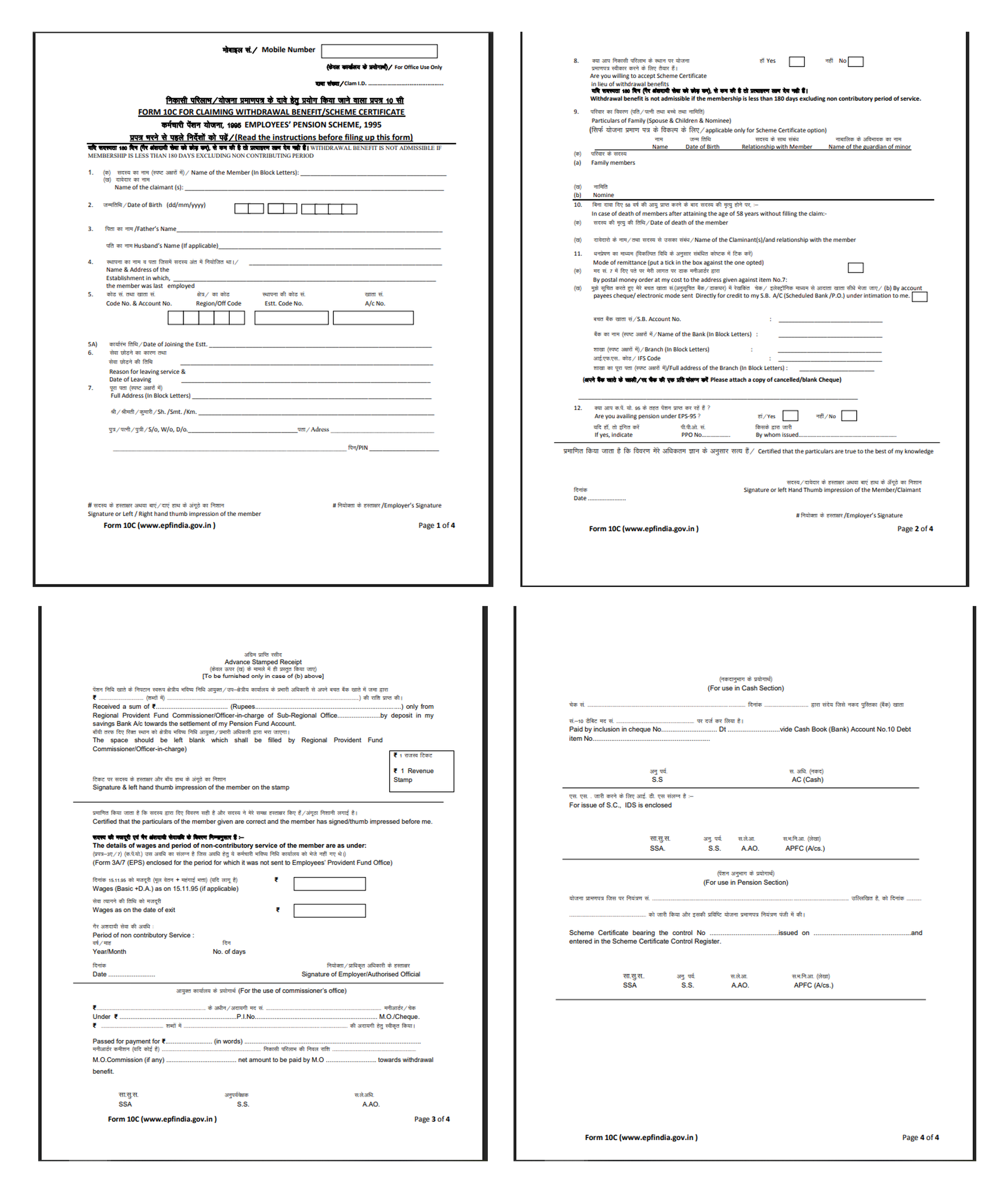
- Filled Form 10C (EPS Withdrawal / Scheme Certificate)
- Cancelled cheque (with your printed name)
- Copy of Aadhaar
- Copy of PAN (recommended)
- UAN / PF number
- Service details (DOJ & DOL)
- Revenue stamps (if required by the EPFO office)
Employer not available or company closed?
You can get the form attested by a Gazetted Officer / Bank Manager / Notary / Magistrate instead.
How to Fill Form 10C (Short Checklist)
- Name (as per EPF records)
- Father’s / Husband’s Name
- Date of Birth
- UAN / PF number
- Name & address of employer
- Date of joining & leaving
- Total service period
- Bank account + IFSC
- Tick purpose:✔ Withdrawal benefit (service < 10 years)✔ Scheme Certificate (service ≥ 10 years)
- Signature & date (sign across stamp if used)
Where to Submit?
Submit the form at your EPFO Regional Office:
- In person
- Or by post/courier
Keep photocopies of all documents for your records.
Processing Time
20–30 working days(May vary by EPFO office and verification status.)
5 Common Reasons for Rejection
- Name / KYC Mismatch: One of the most frequent reasons for EPF claim rejection is a mismatch between your name in EPFO records and the name linked with your KYC documents, such as Aadhaar, PAN, or bank account. Even minor differences like spelling variations, missing middle names, or initials can cause the system to flag the claim. To avoid this issue, ensure that your name is consistent across all documents and updated correctly in your UAN profile before submitting a claim.
- Wrong Bank Account or IFSC: Incorrect bank account details are another common cause of rejection. If the account number or IFSC code entered in your EPF profile is incorrect, outdated, or not verified through KYC, the claim cannot be processed successfully. EPFO transfers funds directly to the registered bank account, so it is essential to double-check these details and make sure your bank account is active and properly verified.
- Missing Attestation or Seal: In cases where offline forms or certain employer-related verifications are required, the absence of an attestation or an official seal can lead to rejection. For example, when submitting physical forms like Form 19, Form 10C, or joint declarations, the employer’s signature and company seal may be mandatory. If these are missing, EPFO may not process the application until the documentation is complete.
- Signature Mismatch: A mismatch between the signature on your EPF claim form and the one recorded in official documents can also lead to rejection. This usually happens when employees sign differently than the signature provided during employment or bank verification. Ensuring that your signature matches the one registered with your employer and bank can help prevent unnecessary complications during claim processing.
- Incorrect Service Details: Your service details, such as joining date, exit date, and employment records, play an important role in determining eligibility for withdrawal or transfer. If these details are incorrect or not updated by the employer in the EPFO system, the claim may get rejected automatically. For example, an unupdated exit date can prevent withdrawal claims from being processed. Employees should verify their service history through the UAN portal and request corrections from their employer if needed.
Fixing these early helps avoid delays and stress
Strategic Advice: Withdraw or Preserve?
Just because you can withdraw your pension money doesn't mean you should.
Choose Withdrawal If:
- You are in financial distress.
- You are starting a business and won't have an EPF account anymore.
- The amount is small, and you want to close the account.
Choose Scheme Certificate If:
- You plan to join another job later.
- You want to reach the 10-year milestone to get a lifelong pension.
- You want to provide family pension security (spouse/children) in case of untimely death.
(Click to know more about the withdrawal process)
Top 3 Reasons Form 10C Gets Rejected
Nothing is more frustrating than a rejection message. Here are the most common culprits:
- Bank Account Mismatch: The name on your bank account does not match the name in the EPF database exactly. Solution: Fix the name in the bank or EPF portal first.
- Date of Exit Missing: Your previous employer forgot to update your exit date. Solution: You can now update the Date of Exit yourself in the "Manage" tab.
- Service Overlap: If you worked two jobs simultaneously (even for a few days), the system flags it. Solution: This requires manual intervention/clarification with the PF commissioner.
Final Thoughts on Form 10C
Filling Form 10C can feel confusing, especially when you’re dealing with a job change, financial stress, or waiting for your EPF and pension benefits. Remember, this form is meant to protect your EPS pension service and support you during career transitions. Whether you choose a Scheme Certificate or a withdrawal benefit, ensure your details are correct, and your documents are updated to avoid delays in processing by EPFO India.
For many employees across India, EPS benefits are an important part of future security. If you’re unsure about the right option, it’s okay to seek guidance from your employer, EPFO helpdesk, or a trusted advisor. Your pension contributions represent your hard work, and you deserve clarity, support, and timely settlement of your Form 10C claim.
Useful Links & Official Resources
EPFO Official Portals
- EPFO Unified Member Portal (UAN Login)https://unifiedportal-mem.epfindia.gov.in/memberinterface/Log in with your UAN to submit Form 10C, check claim status, update KYC details, and access your service history.
- EPFO Official Websitehttps://www.epfindia.gov.inThe official source for EPF notifications, pension rules, scheme guidelines, and government circulars.
- EPFO Passbook Portalhttps://passbook.epfindia.gov.inCheck your PF contributions, employer deposits, and EPS entries before applying for withdrawal or Scheme Certificate.
- UMANG App – EPFO Serviceshttps://web.umang.gov.inA mobile platform to file EPF claims, track applications, and access various EPFO services.
Forms and Scheme Documents
- Download EPF Forms (Form 10C, Form 19, Form 10D)https://www.epfindia.gov.in/site_en/Forms.phpAccess official claim forms and instructions for PF withdrawal, pension withdrawal, and pension application.
- Employees’ Pension Scheme (EPS-95) Official Guidelineshttps://www.epfindia.gov.in/site_docs/PDFs/Schemes/EPS95_update.pdfOfficial documentation explaining pension eligibility, service calculations, and withdrawal benefits.
EPF Claim and Grievance Support
- EPFO Grievance Portal (EPFiGMS)https://epfigms.gov.inRaise complaints related to rejected claims, missing service records, or delays in EPF processing.
- EPFO Regional Office Directoryhttps://www.epfindia.gov.in/site_en/Contact_us.phpFind the nearest EPFO office if you need to submit Form 10C offline or follow up on a claim.
Identity & Tax Verification
- Aadhaar Services Portal (UIDAI)https://uidai.gov.inVerify or update Aadhaar details used for EPF KYC verification.
- Income Tax Department – PAN Serviceshttps://www.incometax.gov.inLink and verify PAN details to avoid higher TDS deductions on EPF withdrawals.
Frequently Asked Questions (FAQs)
Q: Can I apply for Form 19 (PF) and Form 10C (Pension) together?
A: Yes! In fact, it is recommended to apply for both back-to-back on the portal to settle your full account.
Q: Is the Form 10C withdrawal taxable?
A: Generally, the lump sum withdrawal from EPS is not taxable in the hands of the employee.
Q: I worked for 9 years and 6 months. Can I withdraw?
A: Technically, yes. However, EPS rounds up service over 6 months. So, 9 years and 6 months might be treated as 10 years, making you eligible for a Certificate rather than Cash. Check your exact service history in the Service History tab.
Q: How do I fix missing years of service in my EPF Passbook?
A: Submit a Joint Declaration Form to your employer along with proofs like pay slips or appointment letters. Your employer must approve this request via their Digital Signature Certificate (DSC) for the EPFO to update the record.
Q: How can I correct a wrong Date of Exit (DOE) or Date of Joining (DOJ)?
A: Submit a Joint Declaration to your employer with valid proof, such as your Relieving Letter (for DOE) or Appointment Letter (for DOJ). Once the employer verifies it digitally, EPFO updates the dates within 30–90 days.
Q: What documents are needed for name or DOB correction in EPF?
A: For minor corrections (< 3 years difference), Aadhaar is the primary document. For major corrections, you need the Joint Declaration plus a Birth Certificate, Passport, or School Leaving Certificate.
Q: What is Annexure K, and why is it missing?
A: Annexure K is a backend document verifying your service history after a PF transfer. If it is blank, your pension service counts as zero. You must raise a grievance or ask the EPFO to regenerate it before filing for pension.
Q: Why are my EPS (Pension) wages showing as zero?
A: This is usually a data migration error or a missed contribution by the employer. To fix it, your employer must file a clarification letter or resubmit contribution details to the EPFO regional office.
Q: How do I claim a pension if my previous company is closed?
A: You can substitute employer verification with a First Class Judicial Magistrate Affidavit or a Bank Manager Certification. Submit this to the EPFO along with your bank statements and salary slips.
Q: Why was my Form 10D or 10C rejected?
A: Common reasons include Service Mismatch (gaps in history), Name Mismatch with Aadhaar, or a missing Annexure K. Always fix these data errors using the correction process before re-applying.
Q: How long does the EPF correction process take?
A: After employer approval, standard corrections take 30 to 90 days. Complex cases involving missing service or pre-2014 records may take longer due to manual verification.
Disclaimer: This guide is for educational purposes and based on the rules applicable in 2026. EPF rules are subject to change by the government. For specific legal or financial advice, consult a professional.