,
Managing your Provident Fund no longer requires logging into complex government portals every time. With the UMANG app, employees can easily access several Employees’ Provident Fund Organisation (EPFO) services directly from their phones.
From checking your PF balance to downloading your passbook and tracking claim status, UMANG provides a convenient way to monitor your EPF account anytime. This guide explains the key UMANG EPFO services available in 2026, what you can realistically do in the app, and where its limitations still exist.
1. “My UAN Is Active - What Can I Actually Do on UMANG?”
Once your Universal Account Number (UAN) is activated, many employees wonder what the next step is. A common question is whether they still need the EPFO portal or if everything can now be handled from a mobile phone through the UMANG app.
The reality is a little more balanced.
UMANG gives users convenient mobile access to key EPFO information, allowing them to check their provident fund balance, view their passbook, and track claim status without logging into the EPFO website every time. For most routine checks, the app works perfectly and saves time.
However, UMANG does not replace the EPFO portal entirely. It acts as a view and access layer that connects to EPFO’s backend systems. In simple terms, it lets you see and download important PF information, but does not allow full administrative control over your account.
This page focuses on what you can do on UMANG after activating UAN. It does not explain how to activate your UAN.
If your UAN is still not active, check out this guide for a step-by-step process on this:
UMANG App UAN Activation Guide (2026): Step-by-Step
2. What UMANG Is (and Is Not) for EPFO Users
To use UMANG effectively, it helps to understand what role the app actually plays in the EPFO ecosystem.
UMANG is an official government platform developed by the Ministry of Electronics and Information Technology to provide access to multiple government services through a single mobile interface. Within the app, EPFO services are integrated so users can retrieve their PF information easily.
UMANG as an Access Layer
When you check PF balance or open your passbook on UMANG, the app does not store the data itself. Instead, it pulls information directly from EPFO systems using your UAN credentials.
This means the information you see in the app reflects what already exists in EPFO records.
What UMANG Is Not Designed For
While UMANG is very useful for viewing information, it is not intended for complex account management tasks. Actions that require employer verification, administrative approval, or record corrections usually still happen on the EPFO portal.
For most employees, UMANG works best for quick checks, downloads, and status tracking rather than account modifications.
3. EPFO Services Available on UMANG (2026 List)
As of 2026, several employee-centric EPFO services are accessible through the UMANG platform. These services include UAN profile viewing, pf balance check, passbook download, status tracking and more.
The most commonly used UMANG EPFO services include:
UAN Profile View
Employees can access their basic profile details associated with their Universal Account Number (UAN) through the UMANG app. This section allows users to verify whether important information such as their registered mobile number, email address, Aadhaar linkage, and KYC status are correctly recorded in EPFO databases.
Reviewing this information periodically helps ensure that your EPF account remains properly linked to your identity and that future services like claims or transfers proceed smoothly.
Balance Check
One of the most frequently used services on UMANG is the PF balance check feature. It enables employees to quickly view the total provident fund amount accumulated across their EPF accounts linked to the same UAN.
The displayed balance generally includes both employee and employer contributions. However, users should remember that the latest contributions may take some time to appear depending on employer filings and EPFO processing timelines.
Passbook Viewing and Download
The UMANG EPFO UAN passbook feature provides a detailed month-wise record of PF contributions made during employment.
The passbook typically shows:
- Employee contributions
- Employer contributions
- Pension scheme allocations
- Transfer entries from previous employers
Users can also download the passbook in PDF format, which is often used for personal financial tracking, loan documentation, or verifying PF deposits.
Claim Status Tracking
If you have already submitted a PF withdrawal, transfer, or pension claim through the EPFO portal, UMANG allows you to monitor its progress.
The app displays the current claim stage, such as:
- Submitted
- Under process
- Approved
- Settled
This feature helps employees stay informed about their claim without needing to repeatedly log into the EPFO website.
Service History View
UMANG also allows employees to view their EPFO service history, which includes employment records linked to their UAN.
This section shows the establishments where PF contributions were deposited during different periods of employment. It helps employees verify whether all past employers have correctly deposited provident fund contributions..
4. How to Check UAN Balance on UMANG
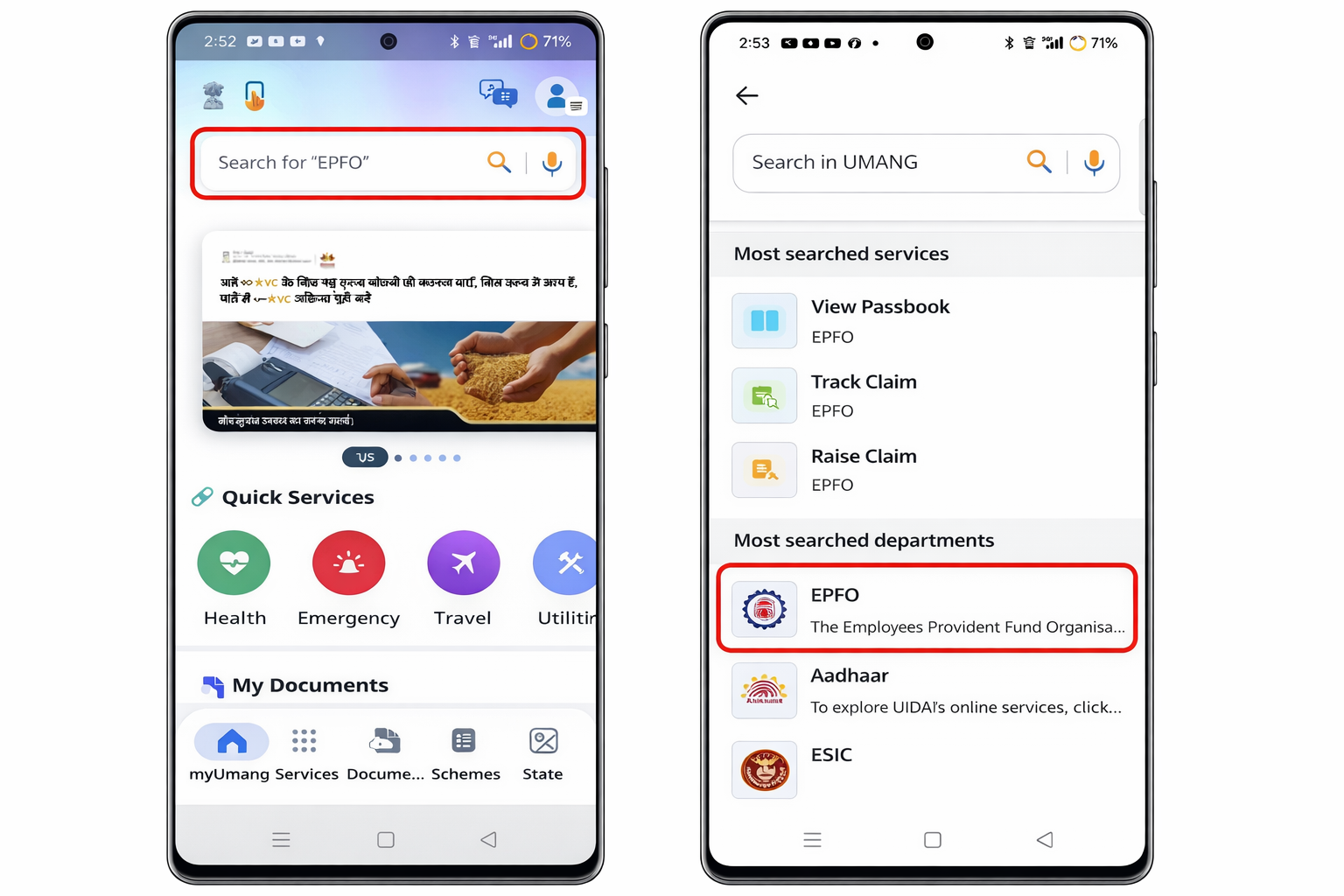
One of the primary reasons people install UMANG is to check the PF balance with UMANG quickly from the phone.
Step-by-Step Process
To check your provident fund balance:
- Open the UMANG mobile app.
- Navigate to EPFO services within the app.
- Select Employee Centric Services.
- Tap on View Passbook / PF Balance.
- Choose the relevant Member ID linked to your UAN.
Once selected, the system retrieves your PF contribution details from EPFO servers and displays the balance.
What Information Appears
The balance screen usually displays three main components:
- Employee contribution
- Employer contribution
- Total accumulated balance
Users should keep in mind that PF balances may not always update immediately after salary credit.
Contribution updates often depend on when the employer files PF returns with EPFO, which means the balance may lag by several days or sometimes weeks.
If you want a detailed guide for checking EPFO Balance, check How to Check EPF Balance.
5. How to View & Download EPFO Passbook on UMANG
The UMANG EPFO UAN passbook feature provides one of the most detailed views of your PF account activity.
What the Passbook Shows
The EPFO passbook contains a month-wise breakdown of provident fund contributions made during your employment. Each entry usually includes:
- Employee PF contribution
- Employer PF contribution
- Pension scheme allocation
- Transfer entries (if you changed jobs)
This helps employees verify whether their employer is depositing PF contributions regularly.
Interest Credit Updates
One important point to remember is that EPF interest is not updated every month.
Interest is typically credited once annually after EPFO finalizes the declared rate. Because of this, the passbook may show contributions monthly but reflect interest only after the yearly update.
Downloading the Passbook
UMANG allows users to download the passbook in PDF format. This file can be saved locally on the device or shared for record-keeping purposes.
Many employees use these passbook PDFs when applying for loans, verifying PF contributions, or maintaining financial documentation.
6. UAN & Profile Details You Can See on UMANG
Apart from balance and passbook data, UMANG also allows users to view certain profile information linked to their EPFO account.
This includes details such as the UAN number, registered mobile number, and basic KYC status associated with the account.
Users can also view limited information about employers who have contributed to their PF in the past. This employment record forms part of the service history maintained by EPFO.
Important Limitation
Although these details are visible in the app, profile corrections cannot usually be made through UMANG.
Changes involving name correction, date of birth updates, or KYC modifications generally require updates through the EPFO portal or employer verification processes.
7. Claim Status & Service History on UMANG
UMANG can also help employees reduce uncertainty after submitting PF-related requests.
Checking Claim Status
If you have applied for PF withdrawal, pension settlement, or account transfer, you can use UMANG to check the claim status. The app typically displays stages such as:
- Submitted
- Under process
- Approved
- Settled
This allows employees to monitor progress without repeatedly visiting the EPFO website.
Understanding Status Delays
Sometimes users worry when claim status does not change for several days. However, this usually reflects processing timelines within EPFO systems, not an issue with the UMANG app itself.
The status visible on UMANG simply mirrors what is recorded in EPFO’s backend.
8. Common UMANG EPFO Limitations (Very Important)
While the UMANG app is extremely convenient for checking PF details, it is important for employees to understand its limitations. The app is designed mainly to provide quick visibility into EPFO records, not to manage or modify those records directly.
Limited Account Control
Most EPFO services available on UMANG allow users to view information rather than change it. This means employees can check their PF balance, download passbooks, and monitor claim status, but they cannot perform many administrative actions that require verification or approvals.
For example, profile corrections such as updating your name, correcting your date of birth, or modifying personal details linked to your UAN typically cannot be completed directly through UMANG. These types of changes usually require validation through employer records or official EPFO processes.
Employer and Administrative Approvals
Many PF-related actions depend on employer participation or administrative approval from the Employees’ Provident Fund Organisation (EPFO). When such verification is needed, the process generally happens through the EPFO portal or employer systems rather than the UMANG app.
Because of this structure, the app is not designed to handle complex workflows involving employer authentication, document verification, or record corrections.
Grievances and Dispute Resolution
Another limitation is that UMANG is not intended for handling complaints or resolving disputes. If an employee needs to raise a grievance related to PF contributions, missing service history, or delayed claim processing, the request typically needs to be submitted through dedicated EPFO grievance systems.
UMANG may help you see the current status of your PF information, but it is not the platform where disputes are investigated or resolved.
Occasional Service Interruptions
Users may also occasionally encounter temporary service disruptions when EPFO systems undergo maintenance or when backend databases are being updated. During these periods, certain EPFO services within UMANG may not load properly or may temporarily show incomplete information.
These interruptions are usually related to backend updates rather than issues with the mobile application itself.
The Key Takeaway
Understanding these boundaries helps avoid unnecessary confusion when using the app. UMANG is best used as a fast and convenient way to access PF information from your phone, especially for tasks like checking balances or downloading passbooks.
However, when it comes to correcting records, resolving disputes, or handling administrative approvals, those actions typically take place through EPFO’s official systems rather than within the app.
9. UMANG vs EPFO Portal: What to Use When
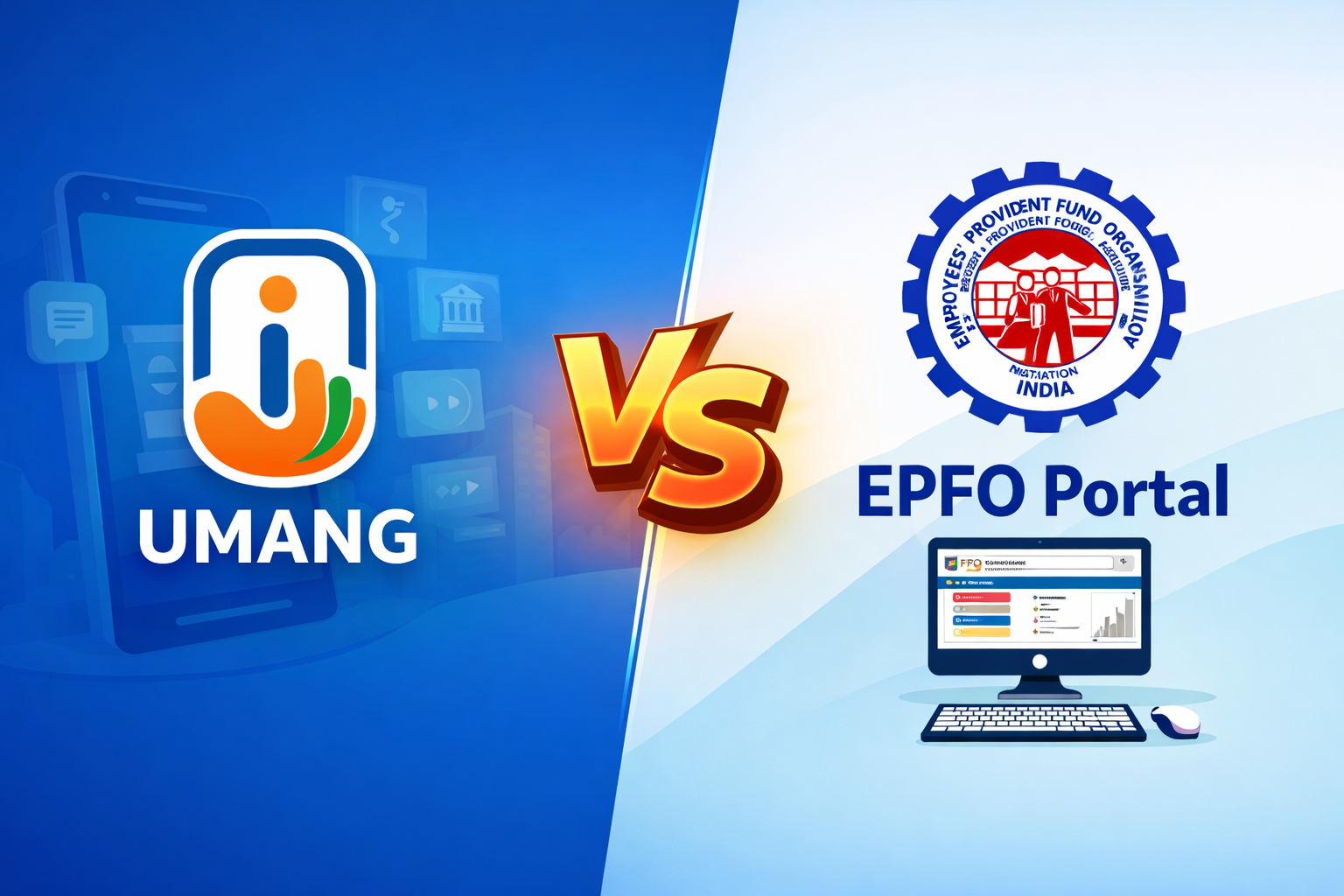
Both platforms serve different purposes, and using them correctly can save time.
UMANG is ideal when you want to quickly check PF balance, download your passbook, or verify claim status directly from your phone. It provides fast access to commonly used EPFO information without requiring a desktop login.
The EPFO portal, on the other hand, is necessary when something needs to be updated or corrected in your account. Activities like submitting claims, correcting profile information, or updating KYC often require using the official EPFO website.
A simple rule of thumb many employees follow is:
Use UMANG for daily checks. Use the EPFO portal when something needs fixing.
10. 5 Reasons UMANG Is Not Showing Correct Data
Sometimes users feel that their PF balance or employment history shown in the UMANG app looks incomplete, outdated, or different from what they expected. This can be concerning, especially when employees rely on the app to monitor their provident fund contributions. However, in most situations, this does not mean the app is malfunctioning.
Why PF Data on UMANG May Look Incorrect
It is important to understand how UMANG works with the Employees’ Provident Fund Organisation (EPFO) systems. The app itself does not store PF account information. Instead, it retrieves data directly from EPFO’s backend servers whenever you request to view your passbook, balance, or service history.
Because of this structure, UMANG can only display information that has already been processed and updated in EPFO records. Several common situations can create a temporary mismatch between what employees expect and what the app shows.
Recent Job Change
When an employee switches companies, the new employer usually generates a new Member ID linked to the same UAN. However, it may take some time before the employment record and PF contributions appear in the EPFO systems. During this transition period, UMANG may still show only the previous employer’s information.
Pending PF Transfer
Employees who move between organizations often transfer their PF balance from the old Member ID to the new one. Until the transfer process is completed and reflected in EPFO records, the passbook may display separate balances or incomplete service history.
Employer Filing Delays
EPF contributions are not automatically reflected when salaries are paid. Employers must file monthly electronic returns and deposit the contributions with EPFO. If this filing happens late or if there is a processing delay, the passbook and PF balance visible on UMANG may not immediately reflect the latest contributions.
Backend Processing Time
Even when employers submit contributions on time, EPFO systems may take a few days to update the passbook and balance data. This backend processing lag is normal and does not indicate any issue with the UMANG platform.
Service History Synchronization
Sometimes employees notice missing or partially displayed service history. This usually occurs when employment records are still being synchronized between EPFO databases or when older employment records have not yet been fully digitized.
What This Means for Users
If the PF balance, passbook entries, or employment history displayed in UMANG appear incomplete, the cause is usually related to EPFO record updates or employer filings, not the app itself.
In simple terms, UMANG functions like a window into EPFO systems. If the information behind that window has not yet been updated, the app will naturally reflect the same delay.
11. When to Get Help
Most PF information checks can be handled independently using UMANG. However, there are situations where employees may need additional guidance.
For example, you may need help if your PF balance has not updated for several months, if your passbook is missing contribution periods, or if claim status appears stuck for an unusually long time.
Similarly, employees sometimes notice multiple employers listed incorrectly or service history records that do not match their actual employment timeline.
In such cases, interpreting EPFO records and identifying the next steps can be confusing.
Support services typically help users understand what EPFO data means and how to proceed, rather than simply reading the information displayed in the app.
How Kustodian Can Help
Understanding PF data on the UMANG app can sometimes be confusing, especially when balances look delayed, service history seems incomplete, or claim statuses remain unchanged. Kustodian helps interpret information sourced from the Employees’ Provident Fund Organisation (EPFO) and guides users on the correct next steps. Instead of simply reading what appears on the screen, the platform helps you understand what the data means and how to proceed if something does not look right.
FAQs
Is UMANG Official for EPFO Services?
Yes. The UMANG (Unified Mobile Application for New-age Governance) is an official platform developed by the Government of India to provide citizens with access to multiple government services in one place.
Through the UMANG app, users can access several services offered by the Employees' Provident Fund Organisation, including checking PF balance, viewing passbooks, tracking claim status, and accessing UAN-related services.
Because the app is integrated with government databases, it serves as a secure and reliable channel for accessing EPFO information directly from your smartphone.
How Often Is PF Balance Updated on UMANG?
The PF balance displayed on UMANG is not updated instantly after every salary contribution. Instead, updates depend on when your employer files the monthly Electronic Challan-cum-Return (ECR) with the Employees' Provident Fund Organisation.
Once the employer submits the contribution details and the EPFO processes them, the updated balance becomes visible in the system. This process may take several days or sometimes a few weeks, depending on employer compliance timelines and EPFO processing cycles.
Therefore, if your balance appears unchanged immediately after payday, it usually reflects processing timelines rather than missing contributions.
Can I Download My EPFO Passbook from UMANG?
Yes. The UMANG app allows users to view and download their EPFO passbook directly on their mobile devices.
After logging in with your registered mobile number and UAN credentials, you can navigate to EPFO services and access the passbook section. From there, the system generates a downloadable PDF version of your passbook that shows:
- Employee and employer contributions
- Monthly credit details
- Total accumulated balance
This downloadable record can be saved for personal financial tracking or documentation purposes.
Why Does UMANG Show Less Balance Than Expected?
Sometimes the PF balance displayed on UMANG may appear lower than expected. This does not necessarily indicate missing funds.
Common reasons include:
- Recent contributions not yet processed by the Employees' Provident Fund Organisation
- Employer contributions that have been filed but have not yet been reflected in the system
- Interest for the current financial year has not yet been credited
Since EPFO processes updates in batches, there may be a temporary gap between contribution submission and the balance displayed in the app.
Can I Submit PF Claims from UMANG?
While UMANG provides access to many EPFO-related services, claim submission capabilities are currently limited.
In most cases, PF withdrawal, transfer, or pension claims must be submitted through the official EPFO Member Portal, where Aadhaar authentication and digital verification processes are completed.
UMANG primarily helps users:
- Check PF balances
- View passbooks
- Track claim status
- Access UAN-related services
This makes it a convenient mobile companion for monitoring EPF accounts, even though full claim processing usually happens through the main EPFO portal.
Disclaimer: This article is for informational purposes only and does not constitute legal or financial advice. Rules may vary based on individual records and EPFO processing.