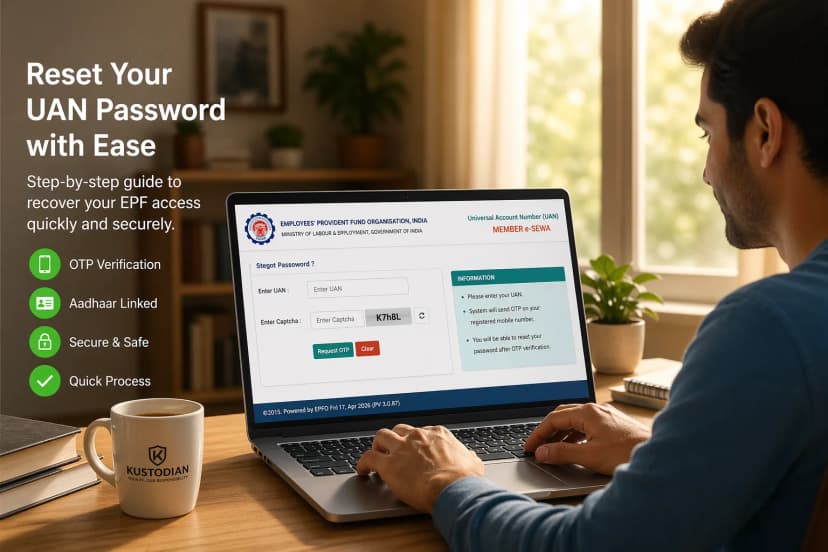
Checking your EPF (Employees’ Provident Fund) balance is one of the simplest ways to stay in control of your financial health. Whether you want to:
- Verify your employer’s contributions
- track your retirement savings
- or prepare for a withdrawal or transfer
You need accurate, up-to-date PF balance information. The good news is that in 2026, the EPFO offers multiple ways to check your balance. Some require internet access and login credentials, while others work instantly through your phone—even without UAN access. This guide covers all official methods, along with when to use each, common issues, and how to interpret your balance correctly.
Quick Ways to Check PF Balance
As per the official Employees' Provident Fund Organisation, you can check your EPF balance using any of these official methods:
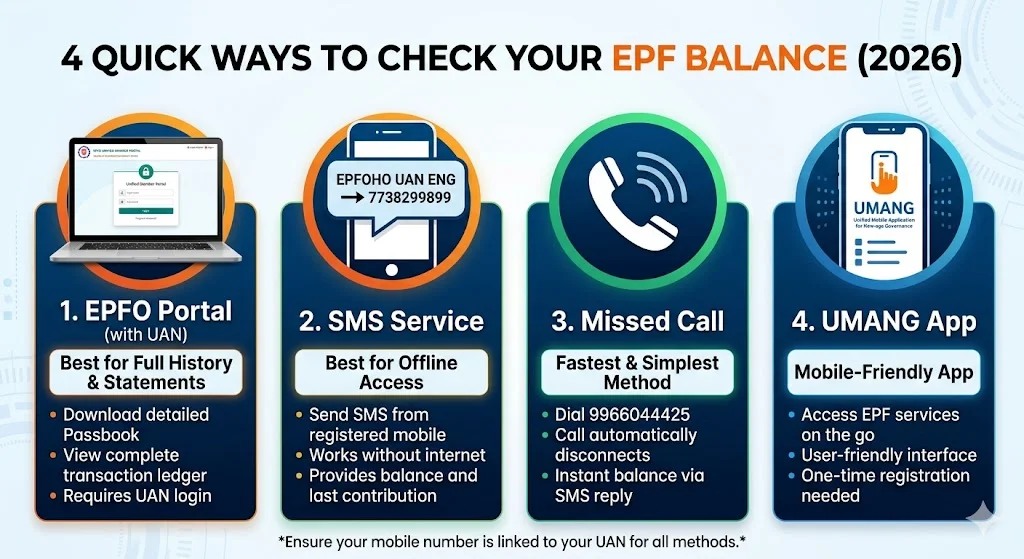
- EPFO Portal (UAN login) → Best for full details and passbook
- EPF Passbook Portal → Detailed monthly breakdown
- SMS Service → Works without internet
- Missed Call → Fastest and simplest method
- UMANG App → Mobile-friendly interface
👉 If you want quick results, use a missed call or SMS
👉 If you want a detailed breakdown, use the EPFO portal or passbook
1. Check EPF Balance via EPFO Portal (With UAN)
Direct Answer: To perform a full EPF balance check with a downloadable statement, visit the EPFO Unified Member Portal, log in with your UAN and Password, and navigate to View > Passbook to access your detailed ledger.
🛠️ Pre-Requisites for 2026 Access:
Before you begin, ensure you have the following ready:
• Active UAN: Your Universal Account Number must be activated at least 24 hours prior.
• Aadhaar-Linked Mobile: Essential for receiving the Multi-Factor Authentication (MFA) OTP.
• Virtual ID (VID): For high-balance accounts (above ₹50 Lakhs), the portal now often requests a VID instead of a standard Aadhaar number for enhanced security.
⚡ Quick Steps: The 60-Second Login
- Visit the Portal: Open the EPFO Unified Member Portal.
- Enter Credentials: Input your 12-digit UAN and unique password.
- Security Check: Enter the Captcha. In 2026, you may be prompted for a second-layer OTP sent to your Aadhaar-linked phone.
- Navigate to View: On the top menu bar, click on 'View' and select 'Passbook' from the dropdown.
- Separate Login: You will be redirected to the dedicated Passbook URL (
passbook.epfindia.gov.in). Log in again with the same UAN/Password. - Select Member ID: Click on the dropdown to choose the specific company account you wish to audit.
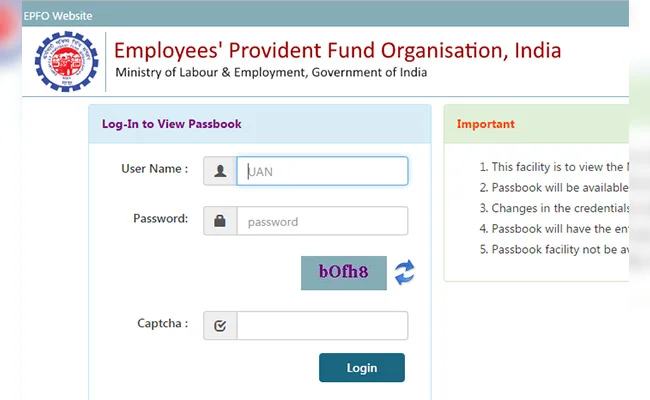
Pro-Tip: If the passbook portal says "Invalid Credentials" immediately after you changed your password, wait 6 hours. The EPFO servers require a sync window to update passwords across different sub-portals.
⚠️ Common Portal Troubleshooting (2026 Edition)
If you hit a wall while checking your balance online, it’s likely one of these three issues:
• "System Error / Service Unavailable": The EPFO portal is notorious for high traffic on the 15th (PF deposit day) and the last day of the month. Use the Missed Call method during these windows.
• "Passbook not available for this UAN": This happens if your employer has generated a UAN but has not yet deposited the first contribution. It also occurs if your e-Nomination is not filed.
• "Invalid Captcha" (Looping): This is often a browser cache issue. Open a "New Incognito Window" (Ctrl+Shift+N) and try again; it usually bypasses the login loop.
2. Check PF Balance Without UAN
Direct Answer: You can perform a PF balance check without a UAN login by using the official Missed Call (9966044425) or SMS (7738299899) services from your registered mobile number. These methods use your phone number as a "Universal Key" to identify your account and push the balance details directly to your handset.
.
⚡ Available Offline Methods
• The Missed Call Method (011-22901406$ or $9966044425): The fastest, zero-cost way to get an instant update.
• The SMS Service (7738299899): Best for users who prefer receiving details in a specific regional language.
💡 Key Insight: The "Discovery" Tool. If you have forgotten your UAN, do not worry. The SMS reply you receive from the EPFO will actually contain your UAN in the text body. This allows you to recover your ID and reset your portal password without needing to contact your employer.
📊 Capabilities: What You Can vs. Cannot Do Checking without a UAN is a summary service, designed for speed rather than account management.
| Feature | Without UAN Login | With UAN Login |
|---|---|---|
| View Total Balance | ✅ Yes | ✅ Yes |
| See Last Contribution | ✅ Yes | ✅ Yes |
| Download PDF Passbook | ❌ No | ✅ Yes |
| Verify KYC Status | ⚠️ Partial | ✅ Yes |
| Consolidate Old Accounts | ❌ No | ✅ Yes |
⚠️ Pre-2014 & Inoperative Accounts:
If your account dates back to before 2014 and has been dormant for over 36 months, automated SMS and Missed Call services will not work.
• The Fix: You must use the EPFO Inoperative Account Helpdesk or visit a Regional PF Office with your old Member ID to link it to a modern UAN.
3. Check PF Balance via SMS
Direct Answer: To perform an EPF balance check via SMS, send EPFOHO UAN [LANG] to 7738299899 from your registered mobile number. This server-side utility bypasses the web portal, making it the most reliable fallback for low-connectivity areas.
⚡ SMS Format Snippet Block
• Send Message: EPFOHO UAN ENG (for English)
• Send To: 7738299899
• Requirement: Must be sent from your registered mobile number.
💡 Key Insight: UAN Recovery via SMS If you have forgotten your UAN, the SMS method acts as a Discovery Tool. The reply you receive from the EPFO will automatically include your 12-digit UAN number in the text body, allowing you to regain access to the portal.
🌐 Supported Languages: Breaking the Digital Divide
The EPFO is one of the few government entities that truly respects India's linguistic diversity. By changing the last three letters of your message, you can receive your balance in any of these 10 regional languages:
| Language | Code | Example Message |
|---|---|---|
| English | ENG | EPFOHO UAN ENG |
| Hindi | HIN | EPFOHO UAN HIN |
| Marathi | MAR | EPFOHO UAN MAR |
| Tamil | TAM | EPFOHO UAN TAM |
| Telugu | TEL | EPFOHO UAN TEL |
| Kannada | KAN | EPFOHO UAN KAN |
| Gujarati | GUJ | EPFOHO UAN GUJ |
| Punjabi | PUN | EPFOHO UAN PUN |
| Malayalam | MAL | EPFOHO UAN MAL |
| Bengali | BEN | EPFOHO UAN BEN |
🔍 Anatomy of the SMS Reply: What to Expect
When you send the code, you won't just get a number. You get a mini-status report of your social security standing. A typical reply in 2026 looks like this: "UAN: 1012XXXXXXXX. Name: [Your Name]. Last Contribution: ₹5,400. Total Balance: ₹4,85,000. KYC: Aadhaar-Yes, PAN-Yes, Bank-Yes."
Expert Interpretation:
• Last Contribution: If this shows a date or amount from 3 months ago, your employer is likely defaulting on payments.
• KYC Status: If any of these say "No," your balance is effectively frozen for withdrawals until you update the portal.
⚠️ Common Issues & Diagnostic Solutions
- No Response: Ensure you are sending from the mobile number linked to your UAN.
- KYC Error: The system will block the balance if your UAN is not linked with Aadhaar or PAN.
- Operator (DND) Issues: Ensure your telecom settings allow transactional messages from the "7738" or "EPFOHO" header.
- UAN Not Activated: New UANs require 48 hours after activation before the SMS service recognizes them.
4. Check PF Balance via Missed Call
Direct Answer: To perform an instant EPF balance check via missed call, dial 9966044425 from your registered mobile number. The system will automatically disconnect after two rings and send your balance details via SMS within 60 seconds.
In 2026, this remains the most resilient utility for the Indian workforce, bypassing portal downtime and password fatigue.
💡 Key Insight: The "Discovery" Tool
If you have forgotten your UAN, the Missed Call service acts as a recovery tool. The SMS you receive will explicitly contain your 12-digit UAN, allowing you to regain access to the portal without contacting your employer.
⚡ Step-by-Step Execution
- Dial the Number: Call
9966044425(Primary) or011-22901406(Legacy). - Automatic Disconnect: The call will drop after two rings; no call charges will apply.
- Receive SMS: A "Mini-Audit Report" is pushed to your handset within a minute.
📊 Anatomy of the Response: What You Get
The 2026 reply format provides a comprehensive snapshot of your account's health:
| Information Point | Why It Matters |
|---|---|
| UAN Number | Helps you recover your UAN if you have forgotten it. |
| Member Name | Confirms the account is linked to the correct legal identity. |
| Last Contribution | Verifies if your employer paid the PF for the previous month. |
| Total Balance | The cumulative sum of Employee and Employer shares. |
| KYC Status (Aadhaar) | Shows "Yes" if your identity is verified; essential for withdrawals. |
| KYC Status (Bank) | Shows "Yes" if your bank account is successfully seeded. |
| KYC Status (PAN) | Shows "Yes" if your PAN is linked (crucial for tax-free withdrawals). |
Technical Prerequisites
• UAN Activation: Your UAN must be activated for at least 48 hours.
• Registered Mobile: You must call from the number linked to your EPFO database.
• KYC Seeding: At least one KYC document (Aadhaar, PAN, or Bank) must be linked for the system to return a balance.
⚠️ Troubleshooting: No SMS Received?
• DND Settings: Ensure your telecom provider is not blocking "EPFOHO" alerts as promotional content.
• Registration Lag: Changes to mobile numbers take 24 to 72 hours to reflect in the Missed Call API.
• Dual SIM: Verify you are calling from the correct registered SIM slot.
• Peak Latency: On the 15th of the month, expect delays of up to 10 minutes due to high traffic.
Expert Audit Tip: If your "Last Contribution" hasn't updated for over two months, it is a major red flag that your employer may be defaulting. Use this method for a quick monthly audit to detect issues early.
5. Check PF Balance via UMANG App
Direct Answer: To check your EPF balance on mobile, open the official UMANG app, search for EPFO, select View Passbook, and log in using your UAN and OTP. The app provides a more stable mobile experience than the web portal and is built for on-the-go utility.
⚡ Step-by-Step Mobile Check
- Install: Download the official UMANG app from the Google Play or Apple App Store.
- Login: Register and log in using your registered mobile number and OTP.
- Find EPFO: Search for "EPFO" or locate it under the "Social Security & Pensioners" category.
- View Passbook: Select the "View Passbook" service.
- Authenticate: Enter your 12-digit UAN and the OTP sent to your Aadhaar-linked phone.
- Select ID: Choose the specific Member ID to view your balance.
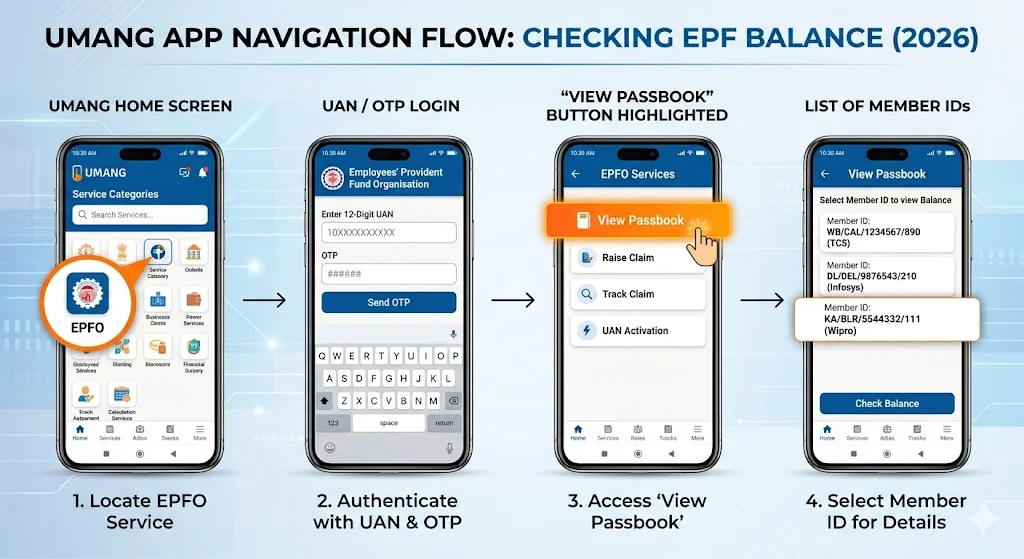
💡 Key Insight: The "One-Tap" Audit UMANG allows you to see every Member ID ever linked to your UAN in a single vertical list under the 'Service History' tab. If you spot an old balance that hasn't moved, you can initiate a [transfer PF between jobs] directly within the app.
📊 Comprehensive App Features
Unlike offline methods, UMANG provides Bi-Directional Utility, allowing you to manage your account rather than just receiving data.
| Feature | Description | 2026 User Benefit |
|---|---|---|
| View Passbook | Real-time ledger of all contributions. | Instant verification of monthly deposits. |
| Raise Claim | Apply for partial or full withdrawals (Form 19, 31, 10C). | No need for a laptop; file while commuting. |
| Track Claim | See a stage-by-stage status of your money movement. | Reduces anxiety about "stuck" payments. |
| UAN Activation | For freshers at their first job. | Get into the system without desktop access. |
| E-Nomination | Update your beneficiary details. | Mandatory in 2026 for most portal features. |
| Grievance Redressal | Lodge a complaint directly with the EPFO. | Direct line to officials for missing balance issues. |
⚠️ Common Challenges & 2026 Solutions
• OTP Delays: If the OTP fails three times, wait 30 minutes before trying again to avoid a server lockout.
• Server Overload: Traffic is highest from the 15th to the 20th of the month. Access the app before 9 AM or after 10 PM for 10x faster response times.
• Session Expiry: Use a "Split Screen" view on your smartphone to copy your UAN from another app without being logged out.
• App Crashes: Check for a mandatory update in the App Store, as the EPFO frequently updates its API schema.
🛡️ 2026 Security Protocol
Only the UMANG app and the official EPFO portal are authorized to handle your sensitive data. Avoid "unofficial" PF trackers on the Play Store, as they are often designed to steal UAN credentials.
Once you’ve verified your total corpus, our EPF Withdrawal Guide can help you transition from simply tracking your savings to successfully accessing them when you need them most.
6. EPF Passbook – How to Read It Properly
Direct Answer: To read your EPF passbook correctly, download the official PDF from the EPFO Passbook Portal. You must verify that your monthly 12\% contribution matches your salary slip and that your employer is splitting their share between your PF (3.67\%) and Pension (8.33\%).
Checking your balance tells you "what" you have; reading the passbook reveals "how" it got there. In 2026, this document is your primary tool to verify your employer is fulfilling their legal obligations.
⚡ Step-by-Step: How to Download EPF Passbook
- Visit: Open the official EPFO Passbook Portal.
- Authenticate: Log in using your UAN and Password.
- Select ID: Click on the specific Member ID you wish to audit.
- Download: Select 'Download Passbook (PDF)' for your permanent records.
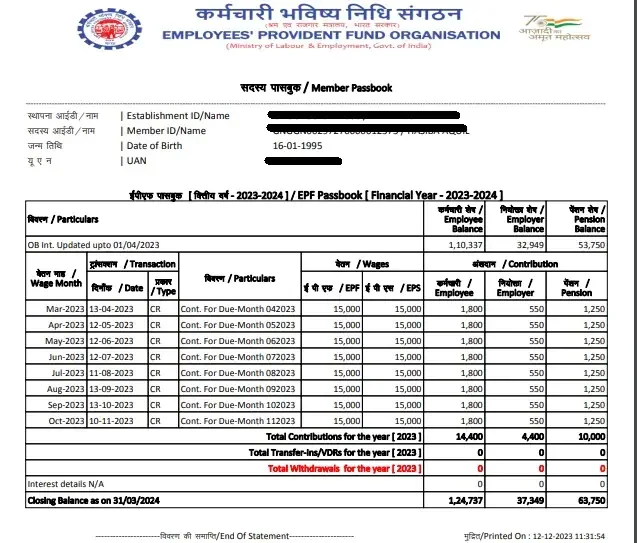
🔍 Decoding Key Passbook Components
Understanding these "buckets" is vital for tracking your long-term wealth
| Component | Detailed Explanation | 2026 Financial Impact |
|---|---|---|
| Employee Contribution | The 12% deducted from your Basic salary + DA. | Directly builds your final lump-sum corpus. |
| Employer Contribution | The 3.67% portion of the employer's share. | This is "free money" added by your company to your PF. |
| EPS (Pension) | The 8.33% portion is diverted to the Pension Scheme. | Used to calculate your Monthly Pension after retirement. |
| Interest | Annual compounding growth is added to your total. | The primary engine of your retirement wealth. |
Key Insight: The "EPS Interest" Myth
A common error is assuming your entire employer contribution earns interest. The EPS (Pension) portion does NOT earn interest. This money is a contribution toward a future service-based benefit, not a personal savings account.
📉 Monthly Deposit Example (Basic + DA = ₹15,000)
| Month | Employee Share (12%) | Employer PF Share (3.67%) | EPS Share (8.33%) |
|---|---|---|---|
| January | ₹1,800 | ₹550 | ₹1,250 |
| February | ₹1,800 | ₹550 | ₹1,250 |
| March | ₹1,800 | ₹550 | ₹1,250 |
Expert Audit Tip for 2026
Check the "Date of Credit" on your PDF. Monthly contributions should ideally be credited by the 15th of the following month. If deposits are consistently 2–3 months late, your employer is delaying payments, which results in a significant loss of compounded interest over your career.
7. Why Your PF Balance Is Not Showing
Direct Answer: A missing or "zero" PF balance is typically caused by employer deposit delays (post the 15th), UAN activation lag (24–48 hours), or Aadhaar-to-UAN data mismatches. In 2026, most visibility errors are due to the Revamped ECR Ledger Posting sync issues rather than an actual loss of funds.
🎯 Use This Section If:
- Your passbook displays "No Records Found".
- Deductions appear on your salary slip but not in the portal.
- Interest for the previous financial year is missing
Key Insight: The "Interest Season" Lag
Your EPF interest is calculated monthly, but only becomes visible once the government notifies the rate and your Regional Office (RO) completes its batch audit. In 2026, this "Interest Season" (August–December) is staggered. If your colleague sees theirs and you don't, your Regional Office is simply still in the processing queue. Your money continues to compound behind the scenes.
🔍 Diagnostic 1: Technical Ledger Migration (2026 System Update)
The early 2026 "Ledger Migration" infrastructure shift has created temporary "visibility gaps".
- The Symptom: Contributions for some months (e.g., January/February) are missing while others are visible.
- The Fix: Most gaps resolve automatically within 7–10 working days. If the gap persists beyond 30 days, it shifts from a system sync issue to an employer compliance issue.
🔍 Diagnostic 2: Employer Compliance & "AI-ECR" Flagging
The 2026 AI-driven ECR system instantly flags establishments that violate new wage structure rules (e.g., Basic Pay below 50% of gross wages).
- The Trap: If an employer's filing is flagged for a "Wage Mismatch," the entire company’s passbook updates can be paused.
- Audit Step: Use the 'Establishment Search' on the EPFO portal. If the "Payment Status" is missing, the fault lies with your employer, not the system.
Strategic Check: If your PF balance is missing or incorrect due to employer defaults, you may need to [fix PF claim rejection] or initiate a formal grievance. Simply checking the balance is not enough if your retirement infrastructure is compromised.
🔍 Diagnostic 3: Data Mismatches & "Online Joint Declaration"
In 2026, mismatches in Name, DOB, or Aadhaar details block the passbook API from verifying your identity.
- The 2026 Fix: Navigate to 'Manage' → 'Modify Basic Details' to trigger a digital Joint Declaration. Once your employer approves it digitally, your passbook will unlock within 48 hours.
🔍 Diagnostic 4: Job Change & "Self-Marking Exit"
A "Zero Balance" often appears after a job switch because the system assumes a transfer is pending.
- The Block: Transfers are blocked if your previous employer forgot to mark your Date of Exit (DOE).
- The Solution: You can now Self-Certify your exit. Go to 'Manage' → 'Mark Exit' (available 60 days after your last contribution). After marking exit, you can smoothly [transfer PF between jobs].
📊 Quick Troubleshooting Table: 2026 Edition
| Symptom | Probable Root Cause | Estimated Resolution Time |
|---|---|---|
| Passbook is Blank | UAN recently activated / Sync lag. | 24–48 Hours |
| "Invalid Credentials" | Recent password change; server sync pending. | 6 Hours |
| Missing Monthly Entry | Employer Filing Delay / AI-ECR Flag. | 5–15 Days |
| Zero Interest for 2025 | Regional Office batch processing. | Next Quarter |
| "User Not Found" | Aadhaar/Mobile Mismatch. | 3–5 Days (via Joint Declaration) |
💡 Expert Insight: The "ABHA" Connection
A new factor in 2026 is the ABHA (Ayushman Bharat Health Account) ID. If you are checking your balance specifically to file a Medical Advance, ensure your Aadhaar name matches your ABHA ID exactly. A mismatch here won't just block your balance visibility; it will trigger an automatic claim rejection by the EPFO's medical audit bot.
Identifying a data mismatch during your balance check is actually an opportunity to fix PF claim rejection triggers now, well before an emergency withdrawal is ever required.
8. Best Way to Check EPF Balance: Choosing the Right Method for Your Situation
Direct Answer: The best way to check EPF balance depends on your immediate need: use the Missed Call service (9966044425) for an instant update, the EPFO Portal for a detailed PDF audit, or the SMS service (7738299899) if you have lost your UAN. In 2026, choosing the wrong method during peak hours (like the 15th) is the primary cause of "Portal Timeout" errors.
📊 PF Balance Check Utility Matrix
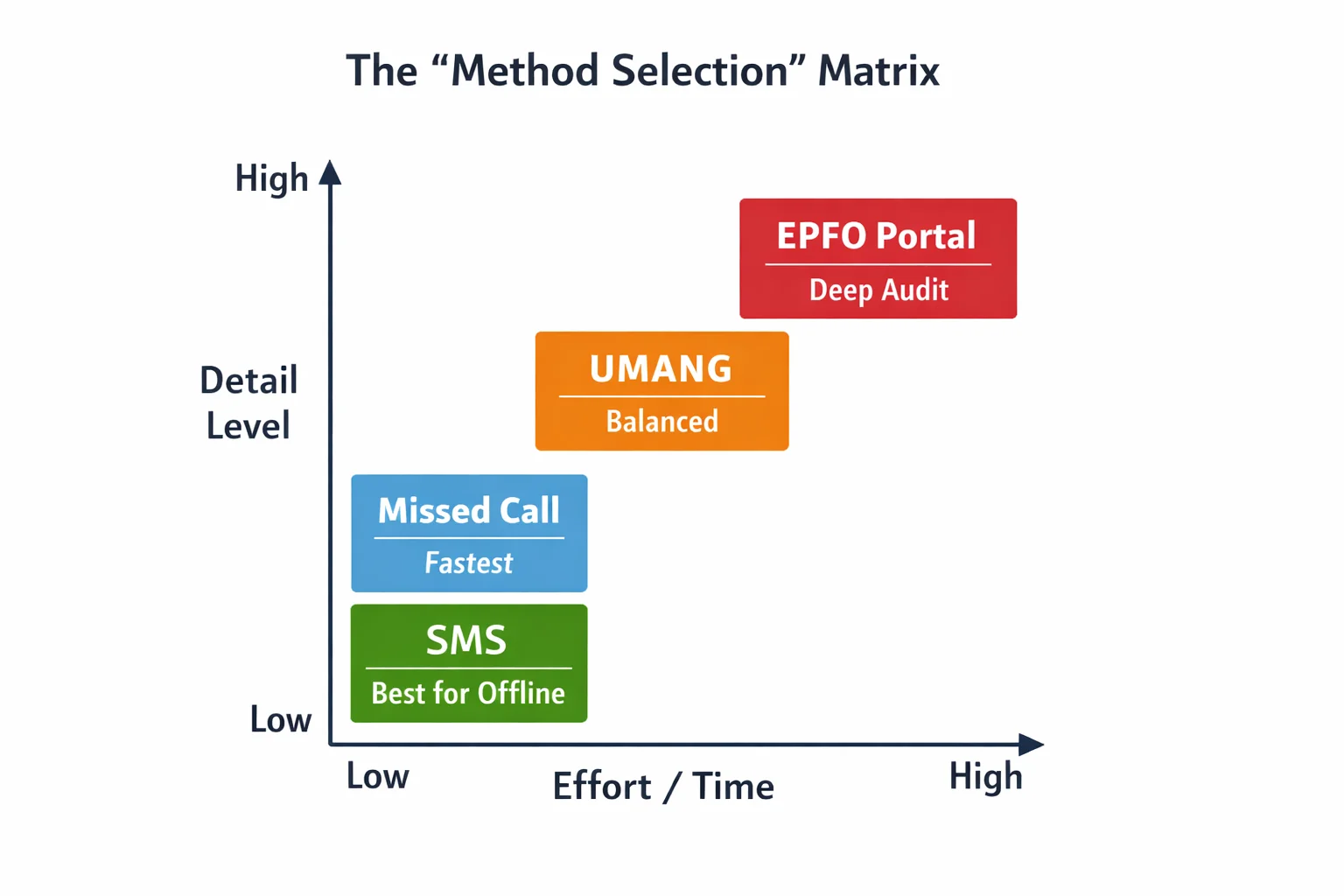
| Your Specific Goal | Recommended Method | Why it’s the Best Choice |
|---|---|---|
| Check PF balance instantly | Missed Call | Zero login; works in $< 60$ seconds. |
| How to check PF balance without UAN | SMS / Missed Call | Recovers your UAN number in the reply. |
| Full PF Balance Check with Passbook | EPFO Portal | The only way to get a line-by-line audit trail. |
| Check PF Balance without Internet | SMS Service | Uses GSM signaling; 100% offline. |
| Track EPF Claim & Balance | UMANG App | Integrated mobile dashboard for smartphones. |
Intent-Match Guide: Which Method Do You Need?
- The "Speed Seeker" Intent
• Goal: Instant verification of a monthly salary deposit.
• Best Method: Missed Call (9966044425).
• Expert Insight: This is the most resilient method in 2026 because it bypasses the heavy web-portal API, making it the gold standard for checking PF balance instantly.
2. The "Power User" Intent
• Goal: Auditing interest credits or preparing for a home loan.
• Best Method: EPFO Passbook Portal.
• Expert Insight: This is the only channel providing a comprehensive audit of the Employer Share (3.67%) versus the Employee Share (12%).
3. The "Mobile-First" Intent
• Goal: Checking balance while filing a withdrawal or [tracking claim status].
• Best Method: UMANG App.
• Expert Insight: UMANG features "Auto-Login" biometrics in 2026, bypassing the frustrating "Invalid Captcha" loops found on mobile web browsers.
💡 Key Insight: UAN Recovery via SMS The SMS method is a secret "UAN Recovery" tool. When you send EPFOHO UAN ENG to 7738299899, the system identifies your mobile number and sends your UAN back to you in the reply. This is the most efficient way to check your balance if you have lost your login credentials.
⚠️ Expert Warning: Avoiding "Fake" PF Check Sites In 2026, numerous third-party "scrapers" use the keyword "Check PF Balance Online" to steal UAN credentials.
• The Risk: These sites can potentially initiate unauthorized fund transfers.
• The Rule: Only use the five official methods. If a site is not an epfindia.gov.in or umang.gov.in domain, exit immediately.
9. FAQs: Everything You Need to Know About EPF Balance Checks (2026)
This section addresses the "Long-Tail" queries that users frequently ask after performing a basic EPF balance check. If your question isn't answered here, it likely requires a deeper audit of your establishment's records.
Q1: Can I check my PF balance using my Aadhaar number directly?
No. You cannot log into the EPFO portal using only an Aadhaar number. However, Aadhaar is the key that unlocks all automated methods.
• If your Aadhaar is linked (seeded) to your UAN, the Missed Call and SMS services will work instantly.
• The system uses your mobile number to find your Aadhaar, which then points to your UAN. So, while you don't "use" the Aadhaar number to check, the service depends on it.
Q2: Why is my PF balance showing zero after I switched jobs?
This is the most common source of panic during an EPF balance check. Your money isn't gone; it is simply "fragmented."
• The Reason: Every time you change companies, a new Member ID is created under your UAN. The balance from your old company does not move to the new one automatically.
• The Solution: You must file a Transfer Claim (Form 13) via the "One Member – One EPF Account" link on the portal. Once the transfer is complete, your old balance will reflect in your current Member ID.
Q3: How often is the PF interest actually credited to my account?
There is a difference between Calculation and Visualization.
• Calculation: Interest is calculated on your monthly running balance.
• Visualization: The interest is usually "pushed" to your visible passbook once a year.
• 2026 Update: In 2026, due to digitized auditing, most users see their interest credited by September or October for the previous financial year. If it’s December and you still don't see it, it might be a delay at your Regional PF Office.
Q4: My employer deducted PF, but the "Check PF Balance" result doesn't show it. Why?
This indicates a Compliance Gap.
• Employers are legally required to deposit the PF by the 15th of the following month.
• If they miss this deadline, they must pay "Damages" and "Interest" for the delay.
• Expert Tip: If your balance is not updated for more than two months, use the 'Establishment Search' feature on the EPFO site to see if your company has defaulted on its overall bulk payment.
Q5: Can I check my PF balance via WhatsApp in 2026? Strictly speaking, no.
While the EPFO has launched WhatsApp-based Grievance Redressal (each Regional Office has a specific number), there is no official "Bot" that provides your balance via WhatsApp.
• Warning: If you see an ad for a WhatsApp bot asking for your UAN and Password, it is a scam. Official balance checks are only available via the Portal, UMANG, SMS ($7738299899$), and Missed Call ($9966044425$).
Q6: What is the 'Tax on EPF Interest' rule for 2026?
If you are a high earner, an EPF balance check might reveal a tax liability.
• The Rule: If your own contribution (Employee Share) exceeds ₹2.5 Lakhs in a single financial year, the interest earned on that excess amount is taxable.
• 2026 Practice: The EPFO passbook now maintains two separate ledgers: one for the non-taxable component and one for the taxable component. You will see this breakdown in your downloaded PDF passbook.
Q7: I have lost my registered mobile number. How can I check my balance?
This is a "Catch-22" because all automated methods send an OTP to your old number.
- You cannot use SMS or Missed Call.
- You must log in to the Unified Member Portal.
- Use the 'Forgot Password' link.
- Select the option that says "Do you want to change your mobile number?"
- You will need to verify your identity using Aadhaar-based Biometrics, or OTP sent to the number currently linked to your Aadhaar.
Q8: Is the SMS PF balance check accurate for "Inoperative Accounts"?
Usually, no. If your account has been dormant (no contributions) for more than 36 months and you haven't yet reached retirement age (55+), it may be marked as "Inoperative."
• These accounts often stop earning interest (for older accounts) and may not respond to the SMS or Missed Call API.
• To check the balance of an inoperative account, you must visit the Regional PF Office or use the specialized Inoperative Account Helpdesk on the website.
Q9: What does it mean when the passbook says "Closing Balance" and "Net Balance"?
• Closing Balance: The total amount at the end of the financial year, including interest.
• Net Balance: The amount currently available for withdrawal (this may exclude the Pension portion, as EPS has different withdrawal rules).
Q10: How can I check the balance of a company that is now closed?
The company holds the records, but the EPFO holds the money.
• As long as you have your UAN or your Member ID, the closure of the company does not affect your ability to check your balance.
• Use the EPFO Portal to see your funds. If the company didn't generate a UAN before shutting down, you will need to file a manual "PF Search" request at the Regional Office with your old salary slips as proof.
10. Beyond the Balance: Mastering Your EPF Discipline in 2026
Checking your PF balance is the digital equivalent of checking your pulse; it tells you that the system is alive, but it doesn't tell you if you're healthy. In 2026, a "zero balance" or a "claim rejection" isn't just a technical glitch—it’s often the result of years of passive management. To truly secure your financial safety net, you must transition from a "Balance Checker" to a "PF Auditor."
🎯 The "Discovery Trap": Why Waiting is a Risk Most employees only realize their PF records are broken when they are in a crisis—whether it’s an urgent medical withdrawal or a job loss.
• The Reality: In 2026, the 75% immediate withdrawal rule (available after just 1 month of unemployment) is a lifesaver, but only if your KYC is flawless.
• The Risk: Discovering a name mismatch or a missing e-Nomination while you are already unemployed can lead to weeks of administrative delays during your most vulnerable time.
✅ Your Quarterly EPF Health Checklist (2026 Edition) Make it a habit to perform this 5-minute audit every three months:
• Verify the 50% Wage Rule: As of April 2026, ensure your Basic + DA reflects at least $50\%$ of your CTC. If your PF deductions haven't increased accordingly, your employer may not be compliant with the new wage codes.
• Mandatory e-Nomination: In 2026, the EPFO made e-Nomination a mandatory prerequisite. You cannot even access the "Online Services" claim page without a valid, Aadhaar-linked nomination.
• TDS Readiness (Form 121): If you are planning a withdrawal in the current financial year, remember that Form 15G/15H is obsolete for PF. Under the Income Tax Act 2025, you must now submit Form 121 to claim TDS relief.
• Interest Accuracy: Confirm that the $8.25\%$ interest (for FY 2025-26) has been calculated on your full monthly running balance, not just the year-end closing.
💡 Final Advice: The "Calm Expert" Approach
Your Provident Fund is not just a deduction on your salary slip; it is a compounding engine that, if managed with discipline, will likely become one of your largest liquid assets. Don't wait for a crisis to check your foundation.
• If your balance is zero—investigate.
• If your KYC is "Pending"—escalate.
• If your employer is defaulting—document.
🚀 Taking the Next Step If your balance audit reveals discrepancies that basic portal tools can't fix—such as untraceable old accounts or complex name mismatches across multiple Member IDs—it may require a deeper level of intervention. Kustodian is designed to provide that expert bridge, moving you from frustration to resolution with the calm, professional empathy your financial future deserves. Your PF isn’t just a number—it’s the infrastructure of your retirement. Audit it today.
![Why E-Khata Applications Get Rejected in Bangalore (And How to Fix Them) [2026]](/_next/image?url=https%3A%2F%2Fwebsite-assets-wix.s3.ap-south-1.amazonaws.com%2Fimages%2Fposts%2F3031ceb9f0274289aad5c5f140be716f.webp&w=828&q=75)