Activating your UAN through the UMANG app is one of the fastest ways to unlock your EPF services without visiting a website or office. If you prefer doing everything on your phone, the UAN activation Umang app process is simple - provided you know exactly where to tap and what details to enter.
This step-by-step 2026 guide walks you through UAN activation on Umang with clear instructions and visual references, so you can complete the process confidently in a few minutes. Whether you’re using UMANG for the first time or just want a no-confusion walkthrough, this page shows you precisely how to activate your UAN correctly using the official EPFO system.
Contents
- UAN Activation on UMANG App (2026): Just Tell Me Where to Tap
- Before You Start (Read This Once)
- Install & Set Up the UMANG App (First-Time Users)
- Navigate to EPFO Services Inside UMANG
- 5-Step process to Activate UAN on UMANG (2026)
- What Happens After Successful Activation
- 4 Common UAN Activation Errors on UMANG (And What to Do)
- UMANG vs EPFO Portal (Quick Context)
- Common Questions While Using UMANG
- When You May Need Help
- Final Reassurance
- Conclusion
1. UAN Activation on UMANG App (2026): Just Tell Me Where to Tap
Designed for Mobile-Only UAN Activation Users
If you are here, you probably don’t want a detailed explanation of provident fund regulations or backend systems. You simply want to complete your UAN activation Umang app process quickly using your phone, without confusion, technical jargon, or unnecessary detours.
This guide is written specifically for users who prefer mobile-only activation and want exact, screen-by-screen clarity. If you are using the UMANG App for the first time, this walkthrough will help you understand exactly where to tap and what to enter at each stage.
Step-by-Step Execution - Not Theory
Instead of explaining policies, this guide focuses purely on execution. You’ll learn how to complete UAN activation on Umang in 2026 through clear, practical instructions. The goal is to help you move from “UAN inactive” to “UAN successfully activated” without second-guessing your steps.
To set expectations clearly:
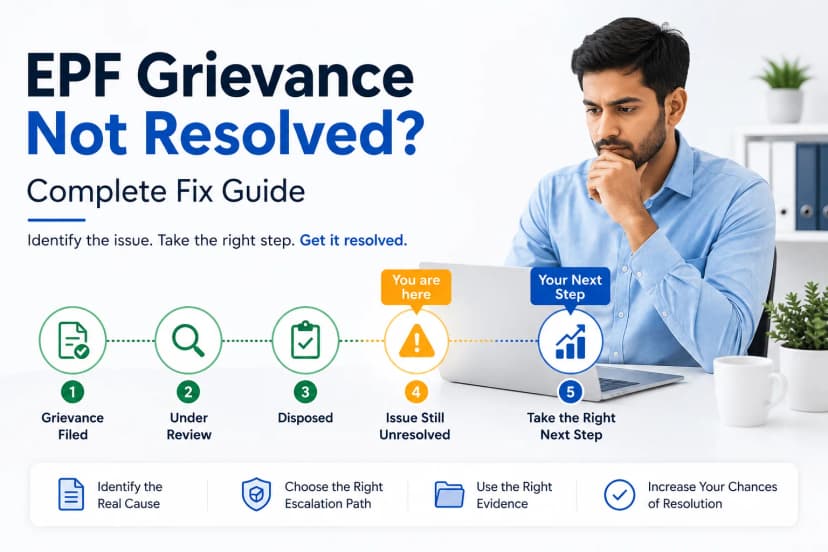
This page shows how to activate. It does not explain why activation fails. If you are already encountering OTP issues, Aadhaar mismatches, or repeated activation errors, click the link below to know more.
Read about Common EPF Problems and How to Fix Them (2026 Guide)
2. Before You Start (Read This Once)
Preparation Prevents Most Activation Failures
A smooth UAN activation UMAng app experience depends more on preparation than on technical skill. Most mid-process failures occur because one small requirement was overlooked.
Before starting the process, make sure you are using a smartphone with a stable internet connection. Since activation involves real-time Aadhaar authentication and backend validation, poor connectivity can interrupt the session or delay OTP delivery.
You should also confirm that the UMANG app installed on your phone is updated to the latest version. An outdated app may not properly display EPFO services or may fail during authentication steps.
Keep your 12-digit UAN number ready and double-check it before entering. Incorrect UAN entry is one of the most common reasons activation does not proceed.
Aadhaar OTP Is Mandatory
Most importantly, ensure that you have access to the mobile number linked to your Aadhaar. UAN activation through UMANG connects directly to the official backend systems operated by the Employees' Provident Fund Organisation.
Under EPFO rules applicable in 2026, Aadhaar-based OTP verification is mandatory wherever applicable.
The OTP will be sent to the Aadhaar-linked mobile number, not necessarily the number registered in UMANG.
If Aadhaar OTP cannot be received, stop here and fix that first.
Without OTP access, UAN activation through UMANG cannot proceed under any circumstances. Taking a few minutes to verify these essentials can save you from repeated attempts and unnecessary frustration later.
3. Install & Set Up the UMANG App (First-Time Users)
If you’ve never used UMANG before, you’ll first complete UMANG registration. This is separate from UAN activation.
Step A: Download the App
Download UMANG from:
Ensure the publisher is MeitY, Government of India.
Step B: Register Your Mobile Number
After installation:
- Open the app
- Enter your mobile number.
- Verify via OTP
- Set MPIN
You may also choose your preferred language and allow basic permissions.
UMANG registration ≠ , UAN activation. Activation happens later inside the EPFO services.
Once you reach the home dashboard, you are ready for the next section.
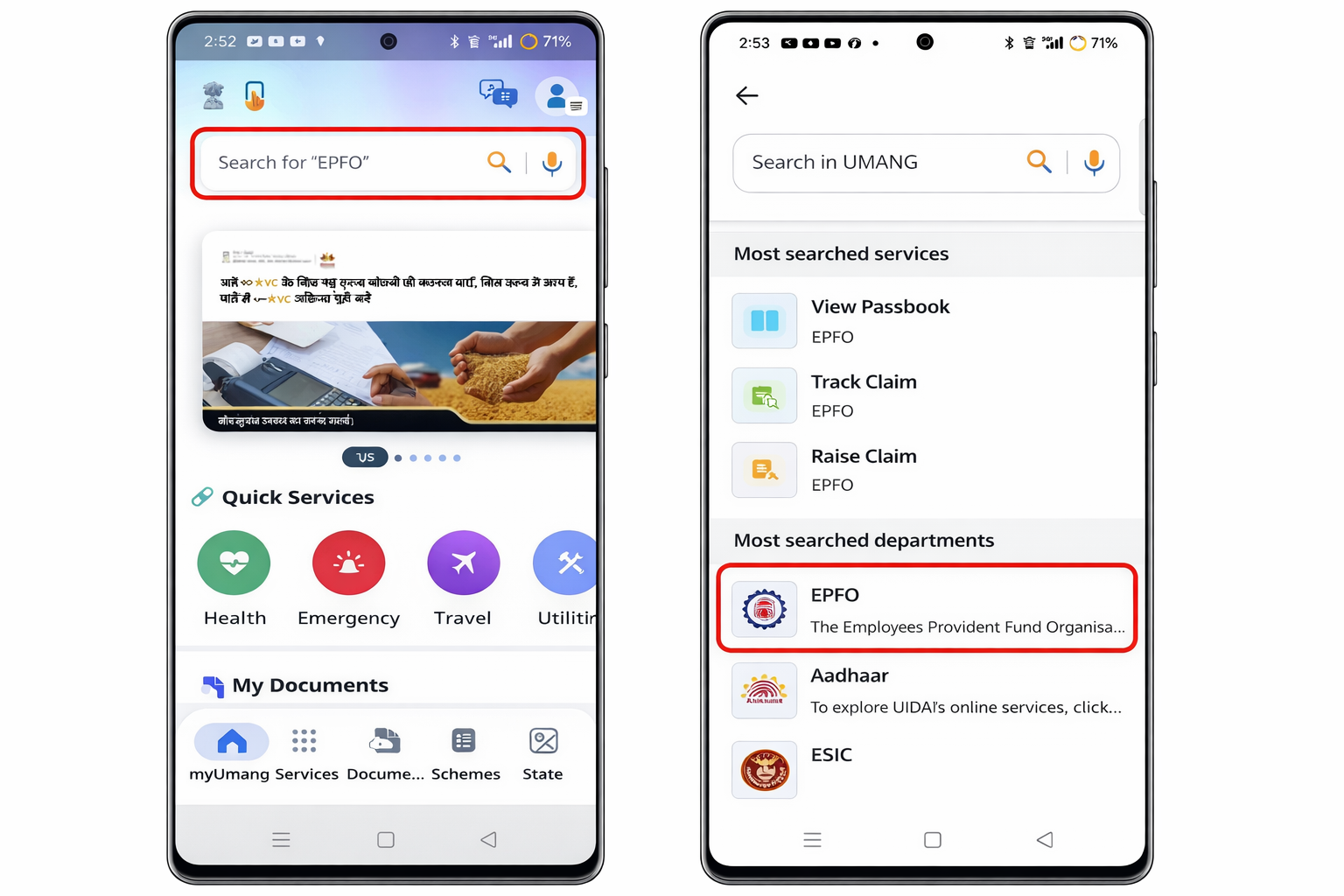
4. Navigate to EPFO Services Inside UMANG
Now we enter the actual activation path. There are various services that Umang App offers, and navigating through these carefully is important.
Follow these taps carefully:
- Open UMANG
- Use the search bar and type EPFO.
- Select EPFO from the results.
- Tap Employee Centric Services
- Choose Activate UAN
You are now inside the official EPFO activation flow.
5. 5-Step Process to Activate UAN on UMANG App (2026)
This is the core section for UAN activation umang app users. Activating UAN is the most important step and should be done using proper UAN details and verification.
Step 1: Enter UAN Details
On the activation screen:
- Enter your 12-digit UAN
- Fill the captcha (if displayed)
- Tap Proceed
Double-check your UAN before moving forward.
In certain cases, EPFO may prompt Aadhaar Face Authentication through the Face RD App, depending on backend validation requirements. Know more about the process on EPFO New Rule 2026: Aadhaar Face Authentication for UAN on UMANG App.
Step 2: Enter Aadhaar Details
You will now:
- Enter your Aadhaar number.
- Tick the consent checkbox.
- Continue
Make sure the Aadhaar number matches EPFO records. Mismatches can stop the process.
Step 3: Aadhaar OTP Verification
An OTP will be sent to your Aadhaar-linked mobile number.
Enter it carefully and submit.
OTP comes from UIDAI, not EPFO.
If you do not receive it within a minute, check your mobile network before retrying.
Step 4: Set UAN Password
You will now create your UAN login password.
Typical rules include:
- Minimum length requirement
- Combination of letters and numbers
- Special character inclusion
Enter the password twice and confirm.
Choose something secure but memorable.
Step 5: Activation Confirmation
If everything is correct, you will see a success message confirming activation.
Once this screen appears, activation is complete.
Your UAN is now officially active.
6. What Happens After Successful Activation
After you have successfully activated the UAN, you get to have these benefits. Your login becomes fully active, and you can access various services with ease.
UAN Login Becomes Fully Active
Once your UAN is successfully activated through the UMANG App, it becomes fully functional within the systems operated by the Employees' Provident Fund Organisation. The password you created during activation now allows you to log in to EPFO Member Services without restrictions. This is the point where your account transitions from inactive to operational status.
Services You Can Now Access
After activation, you can check your PF balance, view or download your EPF passbook, verify your KYC status, and access eligible employee-centric services. These may include profile verification, claim-related services (where eligible), and account detail checks. Activation essentially unlocks your ability to interact with your EPF account digitally.
Using EPFO Services Inside UMANG
You do not necessarily have to switch to a desktop portal. UMANG itself provides access to EPFO services such as balance enquiry and passbook viewing. Since the app connects directly to the official EPFO backend, the data you see is real-time and official. The experience may look different from the website, but the underlying system remains the same.
Activation vs Using Services - Know the Difference
It’s important to understand that activation and service usage are two separate stages. Activation only enables your login credentials. Using services, such as checking the balance or submitting requests, happens after activation. Think of activation as unlocking the door; accessing services is what you do once inside.
Know about how to check PF Balance Using UMANG & Bank Apps (2026): Step-by-Step Guide Without EPFO Login.
There is no need to worry if a step fails. You should pause and read the error, check Aadhar-Linked mobile connectivity, wait before retrying and avoid mistakes during activation for a successful error resolution.
Pause and Read the Exact Error Message
If the activation process does not complete, the first step is to stop and carefully read the message displayed on your screen. EPFO systems usually provide specific prompts indicating what went wrong, whether it is an Aadhaar mismatch, incorrect OTP, or record inconsistency. Rushing past this message often leads to repeated mistakes.
Check Aadhaar-Linked Mobile Connectivity
Since Aadhaar-based OTP verification is mandatory, ensure that your Aadhaar-linked mobile number is active and capable of receiving SMS messages. Network issues, inactive SIM cards, or outdated Aadhaar records are common reasons for OTP failures. If the OTP does not arrive, verify connectivity before attempting again.
Wait Before Retrying the Process
Sometimes delays are system-related rather than user-related. Server load or backend verification delays may temporarily interrupt the flow. Waiting a few minutes before retrying can prevent unnecessary repeated failures. Immediate, rapid attempts may trigger temporary restrictions.
Mistakes to Avoid During Activation
Avoid entering random Aadhaar numbers or modifying details just to test the system. Do not attempt multiple rapid retries in frustration. Also, do not assume your UAN has been permanently blocked after one or two failed attempts. Most activation failures are correctable and not permanent.
Read about Common EPF Problems and How to Fix Them (2026 Guide)
Why Guesswork Makes Errors Worse
Each activation error has a specific cause. Trying different combinations without understanding the issue can create further complications. A careful, measured approach always works better than repeated blind attempts.
8. UMANG vs EPFO Portal (Quick Context)
The UMANG App and EPFO Portal are platforms that are used for EPFO-related services. Both platforms offer various services to cater to the EPF Employees and Employers. There is no difference in eligibility rules, and these have the same backend. Choose what works best for you.
Same EPFO Backend, Different Interface
Many users worry that activating UAN through UMANG may follow a different process compared to the EPFO website. In reality, both platforms connect to the same official EPFO backend. The verification systems, Aadhaar authentication process, and eligibility checks are identical.
No Difference in Eligibility or Rules
The rules governing UAN activation remain the same regardless of the platform you choose. Aadhaar linkage, OTP validation, and record matching follow uniform EPFO guidelines. UMANG does not change or bypass any official requirements.
Choosing the Platform That Suits You
The only difference is convenience. UMANG is mobile-first and designed for ease of access to multiple government services in one place. The EPFO portal is web-based. If you prefer completing tasks on your smartphone, UMANG is ideal. If you are more comfortable using a desktop browser, the EPFO portal works just as well. The outcome is identical.
9. Common Questions While Using UMANG
Is UMANG Activation Official?
Yes, activation through UMANG is fully official. The app integrates directly with EPFO systems, meaning your activation request is processed through the same backend as the EPFO Member Portal.
Can I Activate UAN at Night?
In most cases, yes. UAN activation services are generally available 24/7. However, occasional scheduled maintenance may temporarily interrupt services. If activation fails late at night, trying again after some time often resolves the issue.
Does Activation Work on Weekends?
Yes, the activation process is automated and does not depend on office working days. Weekends usually do not affect activation. Backend maintenance windows, if any, apply equally to weekdays and weekends.
Is Activation Instant After Success Message?
Yes. Once the success confirmation screen appears, your UAN becomes active immediately. You can log in using your newly created password without waiting for additional approval.
10. When You May Need Help
When the Activation Screen Doesn’t Load
If the activation option does not appear inside UMANG or the screen fails to load properly, the issue may be app-related or temporary server-related. Updating the app or checking your internet connection can sometimes resolve this.
When OTP Never Arrives
If OTP messages repeatedly fail despite good network connectivity, the issue may lie with your Aadhaar-linked mobile number. In such cases, verifying your Aadhaar records becomes necessary before attempting activation again.
When Activation Gets Stuck in a Loop
Sometimes users find that after entering details and OTP, the process returns to the starting screen. This may indicate a data mismatch between Aadhaar and EPFO records. Such cases require data alignment rather than repeated retries.
Identifying Whether the Issue Is UMANG, Aadhaar, or EPFO Data
Not all activation problems originate from the app itself. Some issues stem from Aadhaar seeding problems, while others arise from discrepancies in EPFO records. Identifying the correct source of the issue saves time and prevents frustration.
If the process continues to fail despite careful attempts, it may be time to seek guided assistance to determine whether the problem is with UMANG, Aadhaar linkage, or EPFO backend records.
Final Reassurance
If you follow this step by step uan activation umang screenshots guide carefully, activation typically takes under 10 minutes.
Most users succeed on the first attempt when:
- Aadhaar mobile is active.
- UAN details are correct
- The internet connection is stable.
Take it slowly. Enter details carefully. Wait for the OTP calmly.
And once you see that success screen, your UAN is officially activated.
Conclusion: UAN Activation on UMANG Made Simple
Activating your UAN through the Umang app is straightforward when you follow the correct steps and ensure your Aadhaar-linked mobile is active. Since UMANG connects directly to the official systems of the Employees' Provident Fund Organisation, the activation you complete inside the app is fully valid and immediately effective.
If you carefully enter your UAN, verify your Aadhaar details, and complete OTP authentication without rushing, the entire UAN activation through UMANG usually takes just a few minutes. Once you see the success confirmation screen, your UAN is officially active and ready for login.
Take it step by step, avoid guesswork, and you’ll be done faster than you expect.
How Kustodian Can Help You
While most users complete activation smoothly, some cases involve backend mismatches that are not immediately visible on screen. Issues like Aadhaar seeding discrepancies, name/date-of-birth mismatches, inactive mobile numbers, or looping activation screens can make the process frustrating.
That’s where Kustodian steps in.
We help you identify whether the issue lies with UMANG, Aadhaar linkage, or EPFO records. Instead of repeated trial-and-error attempts, we guide you toward the exact correction required - saving you time and preventing unnecessary stress.
If your UAN exists but won’t activate, if OTP never arrives despite retries, or if the system keeps rejecting correct details, you don’t have to figure it out alone.
With the right diagnosis, most activation issues can be resolved systematically.
Disclaimer: This article is for informational purposes only and does not constitute legal or financial advice. Rules may vary based on individual records.