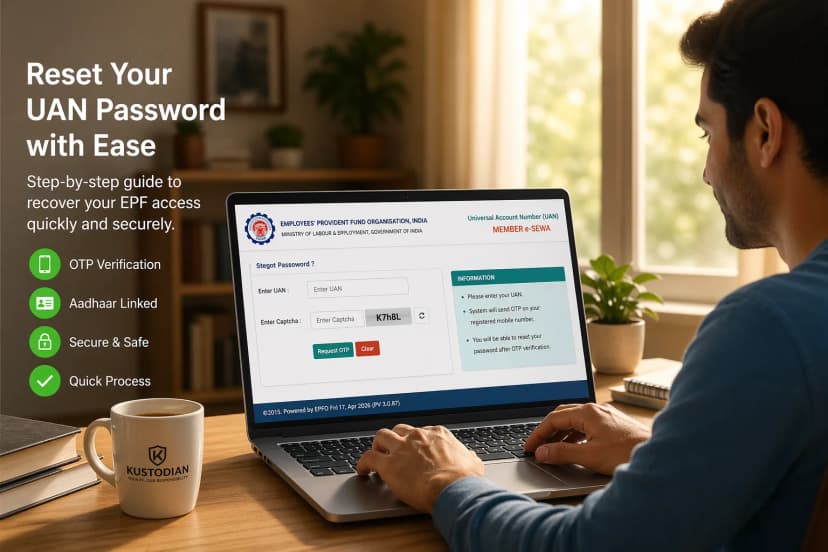
If you are a salaried employee contributing to EPF, keeping your Form 2 EPF nomination updated is essential for safeguarding your family’s financial future. Form 2 EPF is the official nomination form under the EPF scheme that allows you to declare who will receive your Provident Fund balance, Employees’ Pension Scheme (EPS) benefits, and EDLI insurance payout in the event of your unfortunate demise.
Fortunately, the process is now simple and can be completed online through the UAN Member Portal. In this complete 2026 guide, you will understand what Form 2 EPF covers, who must submit or update it, how to complete the e-nomination process step by step, and the key rules you must follow to ensure smooth and timely transfer of benefits to your loved ones.
Read about What is EPF and how does it work?
Contents
- What Is Form 2 for EPFO?
- Why Is Form 2 for EPFO Important for Every Employee?
- Who Must Fill Form 2 EPF?
- Details Required in EPFO Form 2
- EPFO Nomination Rules (As per EPF Scheme, 1952)
- EPFO Nomination Process Step by Step (Offline)
- How to Update Nomination in EPFO Online (e-Nomination Process)
- Documents Required for Form 2 Nomination EPF
- Difference Between Form 2 and e-Nomination
- 7 Situations When You Must Update Form 2 EPF?
- 6 Common Mistakes to Avoid in Form 2 EPF
- Frequently Asked Questions (FAQs)
- Final Thoughts
What Is Form 2 EPFO?
Form 2 EPF is the official nomination form under the EPF scheme that allows employees to declare who will receive their EPF, EPS, and EDLI benefits in case of death. It can be submitted offline or updated online via the UAN portal.
This form covers the nomination for three major EPFO schemes:
- EPF (Employees’ Provident Fund) – Lump sum PF balance
- EPS (Employees’ Pension Scheme) – Monthly pension benefits
- EDLI (Employees’ Deposit Linked Insurance) – Insurance payout to nominees
Filing Form 2 for EPFO ensures that your accumulated savings and insurance benefits are transferred smoothly to the intended beneficiary without unnecessary legal hurdles.
The form is governed under the EPF Scheme, 1952, and is a mandatory compliance requirement at the time of joining an EPF-covered organisation.
Why Form 2 EPF Is Important for Every Employee?
Submitting EPFO Form 2 is not just a procedural formality - it is a legal safeguard for your family.
1. Ensures Smooth Claim Settlement
A valid Form 2 EPF nomination allows the Employees’ Provident Fund Organisation (EPFO) to release PF, pension, and insurance benefits directly to the declared nominee without procedural delays. When nominee details are properly recorded and authenticated, claim processing becomes straightforward because EPFO does not need additional verification of legal heirs. This significantly reduces paperwork and ensures faster financial support to the family during a difficult time.
However, if there are data mismatches, review the common EPF claim rejection reasons and how to fix them before filing.
2. Prevents Legal Disputes
If no nomination is registered under Form 2 EPF, family members may be required to submit succession certificates, indemnity bonds, joint declarations, or even court-issued legal heir certificates. These processes can be time-consuming, costly, and emotionally stressful. A properly updated nomination minimizes the risk of disputes among family members and prevents unnecessary legal complications during claim settlement.
You can read our guide on managing finances after the death of a family member for a broader understanding of documentation and settlement procedures.
3. Faster Withdrawal and Settlement Process
Clear and updated nominee details reduce verification layers during claim processing. When EPFO records match Aadhaar and family declarations, benefits under EPF, EPS, and EDLI can be processed more efficiently. In cases where nomination details are outdated or incomplete, additional scrutiny may delay settlement. Keeping Form 2 EPF updated ensures smoother administrative handling.
4. Mandatory Compliance for New Employees
Submitting Form 2 EPF during onboarding is a standard compliance requirement for employees joining EPF-covered establishments. Employers are required to maintain accurate nomination records as part of statutory obligations under the EPF Scheme. Completing Form 2 EPF at the time of joining ensures that your nomination is officially recorded from the beginning of your employment.
5. Protects Family Financial Security
EPF savings, pension entitlements, and EDLI insurance benefits often form a significant financial cushion for a family in the event of the member’s untimely demise. An updated Form 2 EPF ensures that these accumulated savings and benefits reach the intended nominee without delay, providing essential financial stability during a period of emotional and economic uncertainty.
Failing to update your nomination after major life changes (like marriage, childbirth, or divorce) can create complications for your loved ones.
Who Must Fill Form 2 EPF?
The following individuals are required to submit or update Form 2 EPF to ensure proper nomination under the EPF Scheme:
All new employees joining EPF-registered establishments
Every employee who becomes a member of EPF for the first time must submit Form 2 EPF at the time of joining. This ensures that nomination details are recorded from the beginning of employment. Most HR departments include Form 2 EPF as part of the standard onboarding documentation to comply with statutory requirements.
Employees who have not previously submitted nomination details
If you have been contributing to EPF but have never filed a nomination, it is important to complete Form 2 EPF immediately. Without a registered nominee, claim settlement may require additional legal documentation from family members.
Employees whose marital status has changed
Marriage legally changes your family status under EPF rules. If you were unmarried when you first submitted Form 2 EPF and later got married, your earlier nomination may become invalid. Updating the form ensures compliance with EPF nomination rules and avoids future disputes.
Employees wanting to modify nominee details or percentage allocation
Over time, you may want to revise how benefits are distributed among family members. For example, you may wish to allocate equal shares to children or adjust the percentage assigned to your spouse. Form 2 EPF allows you to modify nominee details and redistribute the percentage share, provided the total equals 100 percent.
Employees whose earlier nominee has expired
If a nominee mentioned in your Form 2 EPF has passed away, the allocation must be updated immediately. Failing to revise nominee details may delay claim processing because EPFO records would no longer reflect a valid beneficiary.
Details Required in Form 2 EPF Nomination
When filling Form 2 for EPFO, you must provide accurate personal and nominee details.
Employee Details:
Provide accurate information exactly as recorded in EPFO records to avoid rejection or claim delays.
Ensure all details match your Aadhaar and UAN database for seamless verification.
- Full Name (as per EPFO records)
- Father’s / Spouse’s name
- Date of Birth
- Gender
- Permanent Address
- UAN number
Nominee Details:
Nominee information determines who will legally receive your PF, pension, and EDLI benefits.
Carefully verify each detail to prevent disputes or settlement complications.
- Full name of nominee
- Relationship with the member
- Date of birth
- Address
- Percentage share allocation
- Guardian details (if nominee is a minor)
Important Rule:
The total percentage allocated among nominees must equal 100%.
For married employees, EPFO nomination rules differ slightly, especially under pension eligibility norms.
EPFO Nomination Rules (As per EPF Scheme, 1952)
If You Have a Family
Under EPF rules, nomination rights are restricted once you legally have a family.
You must nominate only eligible family members as defined under the EPF Scheme.
Under EPF rules, “family” includes:
- Spouse
- Children (including legally adopted children)
- Dependent parents
If you have a legally recognised family, you must nominate only family members. You cannot nominate friends or unrelated individuals.
If You Do Not Have a Family
You may nominate any person. However, once you acquire a family (for example, after marriage), your earlier nomination automatically becomes invalid. You must then update your Form 2 EPF immediately.
Keeping nomination details updated is a legal responsibility of the member.
EPFO Nomination Process Step by Step (Offline)
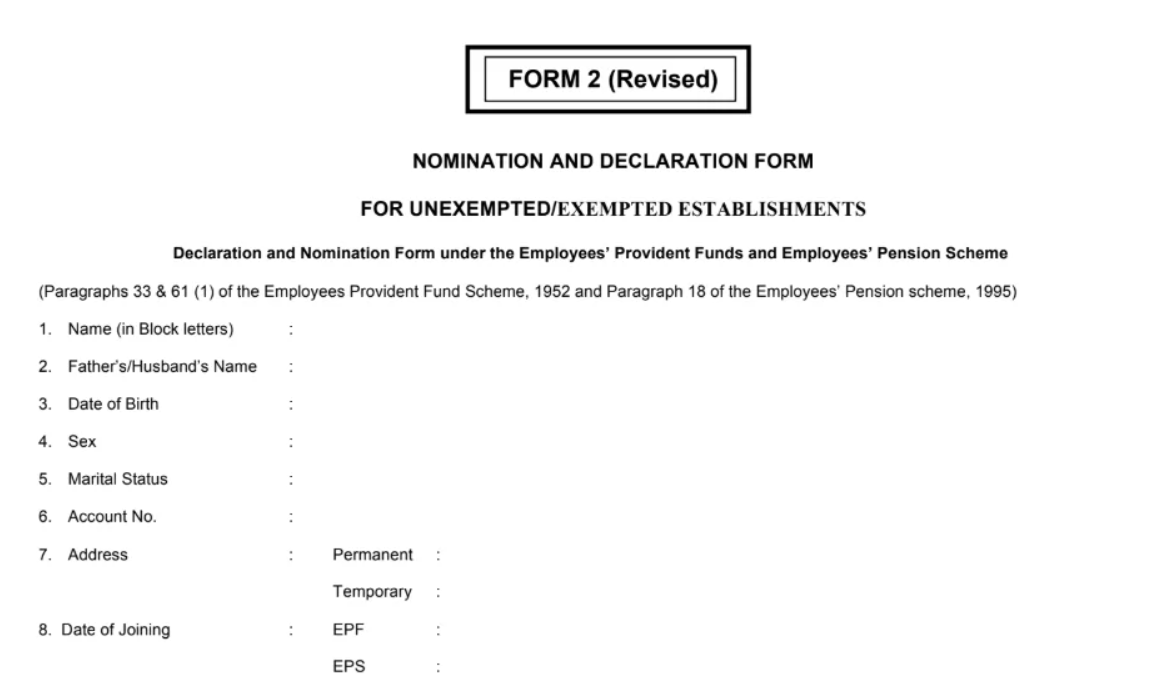
If submitting physically, follow this EPFO nomination process step by step:
- Obtain EPFO Form 2 from your HR department or download it from the official website.
- Fill in your personal details clearly in block letters.
- Enter nominee details and percentage share.
- Sign the declaration.
- Submit the form to your employer.
- Employer verifies and uploads the details to the EPFO records.
Important Tips:
- Ensure nominee names match Aadhaar or official ID
- Avoid overwriting or corrections
- Check that the percentage totals 100%
- Keep a photocopy for your records
Offline submission may take longer due to manual verification.
How to Update Nomination in EPFO Online (e-Nomination Process)
EPFO now provides a fully digital nomination facility through the UAN Member Portal. This is the easiest and fastest way to update details.
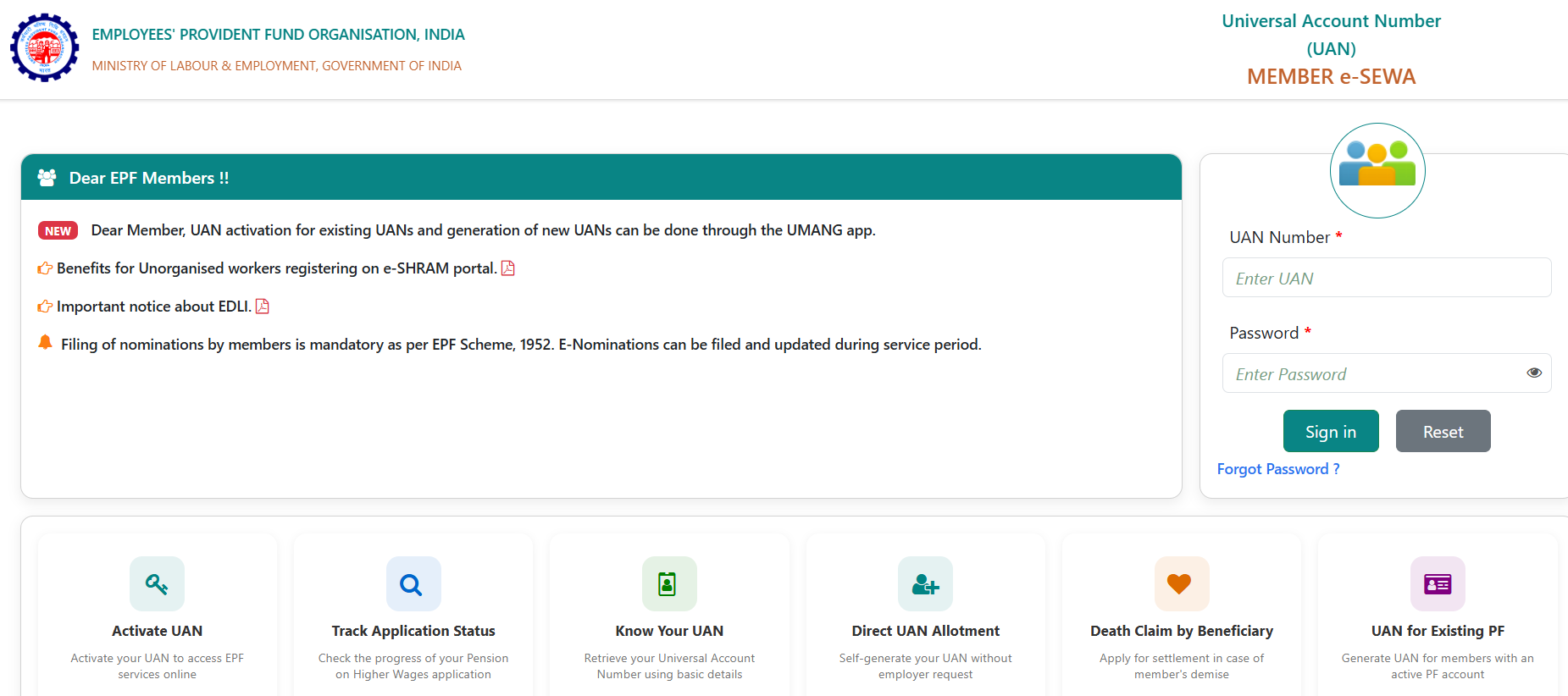
How to Update Nomination in EPFO Online – Step by Step
- Visit the official EPFO Member e-Sewa Portal.
- Log in using UAN and password.
- Click on “Manage” in the top menu.
- Select “E-Nomination”.
- Provide Family Declaration (Yes/No).
- Add family members.
- Enter nominee details.
- Allocate percentage share.
- Save the nomination.
- Authenticate using Aadhaar-based OTP.
Once OTP verification is completed, your Form 2 for EPFO becomes digitally valid.
Benefits of Online Nomination:
- Instant submission
- No paperwork
- Faster claim settlement
- Easy modification anytime
- Direct integration with Aadhaar
Online updates are strongly recommended for all employees.
If your UAN is not active, follow this detailed guide on how to activate UAN online before proceeding.
Documents Required for Form 2 Nomination EPF
For Online Submission:
Generally, no physical documents are required. However, ensure:
- Aadhaar is linked to UAN
- Mobile number linked with Aadhaar is active
- Bank account is verified
- KYC details are updated in the EPFO portal
For Offline Submission:
- Employer verification required
- Signature validation
- Supporting ID proof may be requested
Incorrect KYC details can delay the nomination approval process.
Difference Between Form 2 and e-Nomination
| Feature | Form 2 (Offline) | e-Nomination (Online) |
| Submission Mode | Physical form | Online via UAN |
| Aadhaar Authentication | Not mandatory | Mandatory |
| Processing Speed | Slower | Faster |
| Recommended Today | Less preferred | Strongly recommended |
EPFO encourages digital nomination for faster claim settlements.
7 Situations When You Must Update Form 2 EPF
Updating Form 2 for EPFO is not a one-time compliance requirement. Your nomination should always reflect your current family structure and financial intentions. Any major life event that affects your legal relationships or dependents requires you to revise your Form 2 EPF details. Keeping your Form 2 nomination EPF updated ensures that EPF, EPS, and EDLI benefits are transferred smoothly without disputes or delays.
After Marriage
Marriage changes your legal family status under EPF rules. If you had nominated parents, siblings, or another individual before marriage, that nomination may become invalid once you acquire a legally recognized family. Under EPF regulations, if you have a family, you must nominate one or more family members only. Failing to update Form 2 for EPFO after marriage can create compliance issues and complications during claim settlement. Reviewing and revising your nomination immediately after marriage is strongly recommended.
After Birth or Adoption of a Child
The birth or legal adoption of a child significantly changes your financial responsibilities. Many employees revise their Form 2 EPF to include the child as a nominee or to adjust the percentage share among existing nominees. If the child is a minor, guardian details must be properly entered. Not updating Form 2 nomination EPF after having a child may result in unequal or unintended distribution of benefits during claim settlement.
If a Nominee Passes Away
If a nominee mentioned in your EPFO Form 2 passes away, the percentage allocation associated with that nominee becomes ineffective. You must remove the deceased nominee and reallocate the share among the remaining nominees so that the total equals 100 percent. Delays in updating Form 2 for EPFO in such cases may cause procedural delays at the time of claim processing.
When Changing Allocation Percentage
Over time, your financial priorities may evolve. You may want to increase your spouse’s share, distribute benefits equally among children, or modify allocation based on changing circumstances. The EPFO nomination process, step by step, allows you to update allocation percentages whenever necessary. If your UAN is active, you can easily complete how to update nomination in EPFO online through the member portal.
After Divorce or Legal Separation
Divorce or legal separation is another important reason to revise Form 2 EPF. If your former spouse remains listed as a nominee, it could create legal complications in the future. Updating your Form 2 nomination EPF ensures that your benefits reflect your current legal and financial intentions.
After Acquiring a Family
If you nominated someone while unmarried and later get married, your earlier nomination may automatically become invalid under EPF rules. In such cases, updating Form 2 for EPFO becomes mandatory. This is especially important for employees who completed Form 2 for EPFO for new employee onboarding while single and have since experienced changes in marital status.
Importance of Periodic Review
Even without major life events, it is wise to review your Form 2 EPF periodically. Regular review ensures legal clarity, prevents disputes among family members, and speeds up settlement in unforeseen circumstances. Treating Form 2 for EPFO as a critical financial document rather than a routine HR form helps safeguard your family’s future.
Read about the 5 mistakes to avoid for Estate Planning
6 Common Form 2 EPF Mistakes That Delay Claim Settlement
While filling or updating Form 2 for EPFO, certain errors can delay claim settlement or make the nomination invalid. Understanding these common mistakes helps maintain compliance and ensures smoother processing.
Not Updating After Marriage
One of the most frequent mistakes is failing to revise Form 2 EPF after marriage. Once you acquire a legally recognized family, EPF rules require nomination to be restricted to family members. Continuing with an outdated nomination may result in complications during claim processing.
Incorrect Percentage Allocation
The total share allocated among nominees must equal exactly 100 percent. Allocating more or less than 100 percent can result in rejection or processing delays. Whenever you modify your Form 2 nomination EPF, ensure the final distribution is accurate.
Nominating Non-Family Members Despite Having a Family
Under EPF rules, if you have a family, you cannot nominate unrelated individuals. Some employees overlook this requirement while updating Form 2 for EPFO. Ensuring that your nomination complies with legal definitions of family is essential.
Missing Guardian Details for Minor Nominees
If a nominee is under 18 years of age, guardian details must be provided clearly. Omitting this information can delay settlement because EPFO may require additional verification before releasing funds.
Incomplete Aadhaar Authentication in E-Nomination
When choosing how to update your nomination in EPFO online, Aadhaar-based OTP authentication is mandatory. If Aadhaar is not linked to UAN or the registered mobile number is inactive, the e-nomination remains incomplete. Without final authentication, the Form 2 for EPFO submission is not legally valid.
If Aadhaar is not linked, follow this guide on how to link Aadhaar with UAN before completing e-nomination.
Not Reviewing Nomination After Initial Submission
Many employees submit Form 2 for EPFO for new employee onboarding and never revisit it. However, life circumstances change over time. Periodic review of Form 2 EPF ensures that EPF savings, pension benefits, and EDLI coverage are distributed according to your latest intentions.
Frequently Asked Questions (FAQs)
Is Form 2 EPF mandatory?
Yes, Form 2 EPF is mandatory for every EPF member.
Form 2 serves as your official nomination under the Employees’ Provident Fund (EPF), Employees’ Pension Scheme (EPS), and Employees’ Deposit Linked Insurance (EDLI). It legally declares who will receive your accumulated PF balance, pension benefits, and insurance amount in the event of your death.
Without a valid nomination, your family may face delays in claim settlement because the EPFO will require additional legal documents such as:
- Legal heir certificate
- Succession certificate
- Indemnity bond
- Joint declaration from heirs
Submitting and updating Form 2 ensures smooth, dispute-free, and faster settlement of benefits.
Can I update Form 2 EPF online?
Yes, Form 2 EPF can be updated online through the UAN Member Portal.
Steps to update:
- Log in to the UAN Member Portal.
- Go to Manage → Select E-Nomination.
- Enter nominee details and allocate percentage share.
- Authenticate using Aadhaar-based OTP verification.
Once successfully submitted and e-signed, your nomination is digitally recorded with EPFO. There is no need to submit a physical form if completed online.
Make sure your Aadhaar is linked and verified with your UAN before starting the process.
Do I need to update Form 2 EPF after marriage?
Yes, updating Form 2 EPF after marriage is compulsory under EPF rules.
Under the EPF Scheme, once you acquire a “family” (which includes spouse and children), you can nominate only family members. If you had previously nominated someone else (such as parents or siblings when unmarried), that nomination may become invalid after marriage.
Failure to update nomination after marriage can lead to:
- Claim disputes between spouse and parents
- Delayed PF settlement
- Legal verification process
Therefore, members must immediately update nomination details whenever marital status changes.
What happens if Form 2 EPF is not submitted?
If Form 2 EPF is not submitted, claim settlement becomes legally complex.
In the absence of a valid nomination:
- EPFO will not directly release funds to any individual.
- Legal heir documentation will be required.
- In some cases, a succession certificate from a court may be necessary.
This process can take months and may involve legal expenses. Additionally, if multiple heirs claim the amount, disputes may further delay settlement.
In short, not submitting Form 2 does not mean benefits are lost but it significantly increases procedural hurdles and delays for your family during an already difficult time.
Final Thoughts
Form 2 for EPFO is a critical compliance step that protects your family’s financial future. Whether you are a new employee or someone who hasn’t updated their EPF nomination in years, completing or updating your EPF nomination should be a priority.
With the digital e-nomination facility provided by the Employees’ Provident Fund Organisation (India), the process is now faster, paperless, and more secure.
Keeping your nomination updated is not just compliance - it is responsible financial planning.
Secure Your EPF Nomination & Family Protection with Kustodian.life
Submitting and updating Form 2 EPF is not just a compliance requirement it is a critical step in protecting your family’s financial future. Many employees overlook nomination updates after marriage, job changes, or family status updates, which can later lead to claim disputes and unnecessary legal delays.
With EPFO processes becoming increasingly digital from UAN activation to e-nomination authentication even small errors in nominee details, Aadhaar linking, or percentage allocation can create complications during claim settlement.
That’s where Kustodian.life steps in.
We help individuals and families:
- Update and verify EPF nominations correctly
- Resolve UAN activation or duplication issues
- Fix Aadhaar–UAN linking problems
- Handle rejected EPF claims and documentation gaps
- Ensure smooth PF, EPS, and EDLI settlement for families
Our approach combines compliance expertise with empathy because financial legacy planning is not just paperwork, it’s protection.
Disclaimer: This article is for informational purposes only and does not constitute legal or financial advice. Rules may vary based on individual records and EPFO processing.
![Why E-Khata Applications Get Rejected in Bangalore (And How to Fix Them) [2026]](/_next/image?url=https%3A%2F%2Fwebsite-assets-wix.s3.ap-south-1.amazonaws.com%2Fimages%2Fposts%2F3031ceb9f0274289aad5c5f140be716f.webp&w=828&q=75)