
The Employees’ Provident Fund (EPF) is more than just a monthly deduction on a payslip; for millions of Indian professionals, it is the primary vehicle for long-term financial security. However, the transition from "accumulating" to "withdrawing" is often met with a frustrating digital roadblock: the "PF Claim Pending With Employer" status.
In an era where the EPFO has moved toward UAN-based automation, many members assume that the process is entirely hands-off. In reality, the employer still acts as the primary gatekeeper. This guide serves as a comprehensive manual for employees to navigate employer delays, escalate through official channels, and ensure their hard-earned corpus is settled without unnecessary friction.
Table of Contents
- Why PF Claims Get Stuck With Employer Approval
- How Long Should Employer Approval Take
- Quick Resolution Table
- 4 Common Reasons Employers Delay PF Claims
- What Employees Should Do If the PF Claim Is Stuck
- How to Escalate a PF Claim with EPFO
- What to Do When the Employer Is Not Responding
- When Professional Claim Resolution Is Required
- FAQ: PF Claim Pending With Employer
- Useful Links and Resources
- Conclusion
1. Why PF Claims Get Stuck With Employer Approval
To resolve a delay, one must first understand the mechanics of the Unified Portal. When you submit a claim through the Member Interface, it does not go directly to the EPFO Field Office. Instead, it enters the Employer’s Digital Inbox. The employer is then required to digitally verify the claim using a Digital Signature Certificate (DSC) or an e-KYC approval.
A status of pf claim pending with the employer typically persists due to the following administrative or technical friction points:
- Expired Digital Signature (DSC): This is the most common technical reason for a pf claim stuck at employer approval. Every organisation has an authorised signatory whose digital key must be renewed periodically. If the HR department’s digital key expires, their dashboard physically cannot "push" your claim to the EPFO for final processing.
- Unverified Bank KYC: The employer must "digitally approve" your specific bank KYC entry before a withdrawal claim can be processed against it. If you recently updated your bank details on the UAN portal, the employer must authorise the KYC first. Until that happens, the pf claim pending employer approval status will remain unchanged.
- Internal Clearance Cycles: Many large corporations and establishments do not process PF requests daily. They often have internal "bulk approval" cycles on specific days of the week or month. This can lead to a temporary but frustrating status of pf claim pending employer approval, even if all your documentation is perfectly in order.
- Missing Service History Verification: If you have multiple previous Member IDs that haven't been merged, the current employer may delay approval to verify your total years of service, ensuring they are not liable for any discrepancies in your contribution history.
Technical errors aren't the only hurdle. If your claim is failing due to overlapping service dates, read our deep dive on fixing EPF Date Overlap problems to get your timeline back on track.
2. How Long Should Employer Approval Take
In a standard digital workflow, the timeline for an EPF claim pending employer approval is relatively short. Legally and operationally, an employer is expected to review and authorise the request within 3 to 7 working days.
The digital ecosystem of the Unified Portal is built for efficiency. Once the employer uses their Digital Signature Certificate (DSC) to click "Approve," the status on your dashboard will immediately transition from pf claim pending with employer to "Pending at Field Office." From this stage, the responsibility shifts to the EPFO, which typically takes an additional 7–15 days to process the final settlement.
If you notice that your pf claim pending employer approval status has remained unchanged for more than 10 days, it is a clear sign of an administrative bottleneck or a technical lapse at the company level. At this point, the delay is no longer part of the standard processing time and requires a proactive follow-up with your HR or Finance department.
PF Claim Pending With Employer – Quick Resolution Table (2026)
| Situationis | Possible Reason | What You Should Do | Expected Resolution Time |
| The PF claim is pending with the employer for a few days. | Normal internal approval process | Wait for employer approval through the EPFO Unified Portal. | 3–7 working days |
| PF claim stuck due to an expired Digital Signature (DSC) | Employer’s authorised signatory DSC has expired. | Contact HR or the payroll team and request DSC renewal and claim approval. | 2–5 days after renewal |
| PF claim pending due to the bank's KYC not being approved | The employer has not digitally approved your bank KYC. | Check KYC status in the UAN portal and request employer approval. | 1–3 days |
| PF claim stuck because the Date of Exit (DOE) is missing. | The employer did not update the exit date in the EPFO records. | Mark exits yourself on the UAN portal after 60 days of unemployment. | 1–2 days |
| PF claim pending due to a personal detail mismatch | Name, DOB, or father’s name mismatch between Aadhaar and UAN | Correct details through the Joint Declaration or update Aadhaar-linked data | 5–15 days |
| PF claim stuck because the employer's signatory is unavailable. | The designated PF approver is on leave or has left the company. | Escalate through HR or the payroll manager. | 3–7 days |
| Employer not responding to PF claim request. | Administrative negligence or company closure | File a complaint on the EPFO grievance portal (EPFiGMS) | 7–15 days |
| Company shut down or unreachable. | The employer cannot digitally approve the claim. | Submit the Composite Claim Form with the bank manager's attestation. | 15–30 days |
| PF claim still pending after escalation. | Internal compliance delay or document verification | Contact the Regional PF Commissioner (RPFC) through grievance escalation. | 15–30 days |
3. 4 Common Reasons Employers Delay PF Claims
While the digital interface is designed for speed, several administrative hurdles can lead to a pf claim pending with the employer. Understanding these specific friction points is the first step toward resolving the delay.
- Authorised Signatory Absence: Every organisation has a designated person registered with the EPFO whose Digital Signature Certificate (DSC) is required for approvals. If this individual is on leave, has resigned, or if the company has changed leadership without updating the authorised signatory on the portal, claims will inevitably pile up.
- Incorrect Date of Exit: One of the most frequent triggers for a pf claim pending employer approval is a missing or inaccurate Date of Exit (DOE). If your record shows you are still an active employee while you are filing for a final settlement, the system flags the request for manual verification, causing a significant standstill.
- System Mismatches: Slight discrepancies between your UAN data and the company’s internal payroll records, such as a minor spelling error in a name or an inconsistent father's name, can cause an employer not to approve of claim requests. In these cases, the employer often halts the process until manual corrections are filed and approved by the PF office.
- Technical DSC Failures: Sometimes, the delay isn't intentional but technical. If the employer’s digital signature has expired or if there is a Java-related compatibility issue on their portal, they may be physically unable to approve the pf claim stuck in employer approval, despite their best intentions.
4. Steps Employees Should Take If the Claim Is Stuck
If you find yourself wondering what to do if a pf claim is pending with the employer, you must shift from a passive waiting game to an active resolution strategy. Most delays are not due to malice but administrative oversight. Following a structured escalation matrix ensures that your request moves from a "stuck" inbox to a processed payment.
4.1. Establish a Formal Communication Trail
The first step is always internal. Do not rely on verbal assurances or casual chats with the HR desk. Send a formal email to your HR and Finance departments. Use a clear subject line like: “Urgent: Follow-up on PF Claim Pending Employer Approval - [Your Name] - [UAN].” In the body of the email, include:
- Your UAN (Universal Account Number).
- The Claim ID generated by the portal.
- The specific date you initiated the withdrawal.
- A request for an update on the status of the company’s Digital Signature Certificate (DSC).
This email serves as vital evidence if you later need to escalate the matter to the EPFO, as it proves you attempted to resolve the PF claim pending with the employer internally first.
4.2. Self-Updating the Date of Exit (DOE)
A common reason for a pf claim pending employer approval is a missing "Date of Exit" in the system. Historically, only employers could update this, but the rules have changed. If you have left the organisation, you can now mark your own exit date after 60 days of unemployment via the Member Portal.
- Navigate to the "Manage" tab.
- Select "Mark Exit."
- Follow the Aadhaar-based OTP verification to update your last working day.
Once the DOE is updated, the system recognises you as a retired or former employee, which often clears the digital path for final settlements that were otherwise stuck.
4.3. Check for Pending KYC Approvals
Sometimes, the claim itself isn't the problem; the foundation is. Navigate to the "KYC" section under the "Manage" tab. Ensure that your Bank Account, Aadhaar, and PAN are not just "Seeded" but also "Digitally Approved by Employer." A pf claim stuck employer approval is frequently the result of a "Pending KYC" status.
If you changed your bank details just before filing the claim, the employer must approve the new bank KYC using their digital signature before they can even see the withdrawal request. Confirming that your KYC is "Approved" removes the most common technical barrier to your funds.
Note: Managing your portal access is the first step to independence. If you are having trouble logging in or resetting your credentials, follow our EPF Portal Login 2026 Guide for quick fixes.
5. How To Escalate a PF Claim With EPFO
When internal follow-ups yield no results and your pf claim, pending with the employer, remains stuck, it is time to leverage the official regulatory channels. The EPFO provides a robust platform specifically designed to handle such administrative delays: the EPFiGMS (EPF i-Grievance Management System).
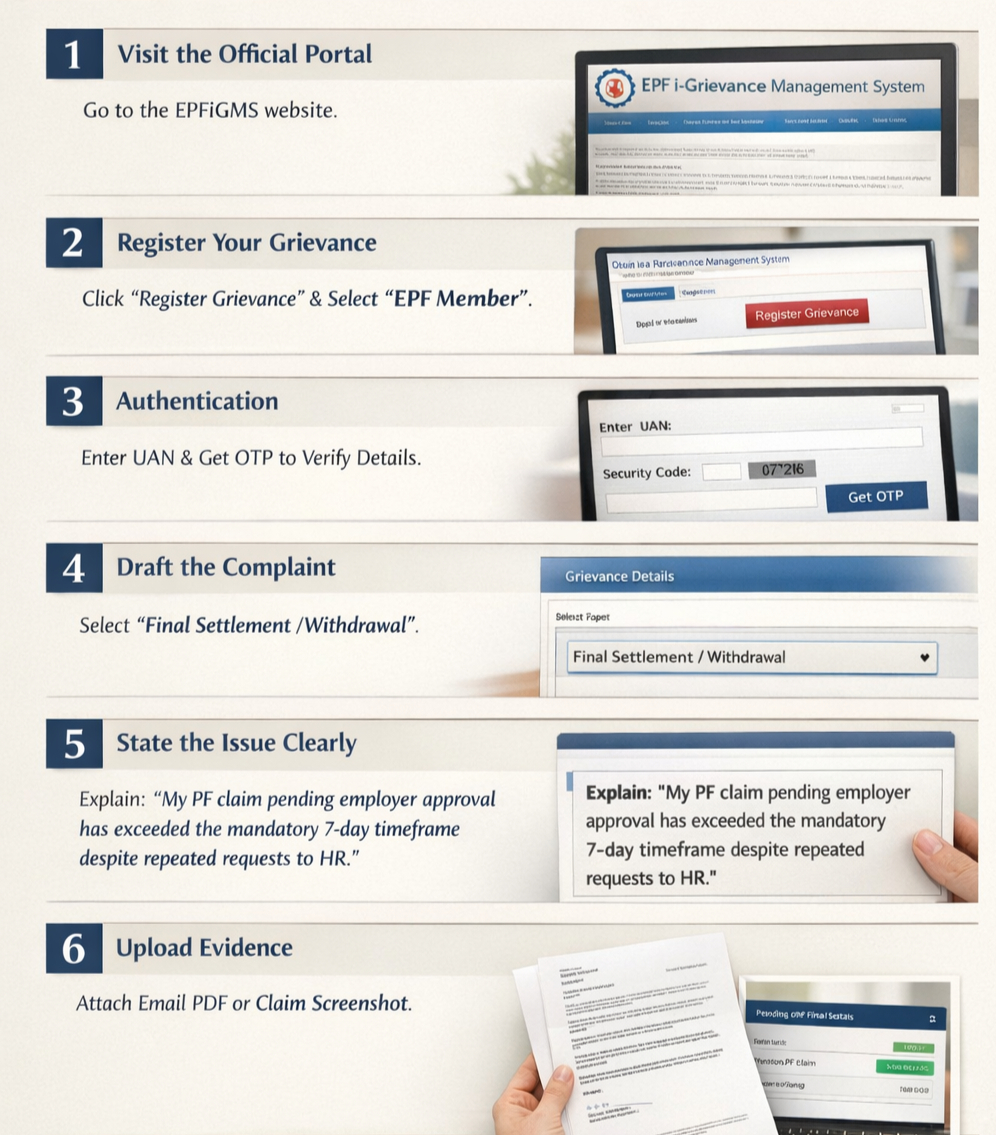
Lodge a formal complaint by following these steps:
- Visit the Official Portal: Navigate to the EPFiGMS website.
- Register Your Grievance: Click on "Register Grievance" and select your status as an 'EPF Member'.
- Authentication: Enter your UAN and the security code. Click "Get Details" and then "Get OTP." Once verified, select the specific Member ID associated with the pending claim.
- Draft the Complaint: Under the "Grievance Details" section, choose the category related to "Final Settlement/Withdrawal."
- State the Issue Clearly: In the description, explicitly state that your pf claim pending employer approval has exceeded the mandatory 7-day timeframe despite your repeated requests to the company's HR department.
- Upload Evidence: Attach a PDF of your email communication with your employer or a screenshot of your current claim status to strengthen your case.
Once submitted, the EPFO generates a unique grievance registration number. The system then issues an automated notice to the employer. In most cases, the fear of an official EPFO audit or a negative compliance rating prompts the employer to resolve the PF claim that is stuck with employer approval almost immediately.
Before you file a grievance, ensure you are using the correct forms for your specific situation. Review our EPFO Forms 2026 Master Guide to distinguish between Form 19, 10C, and 31.
6. When Employer Is Not Responding
In extreme scenarios where an employer not responding to PF withdrawal requests is due to the company shutting down, becoming insolvent, or being intentionally uncooperative, you are not entirely at the mercy of the organisation. The EPFO provides specific alternative routes to ensure your money is not lost.
- Non-Aadhaar-Based Claims & Bank Attestation: If the digital route is blocked because the employer is unreachable, you can opt for the offline method. Download the Composite Claim Form and get it physically attested by a Bank Manager (from the bank where you maintain your KYC-linked account), a Gazetted Officer, or a Magistrate. This attestation serves as a substitute for the employer's digital signature, allowing you to bypass the pending pf claim with the employer status.
- Escalation to the Regional PF Commissioner (RPFC): You have the right to write a formal letter to the RPFC of the zone where your establishment was registered. Explain clearly that the employer's not approving of the claim is due to the company being defunct or unresponsive. The Commissioner has the legal authority to authorise settlements based on Aadhaar-linked verification and your service records without the employer's direct intervention.
7. When Professional Claim Resolution Is Required
Navigating the intersection of complex HR policies and rigid EPFO regulations can quickly turn into a bureaucratic nightmare. A simple PF claim stuck employer approval can balloon into months of delay if there are underlying UAN mismatches, legacy data errors, or if you are dealing with a defunct establishment where the records are hard to trace.
If you are an NRI, a high-net-worth professional with multiple Member IDs, or an employee of a company that has closed its doors, a DIY approach may not be enough. Professional advice can save you from repetitive rejections and months of frustration.
At Kustodian Life, we specialise in these high-friction cases. We act as your strategic partner to bridge the gap between your digital record and the physical approval required for your funds. We ensure your documentation is "error-proof" and help you navigate the grievance and commissioner-level escalations needed to turn a "pending" status into a "settled" one.
8. FAQ: PF Claim Pending with Employer
Navigating the final stages of a withdrawal often brings up specific technical questions. Below are the most common queries regarding a pf claim pending with the employer and how the new 2026 regulations affect your settlement.
8.1. How many days can an employer legally keep a PF claim pending?
While there is no fixed "penalty" for a short delay, the EPFO 3.0 guidelines and 2026 service standards expect employers to act on requests within 3 to 7 working days.
Under the latest digital transformation, the average total settlement time (from application to bank credit) has dropped to approximately 8 to 10 days for KYC-compliant members. If your status has been pf claim pending employer approval for more than 15 days, it is no longer a standard delay and should be reported via the EPFiGMS grievance portal.
8.2. Can an employer reject my PF claim?
Yes, an employer can reject a claim, but only for specific, valid reasons. The most common causes for a pf claim rejection in 2026 include:
- Mismatch in Personal Details: Discrepancies in your name, father’s name, or Date of Birth between Aadhaar and the UAN portal.
- Incorrect Bank KYC: Providing a joint account (not with a spouse) or a defunct IFSC code following a bank merger.
- Missing Date of Exit: Attempting a final settlement (Form 19) while the system still lists you as an active employee.
- Incomplete Service History: If you haven't merged your previous Member IDs, the employer may reject the claim to avoid incorrect contribution calculations.
8.3. What if the company has closed down and my claim is stuck?
If your former establishment is defunct or the employer is not responding to PF withdrawal requests, you can bypass the digital signature requirement. You must submit a physical Composite Claim Form (Aadhaar-based) to the Regional PF Office.
To make this valid without an employer's seal, you must get the form attested by an authorised official.
In 2026, the most effective route is attestation by your Bank Manager (at the branch where your UAN-linked account is held). Alternatively, you can seek attestation from a Gazetted Officer or the Regional PF Commissioner (RPFC) directly, who can authorise the payment based on your Aadhaar-linked verification.
8.4. Does the new 2026 "Auto-Settlement" apply to me?
If your UAN is fully e-KYC compliant and your claim is for a small advance or specific "Special Circumstances," it may qualify for EPFO Auto-Settlement. This bypasses the pf claim pending with employer status entirely, processing the funds within 72 hours. However, for final settlements (Form 19 and 10C), employer verification remains a mandatory security layer.
Understanding why one form gets approved while another is rejected is critical. Learn more about the differences in EPF Form 19 vs Form 10C to avoid partial settlement errors.
Useful Links & Official Resources
EPFO Official Portals
- UAN Member Portal (File claims, update KYC, mark exit):https://unifiedportal-mem.epfindia.gov.in/memberinterface/
- EPFO Main Website:https://www.epfindia.gov.in/
- EPF i-Grievance Management System (EPFiGMS):https://epfigms.gov.in/
- UMANG App (Government service portal for PF services):https://umang.gov.in/
Helpful EPFO Member Services
You can also use these official services to track or verify your PF details:
- EPF Passbook Portal:https://passbook.epfindia.gov.in/
- Check PF Balance via Missed Call: Dial 9966044425 from your registered mobile number.
- Check PF Balance via SMS: Send EPFOHO UAN ENG to 7738299899.
EPF Claim Forms (Official Downloads)
These are the official documents used for EPF withdrawals and settlements.
- Form 19 – Used for final EPF settlement after leaving employment. Download: https://www.epfindia.gov.in/site_docs/PDFs/Downloads_PDFs/Form19.pdf
- Form 10C – Used for EPS withdrawal benefit or obtaining a Scheme Certificate if your service period is below the pension eligibility limit. Download: https://www.epfindia.gov.in/site_docs/PDFs/Downloads_PDFs/Form10C.pdf
- Form 31 – Used for partial PF withdrawals (advances) such as medical emergencies, housing needs, education, or marriage expenses. Download: https://www.epfindia.gov.in/site_docs/PDFs/Downloads_PDFs/Form31.pdf
- Composite Claim Form (Aadhaar) – Used for offline PF withdrawal without employer approval when your UAN is Aadhaar-verified.Download: https://www.epfindia.gov.in/site_docs/PDFs/Downloads_PDFs/Composite_Claim_Form_Aadhar.pdf
- Composite Claim Form (Non-Aadhaar) – Used for offline withdrawal when Aadhaar is not linked, and it requires employer attestation. Download: https://www.epfindia.gov.in/site_docs/PDFs/Downloads_PDFs/Composite_Claim_Form_NonAadhar.pdf
9. Conclusion
A status of pf claim pending with the employer is a common administrative hurdle, but in the modern digital landscape of 2026, it is entirely fixable. By maintaining a clear paper trail, verifying your e-KYC compliance, and utilising the EPFiGMS grievance portal, you can ensure your retirement funds are not held hostage by bureaucratic delays.
The EPFO 3.0 reforms have empowered employees more than ever. Whether it is through self-updating your Date of Exit or leveraging "Auto-Settlement" for compliant accounts, the system is designed to favour the member. Remember, your EPF is your hard-earned right, and the employer is legally obligated to facilitate its withdrawal within the prescribed timelines.
At Kustodian Life, we believe that financial independence begins with having full control over your assets. If your claim remains stuck despite your best efforts, or if you are dealing with a complex NRI withdrawal, professional intervention can bridge the gap. We specialise in navigating these regulatory shifts so that your transition into the next phase of life is smooth and secure.
Disclaimer: While every effort has been made to ensure accuracy, EPF rules and regulations are subject to change. Please refer to official EPFO circulars for the latest updates.


