Struggling to understand your EPF passbook? You’re not alone. Most people can access their passbook, but very few actually understand what the numbers mean—and that’s where costly mistakes happen. This guide focuses on one thing: understanding what your EPF passbook actually means.
So you know:
- What each column actually means
- How much of your balance is truly withdrawable
- Where hidden errors can reduce your savings
Quick Answer: How to Read EPF Passbook
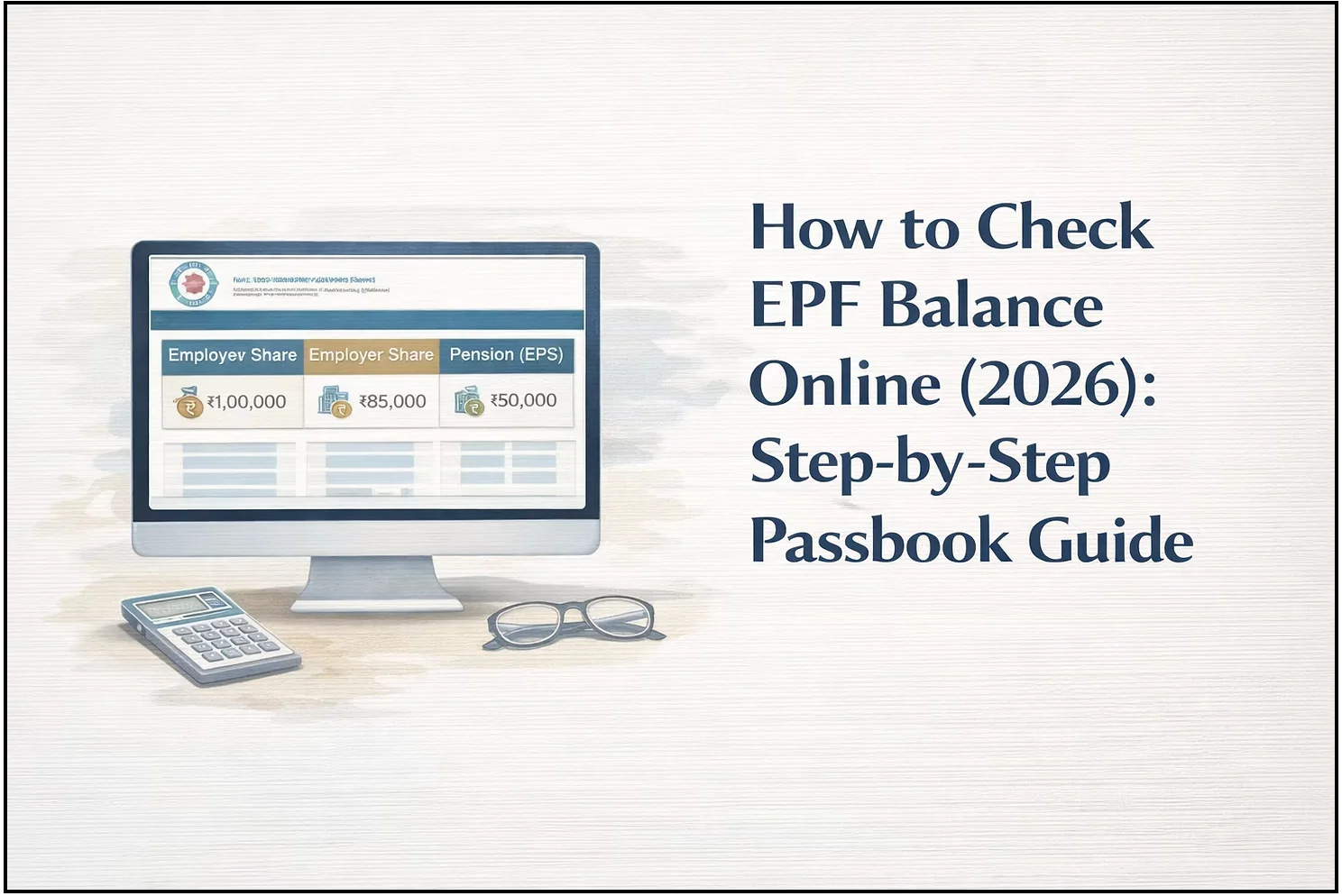
- Employee Share → Your contribution (fully withdrawable)
- Employer Share → Split between EPF + pension
- Pension (EPS) → Locked if service > 10 years
- Total Balance ≠ Withdrawable Amount
Looking to Check Your EPF Balance Quickly?
If you just want to check your PF balance or download your passbook, refer to the dedicated guide:
Stay here if you want to understand what your passbook actually means and how much you can withdraw.
1. What Is an EPF Passbook?
The EPF passbook is your official contribution statement maintained by the Employees' Provident Fund Organisation.
It is generated based on employer-filed Electronic Challan-cum-Returns (ECR) and reflects:
- Monthly contributions
- Employer deposits
- Interest credited
Bottom line: This is the most reliable record of your PF savings—but it is not real-time.
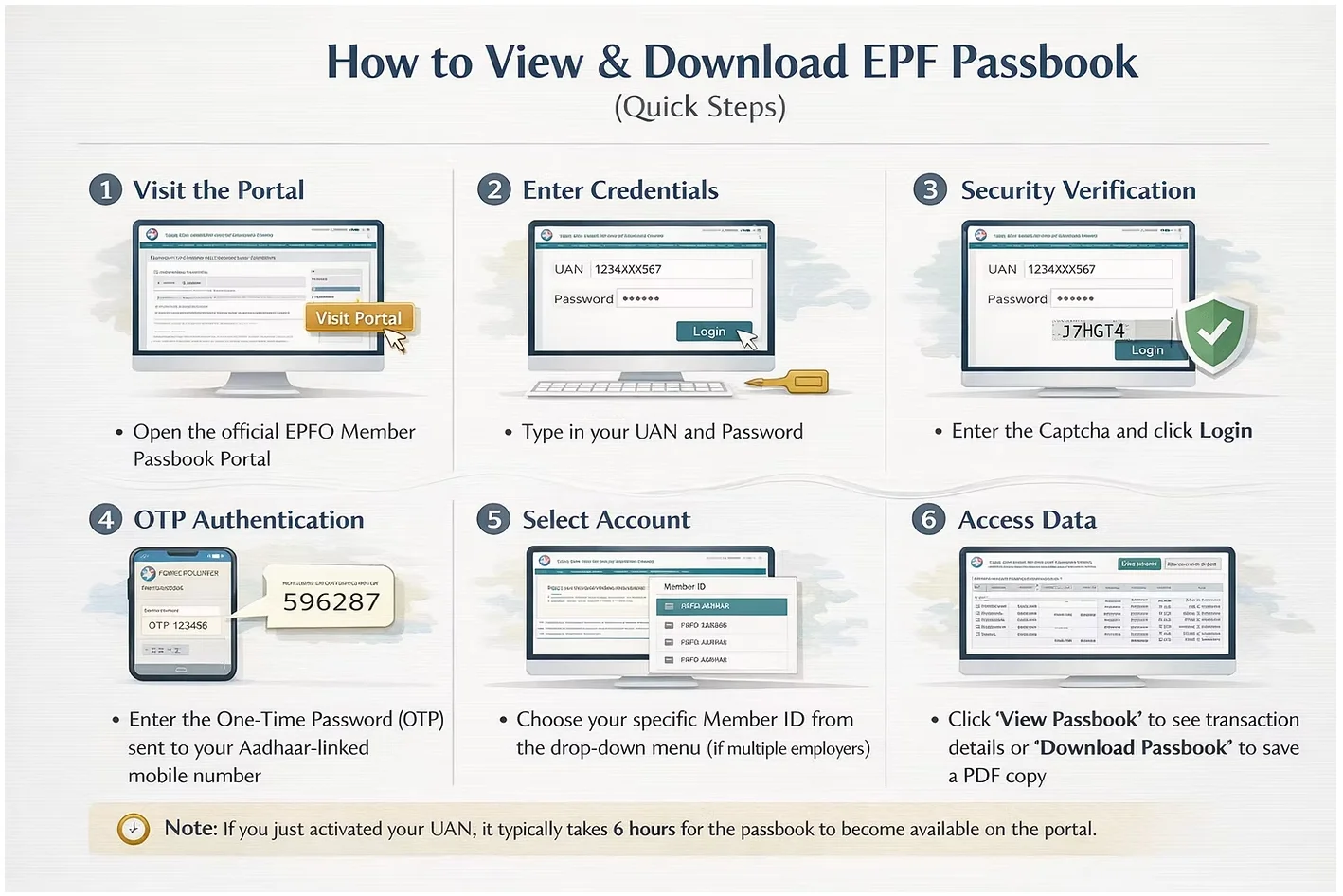
2. How to Access Your EPF Passbook (Quick Overview)
You can view or download your EPF passbook through the official portal of the Employees' Provident Fund Organisation using your UAN and OTP verification.
However, accessing the passbook is only the first step.
👉 If you need step-by-step instructions to:
- Check your EPF balance
- Download your passbook PDF
- Resolve login or OTP issues
Refer to our detailed guide → EPF Balance Check Guide
3. How to Read Your EPF Passbook (Columns Explained)
Your EPF passbook is divided into components. Understanding this structure is critical.
1. Employee Contribution (Your Money)
- ~12% of your salary
- Direct monthly deduction
✅ Meaning: Your core savings
✅ Withdrawable: Yes (subject to rules)
4. Employer Contribution (Split Structure)
Your employer contribution is divided into:
- ~3.67% → EPF
- ~8.33% → Pension (EPS)
👉 Most users assume this is fully liquid—it is not in all cases.
5. Pension (EPS) – The Critical Component
- Allocated to pension, not your PF balance
- Governed under EPF/EPS scheme rules
⚠️ Key rule:
- < 10 years service → Withdrawable
- ≥ 10 years service → Locked till retirement (age 58)
👉 This is why your visible balance can be misleading.
| Column | Contribution | Allocation | Withdrawable |
|---|---|---|---|
| Employee Share | You (~12%) | EPF | Yes (100%) |
| Employer Share | Employer (~3.67%) | EPF | Yes |
| Pension (EPS) | Employer (~8.33%) | Pension Fund | Conditional |
The "Pension Gap" Warning:
Notice that the Pension (EPS) column often looks smaller than your Employer Share for high-salaried individuals. This is because the pension contribution is legally capped at a wage of ₹15,000.
“EPS contributions are currently capped at a ₹15,000 wage ceiling. Any future revisions by EPFO may change this structure.”
"Notice a gap in your pension (EPS) wages or an incorrect 'Date of Joining' in your passbook? These are not minor bugs; they can reduce your lifetime pension. Learn how to file a Joint Declaration for EPS Corrections to protect your future income."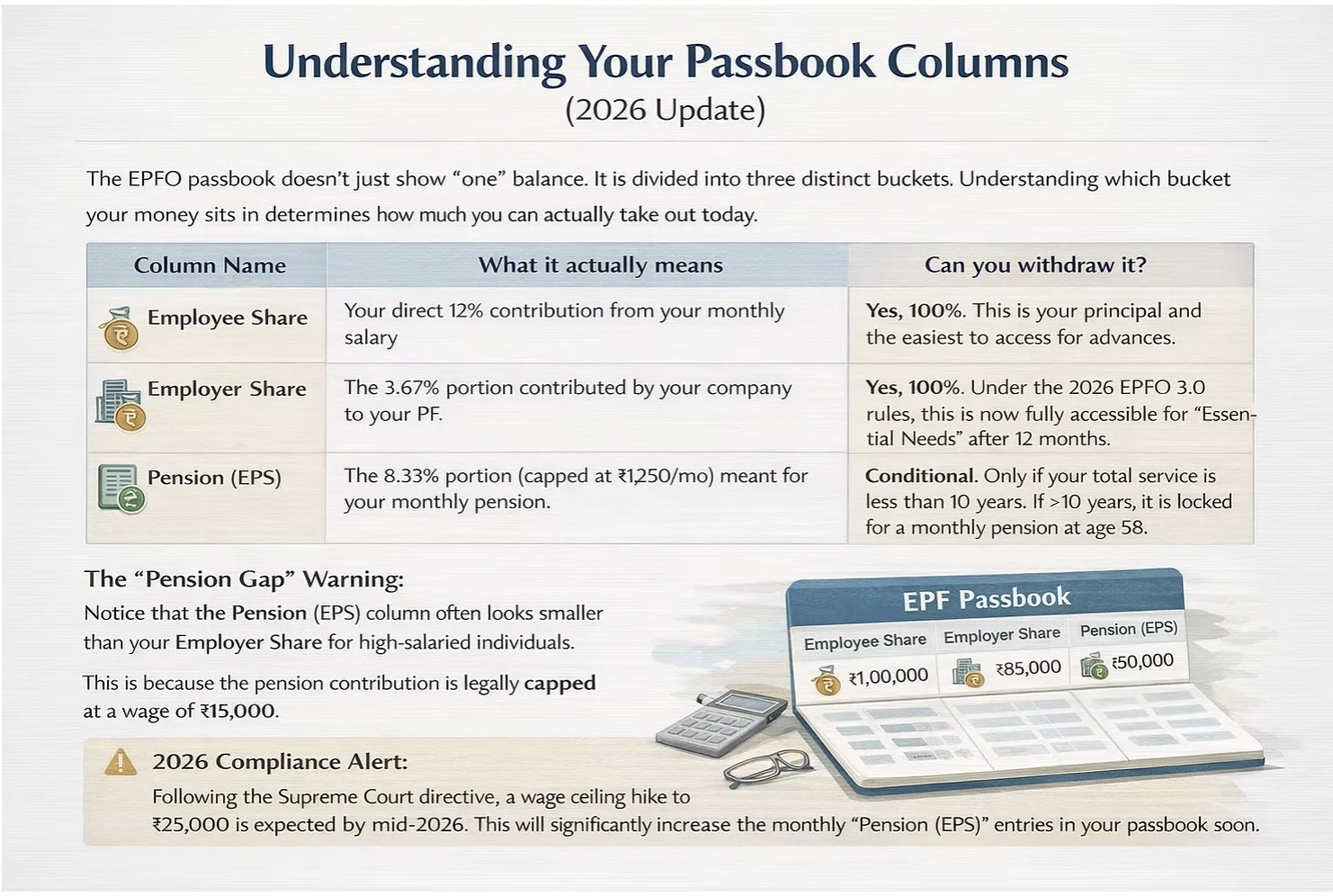
Key Terms Explained
- UAN (Universal Account Number): A unique ID that links all your PF accounts across employers
- Member ID: Employer-specific PF account under your UAN
- ECR (Electronic Challan-cum-Return): Monthly contribution report filed by your employer
- EPS (Employee Pension Scheme): Pension component of employer contribution
4. Why Your EPF Passbook Balance May Look “Wrong.”
Is Your EPF Actually Missing or Just Delayed?
If your EPF passbook doesn’t match expectations, it usually comes down to timing, system structure, or account changes—not missing money.
Here’s how to diagnose it properly:
1. Employer Filing Delay (Most Common Cause)
Your employer does not update your passbook in real-time.
They first file monthly data through the Electronic Challan-cum-Return (ECR) system, after which it reflects in your passbook.
⏱ Typical delay: 15–45 days
👉 If your latest month is missing, this is usually the reason—not an issue.
2. Passbook Is ECR-Based, Not Salary-Based
Your passbook reflects what your employer reports, not what is deducted from your salary immediately.
This means:
- Your salary slip may show PF deduction
- But passbook updates only after ECR filing + processing
👉 Mismatch between salary slip and passbook is normal (short-term)
3. Interest Is Not Updated Monthly
EPF interest:
- Is calculated monthly
- But credited once a year (usually after the financial year close)
👉 So your balance may suddenly jump once interest is added
Until then, it may look “lower than expected.”
4. New Job or Recent Switch
If you’ve recently changed jobs:
- The new Member ID may not reflect immediately
- Employer onboarding + ECR filing takes time
⏱ Typical lag: 2–3 months
👉 During this period, your passbook may look incomplete
5. Multiple Member IDs (Hidden Fragmentation)
If you’ve worked at multiple companies:
- Your PF is split across different Member IDs
- Passbook shows them separately
👉 Your “total PF” may be higher than what you see in one entry
6. When It’s Actually a Problem (Don’t Ignore These)
You should investigate further if:
- No contribution for 2+ months despite salary deduction
- The employer share is consistently missing
- EPS contribution is incorrect or zero
- Personal details are wrong
👉 These are not delays—they are fixable errors
Quick Diagnostic Summary
- Missing last month → likely delay
- Balance mismatch vs salary → ECR timing
- Sudden jump → interest credit
- Missing employer data → possible issue
- Split balances → multiple Member IDs
👉 Bottom line:
A delay or mismatch does not automatically mean your money is missing—but ignoring real errors can cost you significantly over time.
5. EPF Passbook for Job Changes & Multiple Employers
If you move from Company A to Company B:- You will see two different Member IDs in the portal.
- The passbook for your old employer will remain visible even after you leave.
- To consolidate your funds, you must initiate a PF Transfer. Until the transfer is complete, the balances will remain in separate passbooks.
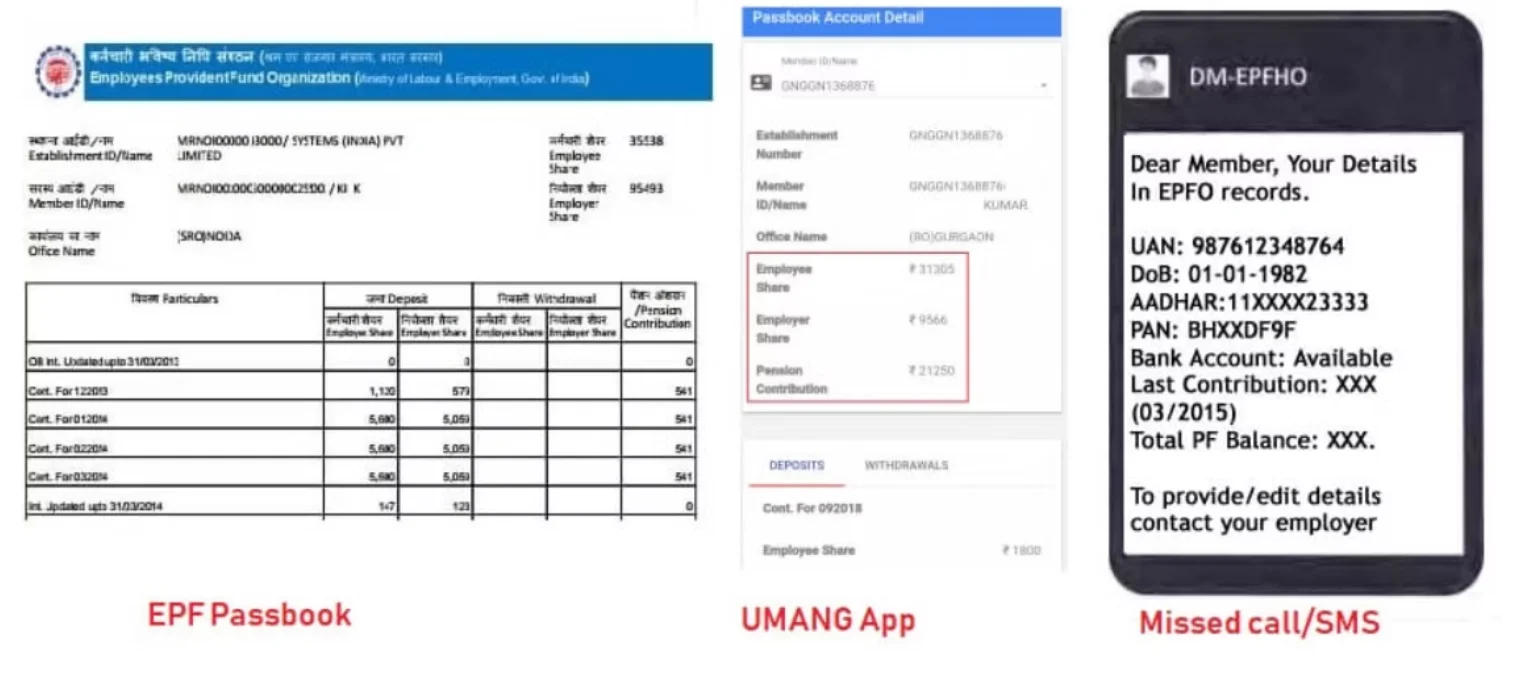
6. EPF Passbook Not Opening? (Quick Fixes)
If you are facing login or access issues, common reasons include:
- Recent password change (server sync delay)
- Browser or cache issues
- KYC or PAN mismatch
For detailed fixes and step-by-step solutions, refer to: EPF Passbook Not Opening – Full Troubleshooting Guide
Internal Check: Is Your Balance Ready for Withdrawal?
Knowing your balance is only the first step. Understanding how much of it is actually accessible is where most users get confused. 👉 Next step: PF Balance vs Withdrawable Amount Guide
Confused by your balance?Mismatched interest, missing employer shares, or "locked" pension funds can cost you lakhs over time. [Run a Free PF Audit with Kustodian] Our experts identify missing contributions and help you fix KYC errors digitally.
7. What the EPF Passbook Does NOT Show
To manage your expectations, remember the passbook excludes:- Pending Withdrawals: Money currently being processed for a claim.
- Claim Status: Check the "Claim Status" tab for withdrawal updates.
- Tax Deductions (TDS): If you withdraw before 5 years of service, the tax deducted is often not reflected in the passbook balance itself.
8. When You Should Take Action
Review your passbook every 3–4 months.
Take action if:
- No contribution for 2+ months
- Employer share missing
- Incorrect personal details
- EPS contribution inconsistencies
👉 Small errors compound into large losses over time.
Conclusion: Empowering Your Financial Future
Understanding your EPF Passbook is more than just checking a balance; it is about taking ownership of your financial legacy. In the digital landscape of 2026, the tools to monitor your savings are more accessible than ever, but they require your consistent attention to ensure your employer is compliant and your retirement nest egg is growing as intended.
By checking your records quarterly and staying informed on updates like UAN consolidation and EPS corrections, you prevent small administrative errors from becoming major hurdles during your retirement or home-buying journey
Useful Links & Official Resources
EPFO Official Portals
EPFO Member Passbook Portal View and download your EPF passbook.https://passbook.epfindia.gov.in/MemberPassBook/Login
UAN Member e-Sewa Portal Manage your UAN, update KYC details, apply for withdrawals, and initiate PF transfers.https://unifiedportal-mem.epfindia.gov.in/memberinterface/
EPFO Official Website Access official notifications, circulars, and updates about EPF rules and policies.https://www.epfindia.gov.in
EPFO Grievance Portal (EPFiGMS)Submit complaints or raise issues related to PF contributions, claims, or KYC updates.https://epfigms.gov.in
UMANG App Government mobile platform that allows you to check EPF balance, track claims, and access passbook services.https://web.umang.gov.in
EPF Forms & Download Links
These forms are commonly required for withdrawals, pension claims, and account updates.
Form 19 – Final EPF settlement after leaving employmenthttps://www.epfindia.gov.in/site_docs/PDFs/Downloads_PDFs/Form19.pdf
Form 10C – Withdrawal benefit or EPS scheme certificatehttps://www.epfindia.gov.in/site_docs/PDFs/Downloads_PDFs/Form10C.pdf
Form 31 – PF advance withdrawal for medical, housing, or emergencieshttps://www.epfindia.gov.in/site_docs/PDFs/Downloads_PDFs/Form31.pdf
Form 11 – Declaration form submitted when joining a new employerhttps://www.epfindia.gov.in/site_docs/PDFs/Downloads_PDFs/Form11.pdf
Form 10D – Monthly pension claim under the EPS schemehttps://www.epfindia.gov.in/site_docs/PDFs/Downloads_PDFs/Form10D.pdf
Verification & Compliance Resources
Income Tax Portal (PAN-Aadhaar Linking Status): Check whether your PAN is linked with Aadhaar, which is required for smooth EPF access and withdrawals.https://www.incometax.gov.in
UIDAI Aadhaar Services: Verify Aadhaar authentication and update Aadhaar details if required.https://uidai.gov.in
EPFO Circulars & Notifications: View official circulars and announcements regarding EPF policy updates.https://www.epfindia.gov.in/site_en/Circulars.php
9. FAQs (Frequently Asked Questions)
Q: What is the EPF member passbook?
A: It is the official digital statement provided by the EPFO that lists all monthly contributions and annual interest for a specific Member ID.
Q: How can I see my EPF passbook online?
A: You can see it by visiting the official EPFO passbook portal (epfoservices.advisors.gov.in/epfo/) and logging in with your UAN and password.
Q: Why is my EPF passbook not updated?
A: This is usually due to the employer not yet filing the monthly ECR or a delay in the EPFO’s annual interest credit cycle.
Q: Does the EPF passbook show the total withdrawable balance?
A: No. It shows the Employee and Employer shares. The Pension (EPS) share is generally not withdrawable as a lump sum unless you have less than 10 years of service and are leaving the workforce.
Q: Can NRIs download the EPF passbook?
A: Yes, NRIs can access the portal from outside India, provided they can receive the mandatory OTP on their registered mobile number.
Audit Your EPF for Errors & Missing Contributions
Understanding your passbook is step one. Identifying issues early is what protects your savings.
At Kustodian, we help you:
- Detect missing employer contributions
- Identify EPS gaps that reduce pension eligibility
- Consolidate multiple Member IDs into a single view
- Fix KYC and data mismatches that block withdrawals
👉 If your passbook looks incorrect or incomplete, don’t ignore it—these issues are fixable.
Disclaimer: This article is for informational purposes only and does not constitute legal or financial advice. Rules may vary based on individual records.