You log into the EPF portal to check your pension eligibility, and you see a nightmare: "Service Gap," "Zero Pension Wages," or "Missing Contribution."
You know you worked during those months. You know your salary was deducted. But the EPFO database says otherwise.
In the digital age of 2026, most EPF data is automated via the Electronic Challan cum Return (ECR). But for older service periods (especially before 2012) or for fixing complex data mismatches, the EPFO relies on one specific, powerful document: Form 3A.
If you are fighting to prove your service history or correct your pension wages, Form 3A is your evidence.
If you are asking:
- "What is Form 3A?"
- "Why is the PF officer asking for it?"
- "How is it different from the Annual Slip?"
Then this guide is for you. We have decoded the latest utility of this "Legacy Form" to help you fix your past and secure your future pension.
Form 3A: Why It Still Decides Your Pension in 2026
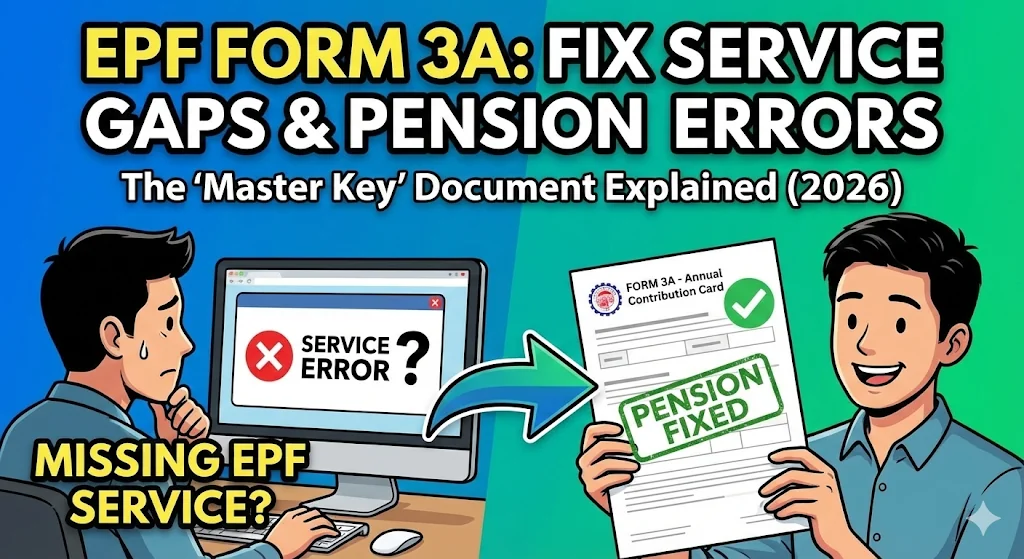
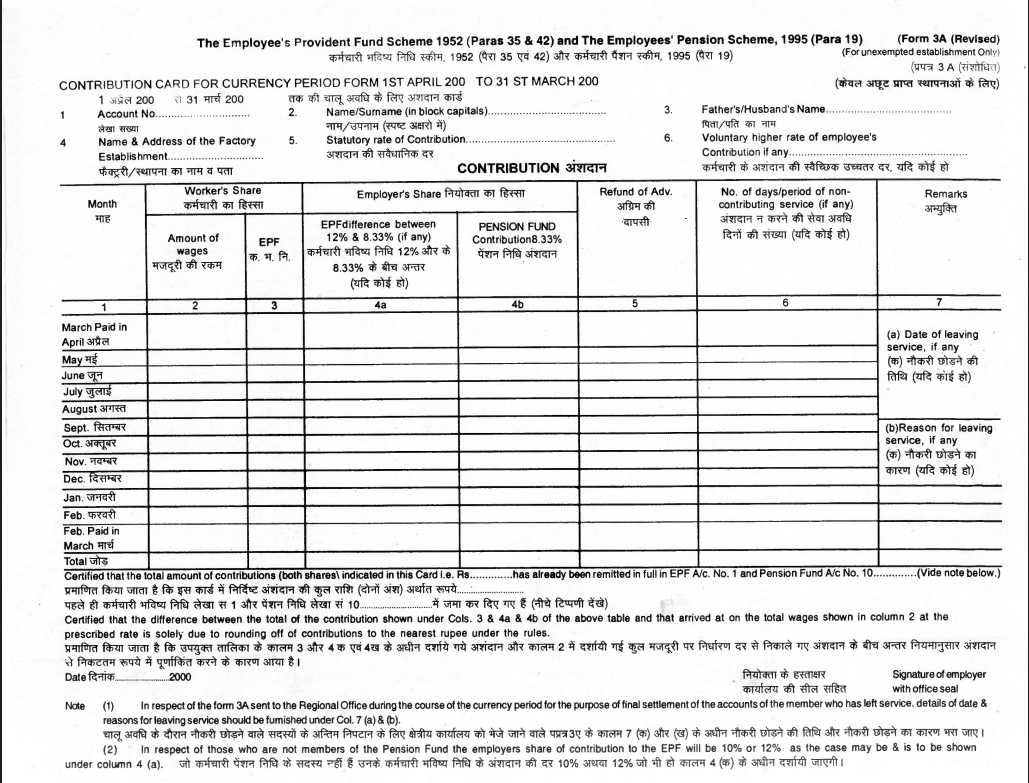
In practice, EPFO treats Form 3A as the Member’s Annual Contribution Card, a year-wise proof of service, and pension wages. It details exactly how much money was deducted from your salary month-by-month and deposited into the EPF and EPS accounts.
While the EPF Passbook shows you the current balance, Form 3A shows the history of deposits.
Click to understand your pension eligibility under the EPS 1995 scheme
Why EPFO Demands Form 3A (and Not Form 6A) During Pension Corrections
These two forms often go together, but they serve different purposes:
| Feature | Form 3A (Individual) | Form 6A (Consolidated) |
| Focus | One Employee (You). | All Employees of the company. |
| Details | Monthly breakdown of your wages & PF. | Summary of total company payments. |
| Purpose | Proving your specific service/wages. | Proving the company paid its dues. |
| Usage | Used for Pension/Service Correction. | Used for Annual Audits. |
When does EPFO explicitly demand Form 3A?
In the modern "ECR Era" (post-2012), Form 3A is generated digitally. However, you explicitly need the physical or verified copy in these 3 critical scenarios:
1. “How Form 3A is used by EPFO to fix missing EPS service..”
If your passbook shows a gap (e.g., April 2010 to March 2011 is missing), the EPFO will treat it as "Non-Contributory Service." This reduces your pension.
- The Fix: Submitting a signed Form 3A for that year proves you worked and contributed, forcing the EPFO to update your history. You usually submit joint declaration along with this to officially update the record
2. How EPFO Uses Form 3A to Correct “Zero EPS Wages.”
Sometimes, the passbook shows PF contribution but Zero Pension. This is a data entry error.
- The Fix: Form 3A contains a specific column for "Pension Fund Contribution." If this column shows values, the EPFO must correct your record.
3. Un-Exempted to Exempted Transfers
If you move from a private trust (Exempted) to a regular company (Un-Exempted), the transfer often fails, or data gets lost. A certified Form 3A acts as the bridge document to manually credit your service.
How to Get or Generate Form 3A
Since you (the employee) cannot generate this form on your own, you must rely on your employer.
Method 1: For Service After 2012 (Digital Era)
- Ask your Employer: Your HR/Finance team can log into the EPFO Employer Portal.
- Navigate: They go to ECR/Returns > View/Download Annual Contribution Statement (Form 3A).
- Search: They enter your UAN and Financial Year.
- Download: The system generates a PDF that they can sign and give to you.
Method 2: For Service Before 2012 (Manual Era)
Digital records for this period are often incomplete.
- Action: You must request your previous employer to check their Physical Records/Archives.
- The Process: They must manually fill out the Form 3A format (available as a download), stamp it with the company seal, and sign it.
- Why it matters: This physical paper is treated as a "Gold Standard" evidence for old pension claims.
How to Verify Form 3A Before Submission (The Checklist)
Before submitting it to the PF office, check these columns to ensure no mistakes were made:
- Account Number: Must match your old PF Member ID (not just UAN).
- Wages Amount: Ensure the "Basic + DA" figure is correct.
- Worker's Share (12%): Your contribution.
- Employer's Share (3.67%): The money goes to your PF corpus.
- Pension Fund (8.33%): (Critical) Ensure this column is NOT zero if you want a pension.
- Remarks: Look for "NCP Days" (Non-Contributory Period). If days are marked here, your pension service will be cut.
Strategic Advice: The "Closed Company" Problem
Scenario: You need Form 3A to fix an error, but your old company has shut down.
The Solution:
You cannot get a Form 3A from a closed company. Instead, you must use the Bank Statement Route.
- Gather your Bank Passbook/Statement from that specific period showing salary credits.
- Write a letter to the Assistant PF Commissioner (APFC) explaining the company closure.
- Attach an Affidavit (Magistrate attested) stating you worked there, supported by the bank entries.
- The APFC has the power to reconstruct your Form 3A based on this "Secondary Evidence."
Top 3 Reasons Form 3A is Rejected
- Signature Mismatch: For manual forms, if the employer’s signature doesn't match the specimen in EPFO records, it gets rejected.
- Calculation Errors: The sum of 12 months must match the totals exactly. Even a ₹1 difference leads to rejection.
- Overwriting/White Fluid: Never accept a Form 3A with correction fluid. It must be fresh and clean.
Final Thoughts on Form 3A
In 2026, we love digital dashboards, but Form 3A remains the backbone of your history. It is the bridge between "Data Not Found" and "Pension Approved." If you are planning to file for Form 10D (Monthly Pension) soon, take a proactive step: Check your service history today. If you see gaps, request your Form 3A from your employer now, rather than waiting until retirement day.
Useful Links & Official Resources
To help readers quickly access the official portals, forms, and services mentioned in this guide, here are some useful links:
EPFO Official Portals
- EPFO Member Portal (UAN Login) https://unifiedportal-mem.epfindia.gov.in/memberinterface/Use this portal to check your EPF passbook, service history, KYC status, and claim status.
- EPFO Employer Portal https://unifiedportal-emp.epfindia.gov.in/epfo/Employers use this portal to file ECR returns, generate Form 3A, and manage employee contributions.
- EPF Passbook Portal https://passbook.epfindia.gov.in/MemberPassBook/Login.jspView your EPF balance and monthly contributions.
Pension & Scheme Information
- EPS 1995 Scheme Details (Official EPFO Page) https://www.epfindia.gov.in/site_en/Pension.phpLearn about pension eligibility, calculation rules, and scheme provisions.
- EPS Pension Calculator https://www.epfindia.gov.in/site_en/PensionCal.phpEstimate your expected pension under the EPS-95 scheme.
Forms & Downloads
- Download Form 3A Format (EPFO Forms Page) https://www.epfindia.gov.in/site_en/Downloads.php: Official page to download PF forms, including Form 3A, Form 6A, Form 19, Form 10C, and Form 10D.
- Form 10D (Monthly Pension Claim Form) https://www.epfindia.gov.in/site_docs/PDFs/Downloads_PDFs/Form10D.pdf
Grievance & Complaint Support
- EPFiGMS Grievance Portal: File a complaint if your employer refuses to provide Form 3A or correct PF records.
- EPFO Helpdesk & Contact Page https://www.epfindia.gov.in/site_en/Contact_us.php
Additional Helpful Resources
- Check Your UAN Status https://unifiedportal-mem.epfindia.gov.in/memberinterface/no-auth/uanActivation/activationRequest
- Track EPF Claim Statushttps://unifiedportal-mem.epfindia.gov.in/memberinterface/
Disclaimer: This guide is for educational purposes and based on the rules applicable in 2026. EPF rules are subject to change by the government. For specific legal or financial advice, consult a professional.