Changing jobs is a normal part of career growth but your Provident Fund should move with you smoothly. Every time you switch employers, your EPF balance and pension service history need to be properly transferred to ensure continuity. That’s where EPF Form 13 comes in.
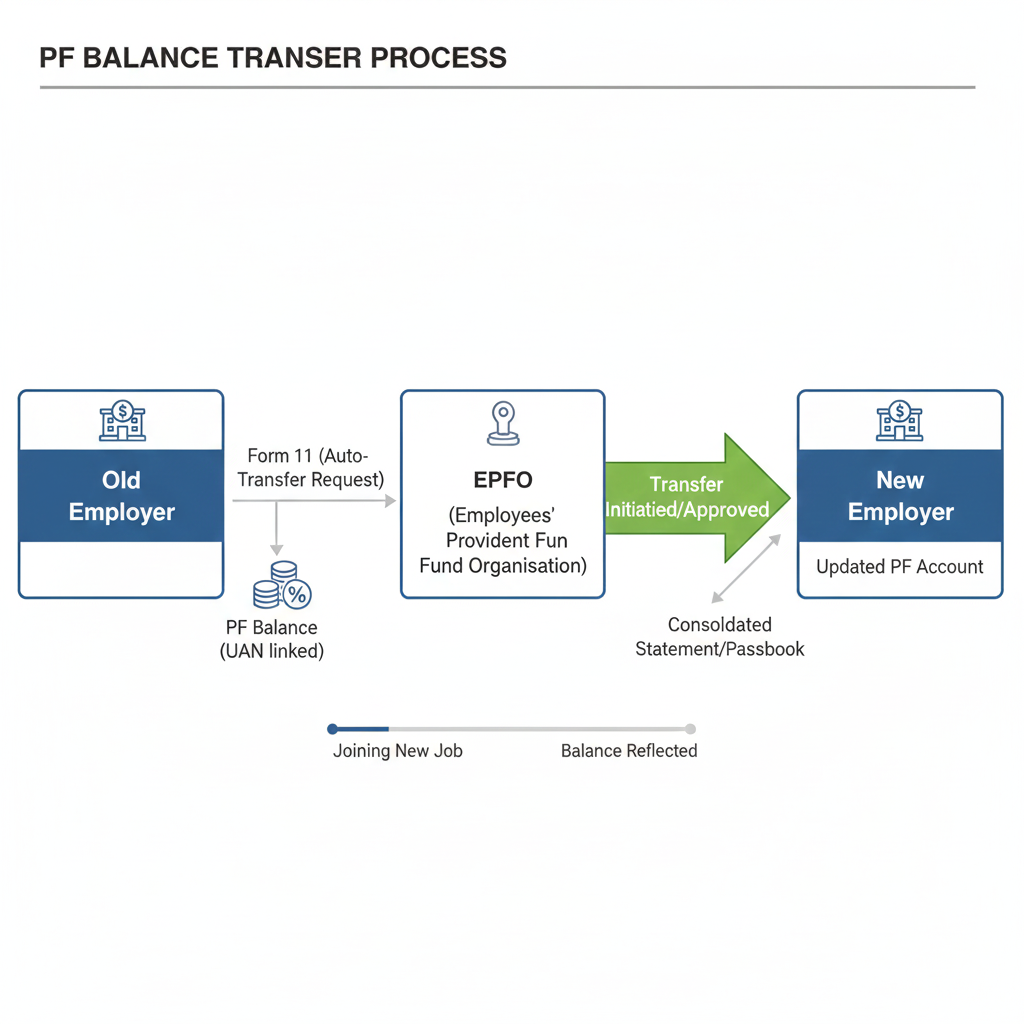
Form 13 is the official mechanism used to transfer your PF balance from your previous employer’s account to your current one under the same UAN. While many transfers today happen automatically under the One Member One EPF system, gaps in exit dates, KYC mismatches, exempted trusts, or multiple UANs can still cause delays or failures. And when a transfer isn’t handled correctly, it can affect not just your interest credits, but also your EPS (pension) eligibility and future settlement claims.
This guide explains when Form 13 is required, when auto-transfer applies, how to apply online or offline, common reasons transfers get stuck, and how to track your request without unnecessary stress. If you’re changing jobs, understanding Form 13 ensures your retirement savings continue to grow, without disruption.
Table Of Contents
- What Is EPF Form 13?
- PF Transfer Stuck? What ‘Pending with Employer’ Really Means
- Form 13 vs One Member One EPF
- How to Apply for EPF Form 13 Online
- Offline Form 13: When Online Isn’t Enough
- FAQs
EPF Form 13 is the official request form used to transfer your Provident Fund balance from your previous employer’s PF account to your current one.
Why it matters
Your PF is linked to your service history, not just your balance. Incorrect or incomplete transfers can impact:
- Interest credit
- EPS (pension) eligibility
- Withdrawal or settlement later in life
A seamless PF transfer ensures continuity, which is particularly important if you change jobs frequently.
Before deciding between transfer and withdrawal, read our guide on PF balance vs withdrawable amount.
Not every job transition requires the manual filing of Form 13.
Auto-transfer typically applies when:
- Your UAN remains the same across jobs.
- Aadhaar and KYC are verified.
- The exit date is accurately updated by the previous employer
Form 13 is necessary when:
- PF is handled by an exempted trust.
- The old employer hasn’t updated the exit date.
- Multiple UANs exist
- You joined before the One Member One EPF initiative became standard
Before filing Form 13, it is beneficial to check if your PF is already qualified for auto-transfer.
Before submitting any request, many individuals find it helpful to review their PF service history to prevent unnecessary rejection. Kustodian offers a Free EPF Audit to help avoid rejections.
Fix issues related to multiple UANs before initiating transfer.
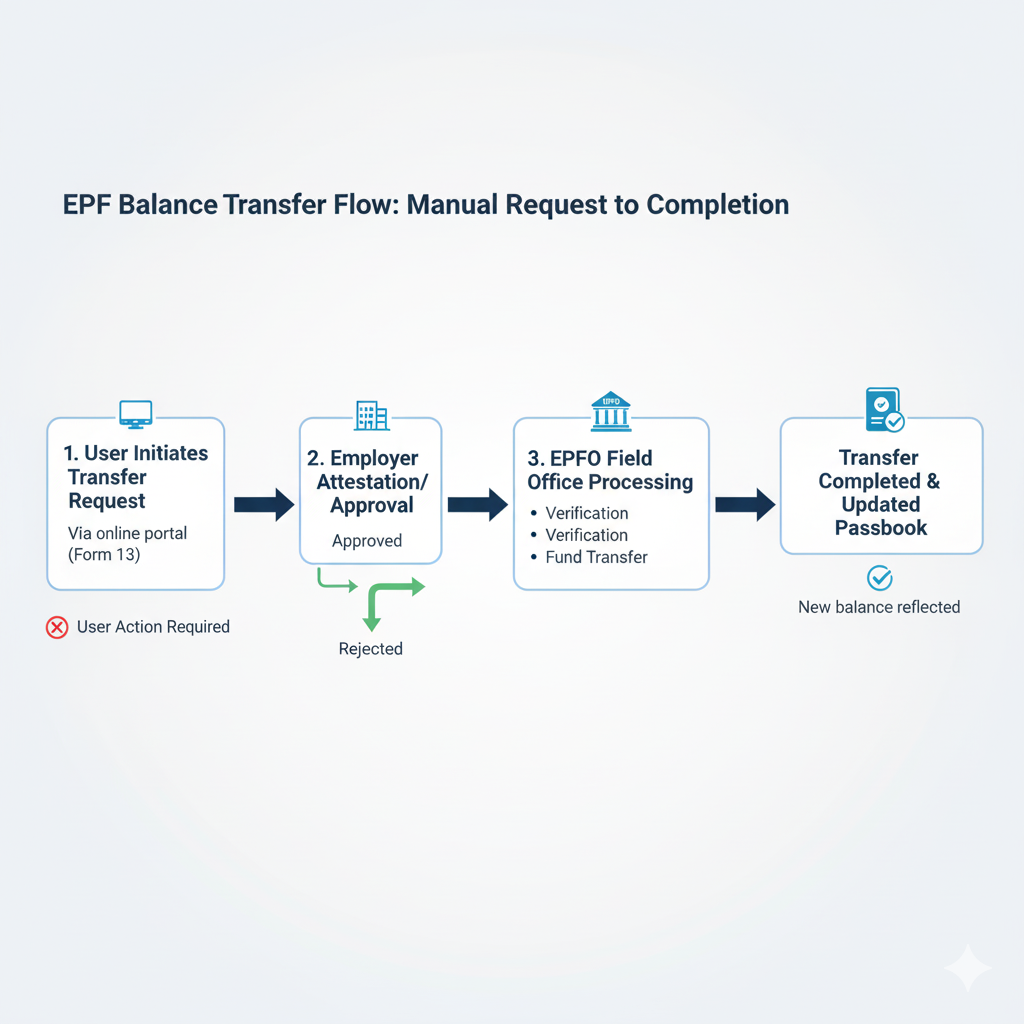
| Aspect | Form 13 | One Member One EPF |
| Process | Manual request | System-driven |
| User action | Required | Minimal |
| Failure points | Employer, trust, data mismatch | KYC, exit date |
| Applicability | Legacy & special cases | Most modern jobs |
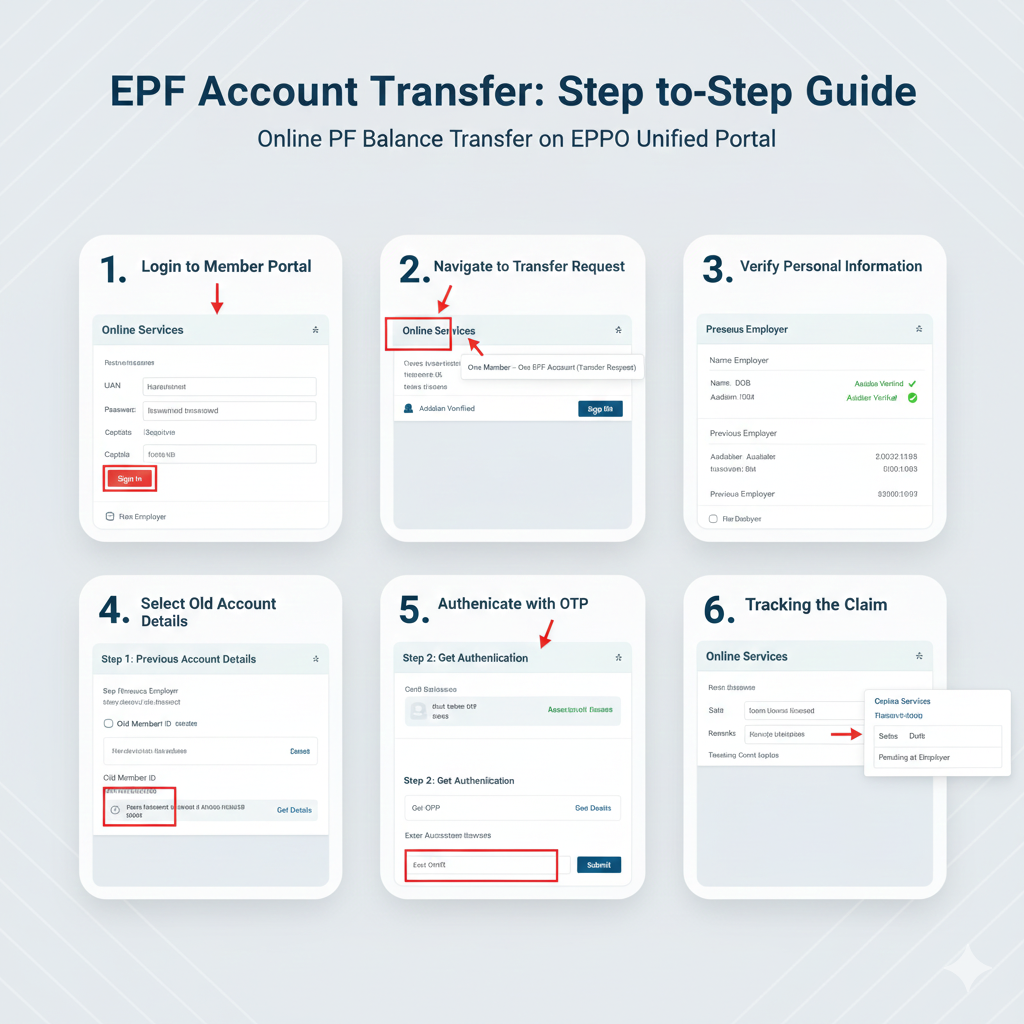
Most transfers are now initiated online.
Via EPFO Member Portal
- Log in using your UAN and password.
- Select One Member – One EPF Transfer Request
- Verify previous and current employment details.
- Choose the employer for attestation.
Via UMANG App
- Log in with your Aadhaar-linked mobile number.
- Go to EPFO services
- Start the transfer request.
Typical processing time: 15–45 days, depending on the employer's response.
If your request is delayed beyond the usual timelines, checking the employer approval status early can prevent extended delays. If issues persist, reach out to Kustodian by booking a free call with us!
Facing login errors? See our EPF portal troubleshooting guide.
Offline Form 13 is required in certain situations:
- Exempted PF trusts
- Company closures
- Legacy manual records
In these instances, Form 13 must be submitted via the employer or the regional EPFO office.
Offline transfers generally take more time and need more diligent follow-up.
How to Fill EPF Form 13 Offline (Quick Guide)
Form 13 is used to transfer your PF balance from your old EPF account to your new one when you change jobs.
Documents Required
- UAN
- Previous & Current PF Numbers
- Aadhaar
- PAN
- Bank details
- Employer details
- Cancelled cheque (if asked)
Steps to Fill Form 13 (Offline)
- Enter Employee Details - Name, Father/Husband Name, DOB, Mobile, UAN, Address
- Fill Previous PF Account Details- Old employer name, establishment code, PF number, date of exit
- Fill Present PF Account Details- New employer name, establishment code, PF number, date of joining
- Select Transfer Option- Tick “Transfer entire EPF balance (employee + employer share)”
- Sign the Form- Attach Aadhaar/PAN copy and cancelled cheque (if required)
- Get Employer Verification- Submit to current employer HR for sign & stamp
- Submission to EPFO- Employer forwards it to the EPFO regional officeClick to download EPF FORM 13
If your Form 13 status hasn’t changed for several weeks, it’s often due to one of the following reasons:
1. Exit date not updated
Without an exit date, EPFO cannot finalise your previous service period.
2. Employer approval delay
Many requests remain pending because HR has not approved them.
3. Mismatch in personal details
Discrepancies in name, date of birth, or Aadhaar hinder processing.
4. Trust-managed PF complications
Trusts conduct internal verification before involving EPFO.
Checking these basic issues before escalating to EPFO or filing grievances can save a lot of time.
How to Verify PF Transfer Status
You can monitor your Form 13 request through:
- EPFO Member Portal
- UMANG App
Typical Status Interpretations
| Status | What it means |
| Pending with Employer | Employer approval awaited |
| Accepted by Employer | Sent to EPFO |
| Under Process | EPFO verification |
| Completed | PF transferred |
When Waiting Is Normal — And When It’s Not
Normal waiting
- Within 30–45 days
- Status updates are progressing.
Action needed when:
- Status unchanged for over 60 days
- Employer is unresponsive
- Errors are apparent in the service history.
Escalation should always be measured and documented, not aggressive.
Click for EPF Troubleshooting Masterclass
Useful Links & Official Resources
EPFO Official Portals
- EPFO Unified Member Portal (UAN Login)https://unifiedportal-mem.epfindia.gov.in/memberinterface/Log in using your UAN to initiate a PF transfer request (Form 13), update KYC details, and track claim status.
- EPFO Official Websitehttps://www.epfindia.gov.inThe official source for EPF policies, scheme rules, circulars, and updates related to provident fund and pension services.
- EPFO Passbook Portalhttps://passbook.epfindia.gov.inView your PF contributions, employer deposits, and service history before initiating a transfer or withdrawal.
- UMANG App – EPFO Serviceshttps://web.umang.gov.inAccess EPFO services from your mobile device, including PF transfer requests, claim status checks, and passbook viewing.
EPF Forms and Documents
- Download EPF Forms (Form 13, Form 19, Form 10C, Form 10D)https://www.epfindia.gov.in/site_en/Forms.phpOfficial EPFO page for downloading claim forms used for PF transfer, withdrawal, and pension benefits.
- Employees’ Pension Scheme (EPS) Guidelineshttps://www.epfindia.gov.in/site_docs/PDFs/Schemes/EPS95_update.pdfOfficial documentation explaining pension eligibility, service continuity rules, and EPS benefits.
EPF Claim & Transfer Support
- EPFO Grievance Portal (EPFiGMS)https://epfigms.gov.inSubmit complaints regarding delayed PF transfers, employer approval issues, or rejected claims.
- EPFO Regional Office Directoryhttps://www.epfindia.gov.in/site_en/Contact_us.phpLocate the nearest EPFO office for offline Form 13 submission or manual assistance.
Identity & Verification Resources
- Aadhaar Services Portal (UIDAI)https://uidai.gov.inVerify or update Aadhaar details used for EPF KYC authentication.
- Income Tax Department – PAN Serviceshttps://www.incometax.gov.inLink or verify PAN to ensure smooth tax processing during PF withdrawals.
1. Is EPF Form 13 mandatory for every job change?
No. Many transfers happen automatically if UAN, Aadhaar, and exit details are correctly updated. Form 13 is needed when the auto-transfer fails.
2. Can I withdraw PF instead of transferring it?
Yes, but withdrawal may break EPS service continuity and affect future pension eligibility. Transfer is usually recommended for long-term benefits.
3. How long does PF transfer usually take?
Typically, 15–45 days after employer approvals. Delays are common due to KYC issues, exit dates, or employer inaction.
4. Does Form 13 also transfer EPS (pension)?
Yes. While money isn’t transferred, your EPS service years are carried forward to maintain pension eligibility.
5. What if my previous employer has closed?
PF transfer is still possible through EPFO-assisted or offline routes. Additional documents may be required, and timelines can be longer.
6. Can I submit Form 13 online?
Yes. Most members can submit Form 13 through the EPFO portal using UAN login and Aadhaar-based authentication.
7. What happens if my exit date is not updated?
The transfer request will fail or remain pending. The previous employer must first update the exit date on the EPFO portal.
8. Is PAN mandatory for PF transfer?
PAN is not mandatory for transfer but is required for tax-free withdrawals. Keeping PAN updated avoids future complications.
9. Can PF be transferred from an exempted trust?
Yes, but the process may involve manual verification and coordination with the PF trust, which can take longer.
10. What are common reasons PF transfers get rejected?
Name mismatches, inactive UANs, missing exit dates, or incomplete KYC are the most frequent causes of rejection.
- Does Form 13 transfer EPS?
Yes, While money is not transferred, Form 13 carries forward your pensionable service years to maintain EPS continuity.
- Is PF transfer automatic?
PF is auto-transferred only if UAN, Aadhaar, and exit dates are correctly updated. Otherwise, Form 13 is required.
Final Guidance: Effective Solutions
Most PF transfer issues stem from data or employer-related problems rather than form issues.
Problems such as a missing exit date, a mismatched name, an inactive UAN, or an unresponsive previous employer can halt a valid transfer. Repeatedly filing requests or escalating complaints without tackling these fundamental issues usually results in more frustration rather than a quicker resolution.
Before proceeding, it's beneficial to pause and review your PF and EPS history comprehensively, checking service continuity, contribution records, and employer updates. This broader perspective often uncovers the actual point of delay in the process.
If you're uncertain whether your PF is eligible for auto-transfer, delayed due to employer issues, or requires Form 13, a simple PF health review can guide you to make the right decision calmly and accurately.
Clarity at this stage saves time, effort, and unnecessary stress later.
Disclaimer: This article is for informational purposes only and does not constitute legal or financial advice. Rules may vary based on individual records and EPFO processing.