An EPF claim rejection because of EPS typically signifies a discrepancy between your Employee Pension Scheme (EPS) contributions and your service history. This occurs due to mismatched exit dates, "wages more than 15,000" errors, or insufficient service periods preventing the final settlement of your pension benefits.
Introduction
“Over 8–10 lakh EPF claims are rejected every year, many due to hidden EPS issues.”
Applied for your EPF withdrawal or transfer and got rejected? You're not alone The and the reason might not be your EPF at all. One of the most common but confusing reasons behind claim rejection is a problem with your EPS (Employee Pension Scheme) record.
Most employees don’t realise that EPS, which manages your pension, is closely tied to your EPF account. So even when your EPF balance is correct, your claim can be denied because of:
- Missing or incorrect EPS contributions
- Un-transferred pension service history
- Conflicts in employer records, especially after a job change
This guide explains why your EPF claim gets rejected due to EPS issues, what the error messages mean, and exactly how you can fix them quickly and correctly.
EPF claim rejected due to EPS issue? Discover the top reasons, pension rules, and actionable fixes. Avoid delays and get your EPF approved faster.
“Not sure what exactly is wrong in your case? Get a Free EPF Audit where our experts review your UAN, EPS, service history, and exit dates, no charges, no pressure.”
What Is EPS, and Why Does It Affect Your EPF Withdrawal?
The Employees’ Pension Scheme (EPS) is a pension benefit program maintained by the Employees’ Provident Fund Organisation (EPFO). It runs alongside your EPF account but plays a very different role: while EPF helps you build a lump sum through contributions, EPS is meant to provide you with monthly pension income post-retirement.
Here’s the catch:
Even though you’re applying for a Provident Fund (EPF) withdrawal, errors in your EPS record, like missing contributions, incorrect service periods, or unverified transfers, can lead to a complete claim rejection.
Why Does EPS Cause EPF Withdrawal Rejections?
- Shared service history: Your EPS and EPF are linked to the same UAN and work history. Missing or mismatched EPS data can flag inconsistencies in your tenure or eligibility, causing your full EPF claim to be denied.
- Default validations: When you file for a final settlement or transfer, EPFO checks for EPS contribution and service continuity before processing your EPF. If they can't verify it, it is rejected.
- Hidden errors: You might not see EPS issues in your passbook, but when EPFO processes your claim, they uncover gaps: missing EPS transfers (Annexure K), misreported salary, or broken service periods.
What This Means Practically:
Even if you're not claiming a pension, your PF claim can still be blocked because the system looks at EPS records first.
It's one of the most confusing and frustrating reasons for PF claim rejections especially when everything else appears to be in order. If your claim was rejected and the reason mentioned EPS, this guide will help you fix it.
EPS Contribution Rules: What Changed and Why It Matters in 2026
Many EPF claims are rejected today because of outdated or incomplete EPS contribution records. Here’s a fast breakdown of the EPS rules that affect your claim.
The "Twin Sibling" Problem: What is EPS?
To fix the error, you first need to understand the trap. Think of your UAN (Universal Account Number) as a bank vault with two distinct lockers inside:
- EPF (The Big Locker): This holds your share (12%) and part of your employer's share (3.67%). This is the lump sum you see in your passbook.
- EPS (The Hidden Locker): This holds the rest of your employer's share (8.33%). This is meant for your monthly pension.
The Trap: Even if you only want to open the big locker (EPF), the EPFO system checks the keys for both lockers. If the data for the small locker (EPS) doesn't match perfectly, the system locks the whole vault.
Before 2014
- EPS applied on salaries up to ₹6,500/month.
- Employer contributed 8.33%, capped at ₹541/month.
- Higher contributions required a joint option form.
After September 1, 2014
- Max EPS contribution = ₹1,250/month.
What Happened in 2025
In 2025, the core EPF contribution structure remained unchanged. Both employee and employer contributions continued as per existing norms:
- Employee contribution: 12% of Basic + DA
- Employer contribution: 12% (split as 8.33% to EPS + 3.67% to EPF)
- EDLI & admin charges continue to be borne by the employer
Mandatory Wage Ceiling (No Change)
- PF remains mandatory up to ₹15,000 Basic + DA per month.
- Above ₹15,000, contribution is voluntary/consensual for employer-employee pairs.
Voluntary Provident Fund (VPF)
- Employees can contribute beyond 12% voluntarily.
- Employer is not required to match the extra amount.
Focus on Wage Definition & Compliance
- Greater clarity in 2025 around what counts as “Basic + DA”
- The move aimed at reducing disputes on salary components for PF calculation.
ECR Filing Modernisation
- A revamped Electronic Challan-cum-Return (ECR) system improved contribution reporting and accuracy.
- Change affects filing and reconciliation, not the rates themselves.
Bottom Line
- No increase in EPF contribution percentages in 2025.
- ₹15,000 wage ceiling remains unchanged.
- Emphasis was on clarity, compliance, and digital reporting improvements.
Why This Matters
You may apply for an EPF withdrawal or transfer, but the entire claim can be blocked if:
- You’re ineligible for EPS , but contributions were made in error.
- Your EPS service records aren’t linked properly.
- Employers didn’t file the required forms when your salary changed or during a job switch.
Tip: If your EPF claim was rejected due to EPS:
- Check if you crossed ₹15,000 in salary.
- Confirm if you opted for a higher pension.
- Get any missing Annexure K from your past employer.
- Use EPFO’s grievance portal to escalate.
Your guide through EPF or PF, to know more about EPFO.
Unsure if you’re eligible for EPS or a higher pension?
Get a free eligibility check from Kustodian’s PF team and avoid future rejections.
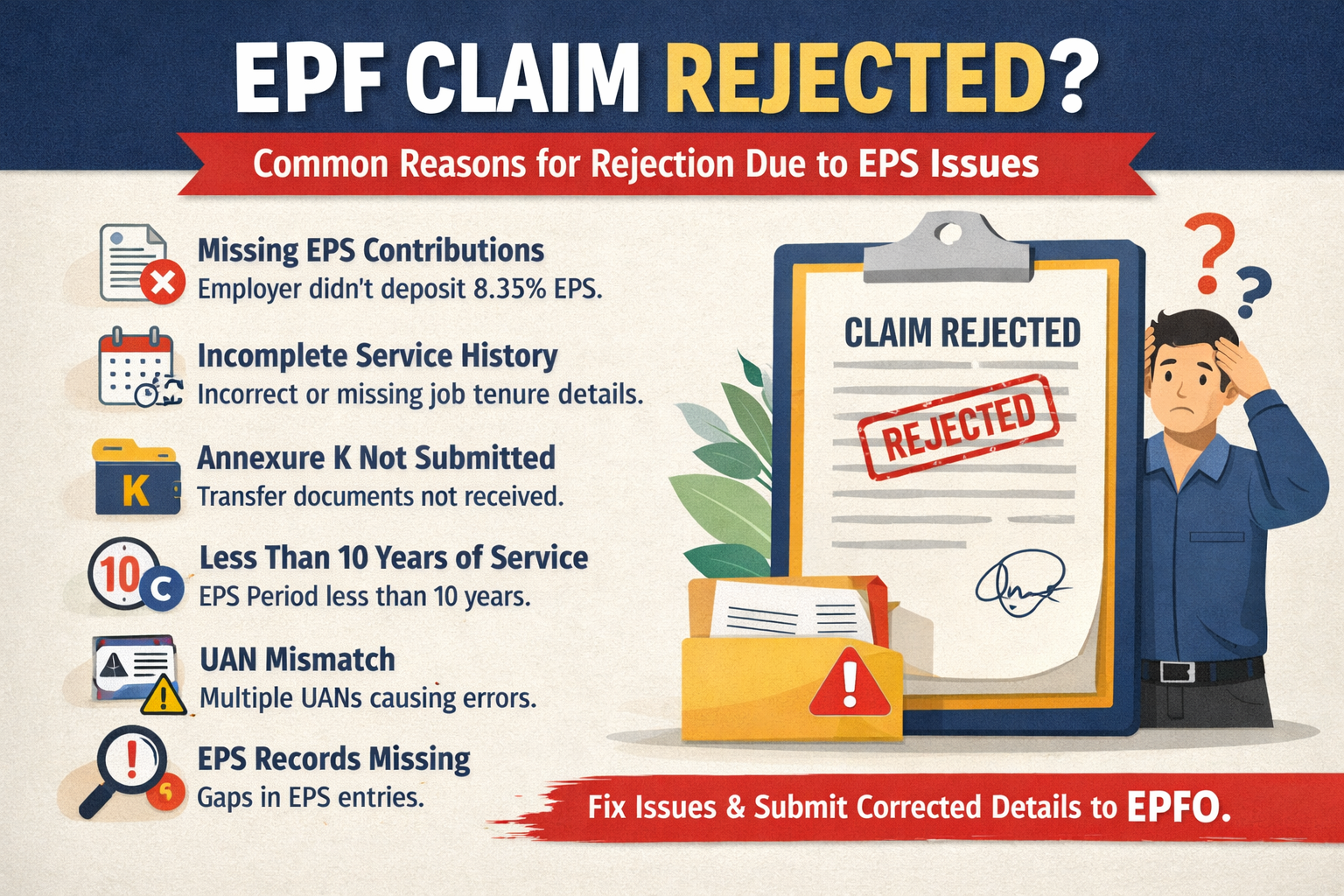
Top Reasons Your EPF Claim Was Rejected Due to EPS Issues
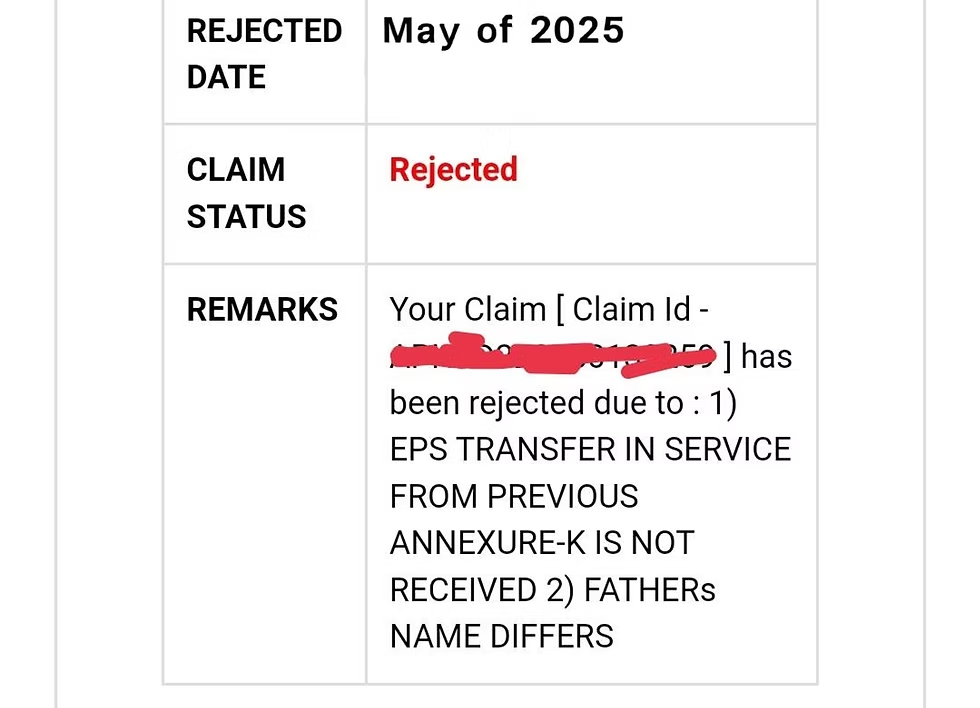
Every week, thousands of EPF claims are denied not because your main PF account is wrong, but due to hidden errors in your EPS (Employees’ Pension Scheme) record. Here’s what to look for:
1. Missing EPS Contributions
Your employer skipped or failed to deposit the 8.33% EPS share for some service months.
- Portal message: “EPS contribution not available.”
- Fix: Request the employer to file arrears and submit a fresh ECR
2. Service Period Mismatch
Total years of service reported is short (e.g., 9 years 11 months instead of 10), often due to wrong dates or gaps between jobs.
- Error: “EPS service is less than 10 years”
- Fix: Get employers to correct joining/exiting dates.
3. Exit Date Missing or Wrong
No exit date shown for a past job is blocking both PF and EPS settlement.
- Error: “Exit date not available”
- Fix: Contact the employer to immediately update the exit date in the EPFO portal
4. Multiple UANs / Gaps in Service
Two or more UANs (usually after a job change) mean your service and EPS records are split.
- Error: “UAN mismatch” or “Service gap detected.”
- Fix: Merge all UANs and ask employers to update service history
5. Wrong or Missing Claim Form
Only Form 19 submitted, not 10C or vice versa. Both are vital for complete PF + EPS settlement.
- Error: “Incorrect form submitted”
- Fix: Submit both Form 19 (PF) and 10C (EPS) when required.
6. Ineligible for EPS (Short Service Under 6 Months)
System flags ineligible applicants, but still expects EPS data, leading to confusion.
- Error: “EPS ineligible due to service less than 6 months”
- Fix: Only file Form 19, skip Form 10C if tenure <6 months
Click to know more about Form 10C
7. The "Higher Pension" Calculation Error
- Error Message: Pension contribution exceeds limit / Wage ceiling mismatch
- What it means: A common issue in 2026 for high earners. If you applied for the "Higher Pension" option on wages above ₹15,000, and the math doesn't balance perfectly with the interest payments, the claim is held for manual audit.
8. The "One Identity" Clash (ABHA/Health ID)
- Error Message: ABHA validation failed / Name mismatch in Health ID
- What it means: This is a specific 2026 hurdle. The government now links your UAN to your Ayushman Bharat Health Account (ABHA) for faster medical claim verification. If the spelling of your name on your Health ID (e.g., "R. Kumar") doesn't match your EPF name (e.g., "Rahul Kumar") exactly, the system auto-rejects the claim to prevent identity fraud.
Act Fast: Most EPS Errors in EPF Claims Are Fixable
Check all PF records, confirm forms and service history, merge UANs, and stay in touch with each employer. If you hit a wall, escalate through the EPFO grievance portal for the fastest resolution.
Don’t know which of these applies to your case?
Share your UAN and claim rejection message, and we’ll pinpoint the cause and fix it.
Read this if you are facing other rejection reasons: Real solutions for common PF problems.
5. Extended List: Common EPS-Related Claim Errors (And How to Fix Them)
It’s common for EPF claims to fail because of errors in your EPS (Employee Pension Scheme) record, not just in your main Provident Fund details. Below is a concise, expert-driven table outlining each error, its typical cause, and the proven steps you should take to resolve them, keeping you efficient, compliant, and stress-free.
| Reason | What It Means | What to Do/Fix |
| EPF claim rejected due to EPS | Rejection linked to invalid/missing EPS data (common umbrella reason) | Check EPS passbook, service history, file grievance & correct via employer. The ā |
| EPS contribution is not available | The employer didn’t contribute or declare a pension share. | Ask the employer for Form 3A; file revised ECR + joint declaration. |
| Missing EPS contribution | Gaps in the EPS share for one or more jobs | Contact the employer, get salary slips, and request the missed month re-submission |
| Eps service less than 10 years | Service period (as per EPS record) is <10 years—even if actual is more | Check the date of joining/leaving across jobs; correct in EPFO via the employer. |
| Form 10c rejected | Form submitted incorrectly, service <6 months, or mismatch in EPS history | Refile with updated info only if eligible (6+ months EPS) |
| Multiple UAN in epf | Two or more UANs = split service data = EPS mismatch | Merge UANs through EPFO or the employer; update service details. |
| EPS not declared in Form 11 | EPS membership is not declared when joining a new job; the The current EPS blank | Submit revised Form 11; employer files correct ECR and pays arrears. |
| Annexure K is missing the EPF transfer. | EPS service isn’t transferred between jobs without Annexure K | Ask your old employer to upload Annexure K; then re-initiate transfer. |
| UAN mismatch is considered a new joinee | UAN is not linked across jobs, treated as a new EPS case again | Merge accounts, correct UANs in the PF portal |
| EPFO exit date missing | No exit date updated for old job BlocksThe both EPS and PF withdrawal. | Request the employer to update the DOE (Date of Exit) in the EPFO portal. |
| EPF claim rejected due to the wrong form | Filed only Form 19; forgot Form 10C; or submitted both when service <6 months | Refile correctly: Only 19 (PF) for <6 months; 10C for EPS if eligible |
| EPS ineligible due to salary above 15000 | Joined after Sep 2014 with a salary > ₹15k, and didn’t opt for higher EPS | Talk to the employer; excess EPS must be reversed to EPF. |
| EPS contribution is more than 1250 | EPS can’t exceed the statutory cap (₹1,250/month without higher pension option) | Employer must revise ECR and pay excess into EPF, not EPS |
| EPS claim rejected service <6 months | Auto-rejection for short service (below EPS minimum requirement) | Don't file 10C; claim only EPF using Form 19 |
| Service not showing in UAN. | Employment is not mapped to the EPS section of the UAN account. | Employer to update joining/leaving in the portal + send joint declaration. |
| Pension not showing in pf passbook. | EPS balance not visible; usually by design (EPS doesn’t show directly in the passbook) | Verify contributions through 3A or service history only; EPS is not itemised. |
| EPS error code 009 / 010 / 012 | Invalid EPS share entry: wrong amount, blank, exceeds limit | The employer must fix the data in the ECR submission. |
| GPS data mismatch in eps | Incorrect joining/leaving dates = GPS/TCS uploads fail | Employer corrects dates in the PF system + resubmits. |
| Reason for leaving not entered/faulty | Mandatory “reason for leaving” (code C, S, R, etc.) left blank triggers rejection. | Employer updates the reason in the EPFO/UAN portal. |
| EPS pension eligibility rejected | System flags salary/cap/service mismatch for pension eligibility check | Confirm eligibility; file higher pension option if applicable. |
6. How to Diagnose Your EPS Contribution Problem (Checklist)
A rejected EPF claim often points to hidden issues in your EPS (Employees’ Pension Scheme) record. Use this step-by-step diagnosis checklist to quickly identify and prepare to resolve any EPS contribution problems that may block your PF withdrawal, transfer, or pension claim.
Step-by-Step EPS Contribution Diagnosis
1. Log in to Your EPFO Passbook & Review EPS Entries
- Access the EPFO passbook portal using your UAN and password.
- For each employer listed, scan “Deduction Details”: Check if the “EPS” column has consistent entries for eligible months.
- Red Flags: Missing EPS entries for some periods or a sudden drop to zero can indicate employer non-compliance or eligibility errors.
2. Check “Service History” for Pensionable Duration
- On the UAN Member Portal, select “View> Service History.
- Confirm that all jobs are listed in sequence and the total “Pensionable Service” matches your actual tenure.
- Look for gaps, overlaps, or missing months; these can trigger the error “EPS service less than 10 years” regardless of your real service length.
3. Confirm Employers' Updated Exit Dates
- Still on the Service History page, verify that “Date of Exit” is filled for every previous employer.
- An absent or incorrect exit date will freeze both your EPF and EPS processing.
- If missing, contact your past HR or payroll and request an immediate update via the EPFO portal; attach proof if needed.
4. Check If Form 10C Was Ever Filed (and Approved/Rejected)
- In the EPFO portal, navigate to “Track Claim Status.
- Look for recent Form 10C submissions (for claiming EPS withdrawal benefit or pension).
5. Raise a Query on EPFiGMS Portal If Unsure
- If previous steps don’t make the issue clear, submit a complaint at the EPFiGMS Grievance Portal.
- Attach payslips, appointment letters, service certificates, and any proof of contributions.
- The EPFO field office will respond with specific instructions or clarifications for your case.
Pro Tip: EPS Diagnosis Table
| What to Check | What to Look For | Next Action If Problem Found |
| EPS column in Passbook | Consistent deduction every eligible month | Contact the employer to file the arrears/joint declaration. |
| Service History – Pensionable Years | Continuous, correct total tenure | Have employers correct dates, merge UANs if split. |
| Exit Date for Each Employer | Present and matches the actual job leave date | Ask the employer to update immediately. |
| Form 10C Status | Approved, rejected, or never filed? | Refile correctly, correct service/KYC data |
| Grievance Response (if escalated) | Specific error code or officer advice | Follow their guidance for supporting docs. |
By following this diagnosis checklist, you’ll pinpoint the actual EPS contribution or service issue holding back your EPF claim so you can move quickly to fix it and secure your rightful benefits.
Short on time? Kustodian offers a Free EPF Audit where our experts perform this entire diagnosis for you, including EPS gaps, service mismatches, UAN issues, and exit errors included.
A Quick Guide to Your EPF (Employee Provident Fund)
7. How to Fix an EPS-Linked Rejection: Proven Methods
When your EPF claim is rejected due to EPS (Employee Pension Scheme) errors like missing contributions, service period mismatches, or incomplete documentation, take the following structured steps to resolve the issue and secure your provident fund settlement:
1. The New Standard: The Online Joint Declaration 2026 (JD)
In 2026, the EPFO stopped accepting physical correction forms for the most common errors. If you need to fix your Date of Exit, Date of Joining, Reason for Leaving, or Name Spelling, you must do it digitally.
Here is the exact workflow:
- Log in to the EPFO Unified Member Portal.
- Go to the top menu: Manage.
- Click on Joint Declaration.
- Select the Member ID: Choose the specific employer ID where the data is wrong.
- Enter Correct Details: You will see two columns: "Existing Details" (Wrong) and "Correct Details" (Empty). Fill in the right info.
- Upload Proof: The system will ask for proof based on what you are changing (e.g., for Date of Exit, upload your Experience Letter or Resignation Acceptance.
- Submit & Verify: Once you submit, the request goes to your Employer’s Portal. Call your ex-employer and ask them to approve it using their Digital Signature (DSC).
Once approved by the employer, the EPFO updates your data automatically within 7–15 days.
3. Ensure Proper Submission of Form 10C If Eligible
- Submit Form 10C for EPS withdrawal or settlement if your service exceeds six months and you’re not eligible for a pension.
- If previously skipped or rejected, refile after correcting all service/KYC details.
- Track claim status for Form 10C and address any new errors immediately.
4. Raise a Complaint on EPFiGMS for Persistent EPS Errors
- If the employer is unresponsive, data is still missing, or the rejection cause is unclear:
5. Wait 15–30 Days, Then Follow Up (Including RTI, If Needed)
- Standard response/rectification time for EPFO is 2–4 weeks.
- If you receive no update or unsatisfactory resolution, file a Right to Information (RTI) application to escalate with the EPFO office—this often triggers faster, formal answers.
6. Reapply Your EPF Claim on the EPFO Portal
- Once service history, EPS contributions, and exits are corrected and reflected in your UAN/EPFO portal:
Quick Reference Checklist
| Step | Purpose | Who to Contact |
| Joint Declaration | Fix service/data/KYC/exit/EPS details. | Former employer + EPFO |
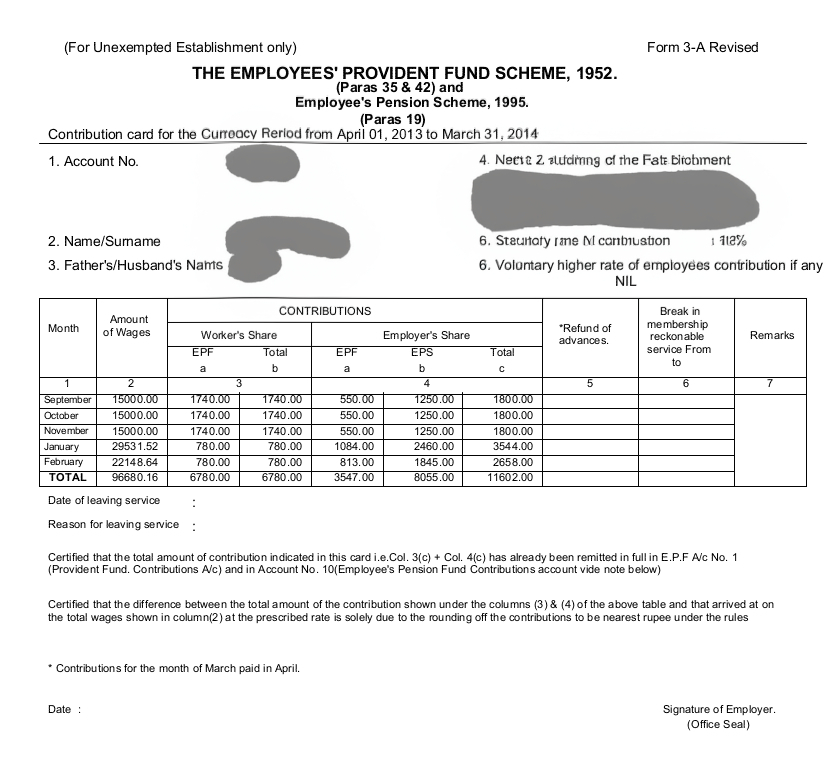
| Form 3A | Summarise and prove EPS contributions each year. | Employer/Payroll Dept |
| Form 10C | Official EPS withdrawal/settlement application | Self, with employer as needed |
| EPFiGMS Complaint | Escalate unresolved errors or non-cooperation | Online via the EPFO portal |
| RTI Application | Legal information request if there is no/slow response | EPFO regional office |
| Reapply Claim | Fresh submission post-correction | EPFO/UAN Portal |
Essential Tips
- Always maintain digital copies of every submitted form and EPFO correspondence.
- Push employers for timely electronic updates; delays often stem from slow HR response.
- When filing grievances or RTI, be clear, concise, and include all supporting documents.
- After reapplication, check your claim status weekly and respond swiftly to any additional requests.
By following this process, you can resolve most EPS-related EPF claim rejections with minimal delay and reclaim your rightful retirement savings.
8. Real Story: How Ramesh from Bengaluru Finally Got His EPF With Kustodian.life Help

Ramesh, an employee from Bengaluru, spent two frustrating years battling EPF claim rejections. Every time he filed, he saw the dreaded message: “EPS contribution not available, a result of one past employer failing to deposit his pension share, and a missing exit date in the EPFO portal. Despite repeated calls, emails, and even visits to the HR department and local EPFO office, Ramesh got nowhere. His hard-earned ₹3.6 lakh remained out of reach.
Desperate, Ramesh turned to Kustodian.life. Their team immediately reviewed his case, identified the missed EPS years, and guided him to secure Form 3A from his employer while facilitating prompt corrections to his exit date through a joint declaration. With Kustodian’s step-by-step support, crafting emails, handling calls, and pushing both the employer and EPFO for action, Ramesh was finally able to reapply with complete, accurate documentation.
From the moment he partnered with Kustodian.life, the blocking errors were resolved, and his full EPF claim was approved in just 2 months after waiting in limbo for two years.
For anyone facing endless EPF claim rejections linked to EPS issues, Ramesh’s story shows: targeted, expert help can mean the difference between years of financial stress and fast, successful resolution.
You deserve the same clarity and success.
Don’t wait for years - let Kustodian fix your EPS rejections now.
Book a Free EPF Claim Consultation
9. 5 Actionable Tips to Avoid EPS-Related Rejections
Avoid unnecessary delays by following these sharp, proven steps to keep your EPF claim from being blocked due to EPS issues.
Must-Do Checklist
- Check EPS Service Before You ApplyLog in to the UAN portal and review your “Service History.” Carefully confirm that all jobs, joining and exit dates, and pensionable service are accurately recorded. Any missing entry or gap can put your claim at risk of rejection.
- Merge UANs After Every Job ChangeIf you've worked for different employers and have multiple UANs, your EPS records may be split or incomplete. Merge UANs immediately through the EPFO portal to ensure a unified and complete service history.
- Ensure Employer Marks Exit DateIf your previous employer does not update the Date of Exit correctly in the EPFO portal, your claim may get stuck. Always confirm that the exit date for your last employment is properly updated and matches your actual departure month.
- Keep All Key Documents HandyMaintain copies of Form 3A (annual statement), Form 10C (EPS claim), and your latest UAN passbook. These records are crucial for resolving errors, proving service, or filing grievances if issues arise.
- Track Using UMANG and File on EPFiGMSRegularly monitor your service and claim status using the UMANG app or the EPFO member portal. If you notice any inconsistencies or issues, promptly raise a support request through the EPFiGMS grievance portal for quick and official resolution.
Quick Fix Table
| Action | Prevents |
| Review service and EPS history | Pensionable service errors |
| Merge UANs | Split or missing EPS records |
| Confirm exit update | Rejection due to blank exit date |
| Save forms and documents. | Lack of proof in resolving issues |
| Use UMANG/EPFiGMS | Early detection and fast action |
One inaccuracy in your EPS record can block your EPF claim. Stay proactive: review, merge, update, and submit your claim with full confidence.
Want to prevent rejection before you apply? Kustodian’s Free EPF Audit checks your service history, EPS eligibility, and exit dates in advance so your claim goes through the first time.
The 3-Step "Digital Diagnosis" Workflow
Before you file a complaint, you must find the exact mismatch. Follow this digital audit trail:
Step 1: The "Service History" Deep Dive
- Action: Log in to the EPFO Unified Member Portal.
- Navigate: Click on View, then click Service History.
- The Check: Look at every Member ID listed. Does every job have a Date of Joining (DOJ) and Date of Exit (DOE)?
- Red Flag: If an old job shows "Not Available" under DOE, your service is open, and claims will be rejected.
Step 2: The "Gap" Hunt (NCP Days)
- Action: Open your EPF Passbook (via the portal or UMANG App).
- The Check: Look for a column named "NCP Days" (Non-Contributory Period).
- Red Flag: If you see a high number of NCP days (e.g., 20 days in a month) but you were actually working, your employer has under-reported your service. This "break in service" causes pension rejection.
Step 3: The "Twin-Name" Verification
- Action: Compare your UAN Profile vs. your Aadhaar/ABHA Card.
- The Check: Is the spelling identical? (e.g., Rahul Kumar vs. Rahul K.).
- Red Flag: Even a missing space or initial will trigger an "Identity Verification Failed" rejection in 2026.
2026 Cheat Sheet: Which Form Do I Need?
Confusion about forms is the #1 cause of "Technical Rejection."
Use this table to pick the right one.
| Form Name | Purpose | When to Use (The "Trigger") | Key Condition / Rule |
| Form 19 | Final PF Settlement | You have quit your job, retired, or been terminated. | You must be unemployed for at least 2 months (or retiring). |
| Form 10C | Pension Withdrawal | You want to withdraw the "Pension" portion (EPS) along with your PF. | Rule: Valid only if the total service is more than 6 months but less than 10 years. |
| Form 10C (Scheme Cert) | Pension Certificate | You have worked for more than 10 years and cannot withdraw a cash pension. | Instead of cash, you get a "Scheme Certificate" to carry forward service for a monthly pension later. |
| Form 13 | Transfer PF | You have switched jobs (Old Company > New Company). | Do not withdraw! Always use this to move money and service history to your new employer. |
| Form 31 | Partial Advance | You are still working but need money for an emergency (Medical, Marriage, or house). | Withdrawal limit depends on the specific reason (e.g., Illness = 6 months' wages). |
FAQs: EPF Claim Rejection Due to EPS Issues
Can I get EPF if EPS is less than 10 years?
Yes, you can withdraw your entire EPF balance even if your EPS (pension) service is under 10 years. For EPS, you get a lump sum (Form 10C), but not a monthly pension.
What is Form 3A in EPFO?
Form 3A is your annual statement summarising monthly EPF and EPS contributions by both employee and employer. It serves as proof of service and contributions for every financial year.
How do I know if my EPS contribution is missing?
Check your EPFO e-passbook or UMANG app for “EPS” entries. If months are missing, ask your employer for Form 3A and compare it with your payslips. Gaps mean missing contributions; file a grievance if not fixed.
Why was my EPF claim rejected due to EPS?
Your claim may be rejected if EPS contributions are missing, service history is incomplete, or transfer documents like Annexure K are not submitted.
What does "EPS contribution not available" mean?
It means your employer failed to deposit the 8.33% EPS share; claims get blocked until arrears are paid and the record is corrected.
How do I fix the “service less than 10 years” error?
Ask your employer to correct the joining/leaving dates or update service history in the EPFO portal. If your actual service is 10+ years, but the error persists, submit a joint declaration.
Why is my claim rejected after a job change?
It’s often due to missing the service transfer or Annexure K from your previous employer, especially after switching from a trust to direct EPFO coverage. Always get Annexure K for every transfer.
What does UAN mismatch mean in EPF claims?
Multiple UANs split your EPS service record, causing errors and rejections. Merge all previous UANs under your main account to ensure full credit and smooth claims.
10. Resources and Useful Links
Get fast, official answers from the sources that matter:
- EPFO Member Portal:https://unifiedportal-mem.epfindia.gov.in/Track claims, view passbook, update KYC, and review service history.
- EPFiGMS Grievance Portal:https://epfigms.gov.in/File complaints, upload documents, and monitor grievance status.
- EPFO Form 10C Info:https://www.epfindia.gov.in/site_en/For_Employees.php?id=sm2_indexOfficial details and instructions for EPS withdrawal/settlement.
- UMANG App (Official):https://web.umang.gov.in/landing/Mobile access to EPF services, claim tracking, and record management.
- Kustodian.LifeGet Expert Help for EPF Withdrawal & Claims
11. Conclusion: EPS Might Be the Hidden Reason Your EPF Is Stuck, But It’s Fixable
If your EPF claim is rejected, and the reason mentions "EPS contribution" or "service mismatch," you’re not alone. Thousands of employees face claim delays every month due to small but critical EPS-related issues, such as missing contributions, incorrect exit dates, or incomplete service history.
The good news? Most EPS-based rejections are fixable.
With the right documentation, Form 3A, joint declarations, corrected exit dates or UAN merges and timely follow-up via the EPFiGMS portal, your claim can be successfully approved. Tools like the UMANG app and official EPFO platforms make it easier than ever to track and resolve claim issues.
And if you’re stuck or unsure where to start, let the experts take over.
Kustodian.life has helped people across India clear confusing rejections, coordinate with employers, and unlock their rightful PF and pension payouts quickly and with confidence.
Facing claim rejection, missing EPS data, or confusion about Form 10C?
Kustodian.life has helped thousands of employees across India fix errors, recover lost pension years, and finally get their EPF approved.
Disclaimer: This article is for informational purposes only and does not constitute legal or financial advice. Rules may vary based on individual records and EPFO processing.